

Website Service
Website Service is a service capability provided by Informat for site pages embedded in Informat. It supports communication with the system and provides convenient tools to organically integrate embedded site pages with the system to form a complete whole.
The communication principle is that site pages are embedded in the Informat system through iframe, using postMessage as the inter-page communication tool, and introducing postmessage-rpc.js and rpc.js on the page. In this way, site pages can use the RPC framework provided by Informat to call website services, ensuring seamless integration between site pages and the system, and realizing data interaction and function calls.
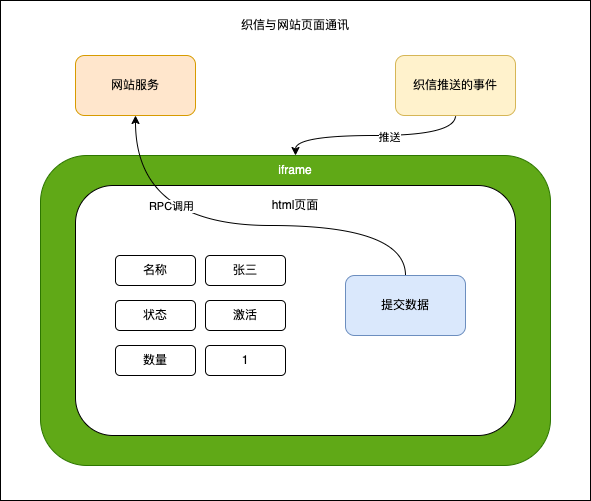
Website Service Call Timing
Since site pages call website services based on RPC channels, all website services must be called after the RPC channel is established.
If you want to call the website service immediately after the page loads, you need to listen for the rpc-ready event (RPC channel establishment success) on the page and call the website service in its callback.
eventService.onceEvent("rpc-ready", (e) => {
  console.log(e);
});Available Service Interfaces
Quick Start
We will demonstrate calling the systemService.toast method immediately after the page rpc channel is established to pop up a prompt box
<script src="https://ai.ainformat.com//js/postmessage-rpc.js"></script>
<script src="https://ai.ainformat.com//js/rpc.js"></script>
<script>
  // Wait for the RPC communication channel to be established
  eventService.onceEvent("rpc-ready", (e) => {
    // Call website service
    systemService
      .toast("RPC communication channel established successfully")
      .then((result) => {
        // Call successful
      })
      .catch((e) => {
        // Call failed
      });
  });
</script>Script Resource Reference
For the stability of website services and consistency with the current private deployment version, please use the domain name of the private deployment for the postmessage-rpc.js and rpc.js scripts. If the Informat service is currently deployed at https://test.example.com, the corresponding script addresses are:
<script src="https://test.example.com/js/postmessage-rpc.js"></script>
<script src="https://test.example.com/js/rpc.js"></script>Notes
Interface service capabilities can only be used when website pages are embedded in the platform
- Custom Component Field
- Custom View
- External system module
- External Page of dashboard module
- Open Website Page in automation
- Open Link in automation
Development Recommendations
When developing with tools like VsCode or WebStorm, you can download rpc.d.ts to get the description file for calling website services, and place it in the
typingsdirectory of the project to solve code error problems.After importing the downloaded rpc.d.ts into the editor, if the rpc function call still reports an error, you can create an empty jsconfig.json file in the project root directory and restart the editor. The specific file content is as follows:
json{}If you want to debug website services during development, you can add an
External Pagemodule to the corresponding application and use the local link address for the embedded address.