Basic Information
Application Identifier
When creating a new application, you must specify a unique application identifier, which cannot be modified.
Uniqueness The application identifier is a unique string used to uniquely identify an application. This means each application has a unique identifier that won't conflict with other applications. Similar to Java package names, this uniqueness ensures that application names don't conflict between different developers or teams.
Naming Rules Application identifiers typically follow certain naming rules to ensure uniqueness and readability. Common naming rules include:
Using reverse domain name notation, for example:
com.companyname.projectnameAvoiding special characters and spaces, usually using lowercase letters, numbers, and dots (
.) as separatorsBeing as concise and clear as possible to reflect the application's functionality or the project it belongs to
Suppose we have a company named example developing a project called inventory. We can specify an application identifier for this project as follows:
com.example.inventoryIn this identifier:
comrepresents a commercial domain name (usually used for companies)exampleis the company nameinventoryis the project name
This way, we can ensure that the application identifier is unique globally and won't conflict with projects from other companies.
App Version and Release Number
In the Informat AI low-code platform, application version numbers are used to identify different versions of an application, facilitating version control, release, and rollback. Version numbers typically follow the Semantic Versioning specification, using the format MAJOR.MINOR.PATCH.
Version Number Format
- Major Version (MAJOR): Update the major version number when making incompatible API changes.
- Minor Version (MINOR): Update the minor version number when making backward-compatible functional additions.
- Patch Version (PATCH): Update the patch version number when making backward-compatible bug fixes.
For example: 1.0.0 represents the first official release; 1.1.0 represents adding new features to the 1.0.0 version; 1.1.1 represents fixing a bug in the 1.1.0 version.
Important Note
In Informat, the version number is only a static attribute in the application information and does not affect application release or upgrade. The release number increments with each application release, where a larger release number indicates a newer version.
Navigation Bar Layout
When an application is rendered on the PC side, it supports five navigation bar layout methods: Top-Bottom Layout (1), Top-Bottom Layout (Only Menu Navigation) (2), Left-Right Layout (3), Left-Right Layout (User Info in Top Right) (4), and No Navigation Bar (5).
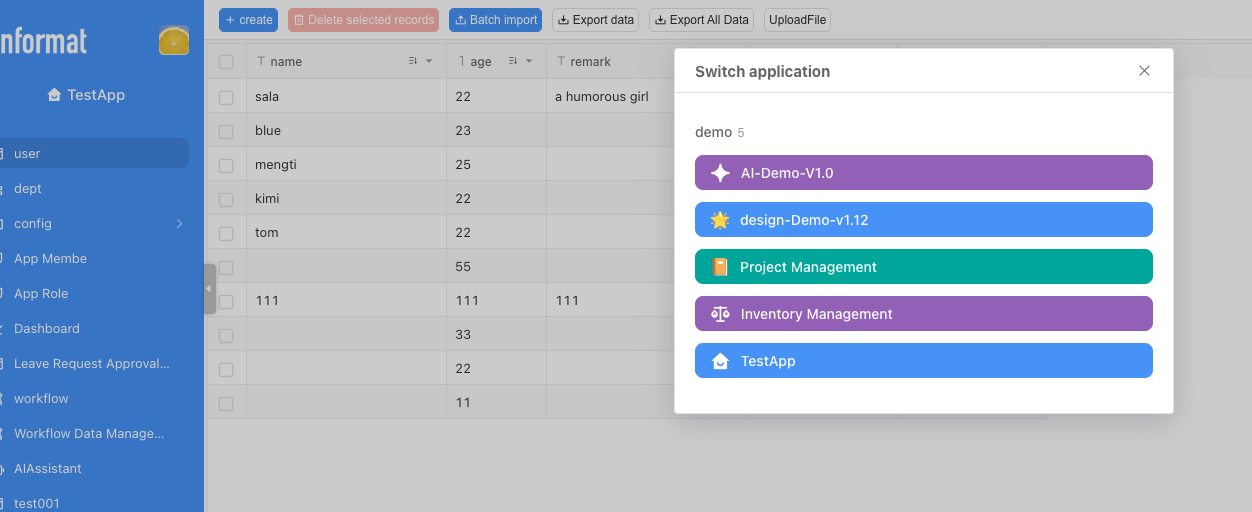
App Switching
By default, clicking the application name will display the switch application dialog box. If you want to disable this behavior, you can set the Disable clicking application title to switch apps when condition is met expression.
${user.name=='Zhang San'}//Disable switching when user name equals Zhang San

${true} //Disable globally