

Advanced Features
The advanced features of Informat AI Low-Code Platform are mainly used to meet users' deep business requirements, including highly personalized page customization, cross-system integration, big data high concurrency, etc. For example, implementing business management systems (with multiple types of reports, multi-system data integration), business front-end app docking (with front-end and back-end business data docking, customized pages).
Static Resources
Support for static resource hosting, server-side rendering (SSR), etc., which can quickly implement the launch of static or dynamic websites.
In some scenarios where Informat's pages may not meet your diverse display needs, you need to use Informat's website function. You can display data on Informat as a website without writing any back-end code.
Usage Scenarios
- Launching independently developed activity pages by uploading page resources to this module for quick feature launch
- Using SSR capability to implement portal websites, corporate official websites and other pages that need SEO optimization
- Custom data interaction for data table fields: embedding developed pages into Informat forms and using RPC Service provided by the platform The Custom Component Field Service implements data interoperability
- Custom Views: embedding developed pages into Informat forms and using RPC Service provided by the platform The Custom View Service implements data interoperability
Component Designer
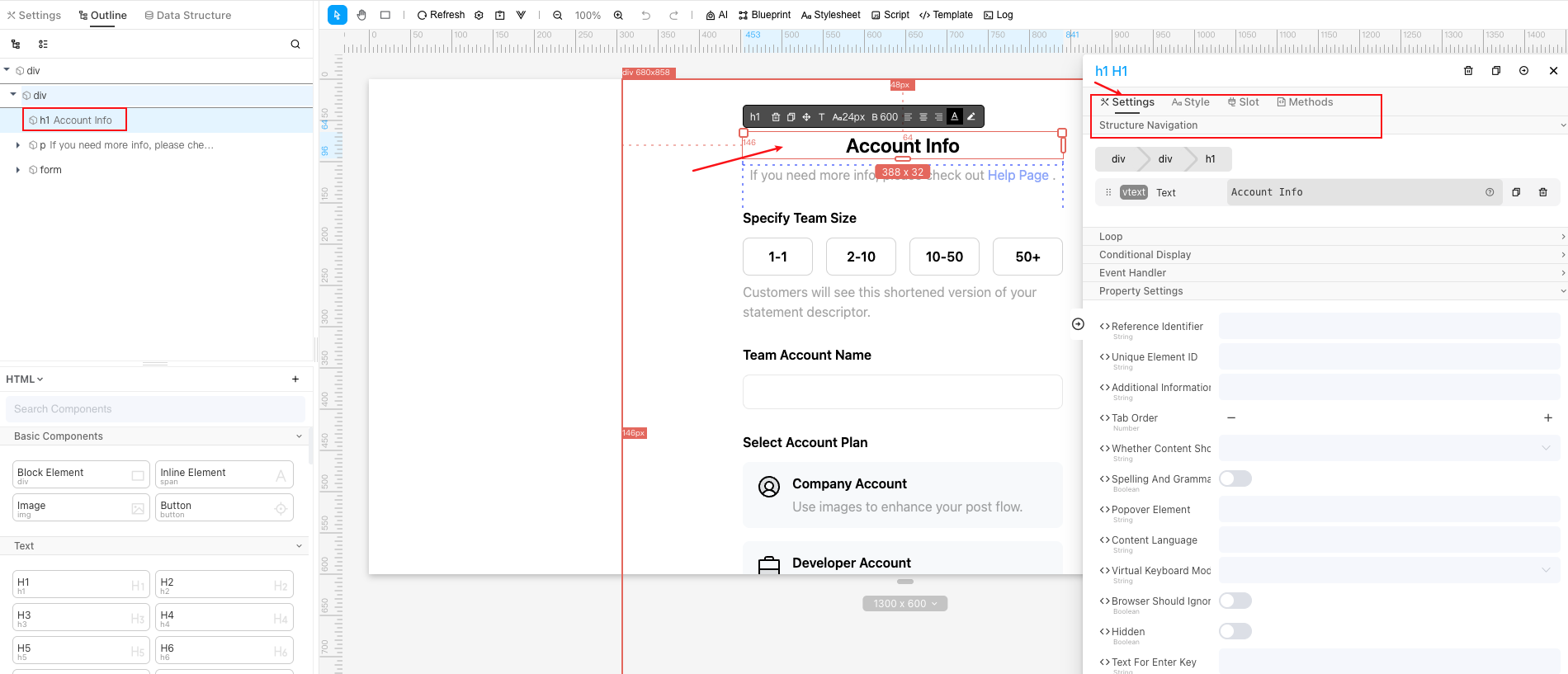
The Component Designer is a front-end visual design tool that supports drag-and-drop operation for customized page design, enabling the construction of fully functional front-end pages without writing a lot of code. In the Component Designer, users can implement drag-and-drop page development through HTML, elementUI, vantUI, echarts and other components loaded by the platform itself. You can also import Vue, CSS and other files by yourself. Compared with traditional coding, developed component tools can be quickly connected through context transfer in Informat's data tables, dashboards, data table views and other modules.
Implementation Principle
The platform uses Vue for rendering components built by the Component Designer. The platform will convert the templates, styles and scripts (script blueprints will be automatically converted to scripts) built by designers into a single-file component (SFC) according to Vue component specifications, and the generated Vue component files will be compiled by Vue Cli in library mode (lib) to generate the final CSS and JS, and then the components will be rendered to users by dynamically mounting CSS and JS in the referenced component functions. This entire process is automatically completed by the platform without designer intervention.
Data Query Preprocessing and Postprocessing
In some scenarios, we need to perform some preprocessing and postprocessing on data in data views, such as data encryption and decryption, desensitization, dynamically controlling data return range, etc. You can use the Data Query Preprocessing and Postprocessing function of views according to business needs.
Usage Scenarios
- Dynamically query all subordinate data of the current user based on current user data. Use Data Query Preprocessing to attach dynamic conditions to user query behavior
- For scenarios that require desensitization or encryption and decryption of mobile phone numbers, ID card numbers and other data. Use Data Query Postprocessing to postprocess data
Print Templates
The platform supports print template functionality, which can quickly implement the display of contract, invoice and other types of data through the combination of controls provided by the functionality. Combined with browser printing functionality, it can achieve document printing functionality.
Print templates support display through automation and URL address methods.
Usage Scenarios
- Employee ID card, business card making and printing
- Material QR code labels
- Work order, warehousing order, delivery order and other printing
- Query data documents through links
Form Designer
The platform supports form designer functionality, which can build complex forms with special interactive logic by dragging and combining various form components provided by the functionality. The designed forms can be referenced by data tables, automation, form design pages.
The built-in data table forms of the platform have relatively weak capabilities in layout and display style, and the form designer makes up for this deficiency.
Field Support
The form designer provides six categories of field support: Layout, Container, Form, Display, Interaction, and Data Table.
- Layout: Grid, Table, Tab, Collapse Panel, Inline Layout, Card, etc.
- Container: Sub-table, Sub-form, Dialog Box, Group, etc.
- Form: Text, Selection, Date, Time, Color Selection, Rich Text Editor, etc.
- Display: Static Image, HTML Content, External Page, etc.
- Interaction: Button, Pagination, Step Bar, etc.
- Data Table: After the form designer references a data table, all defined fields in the data table can be used.
Notes
The forms designed by the form designer only have the function of data entry and display, and do not have the ability to save data. If you need to save data, you need to use automation or reference in data table to achieve data saving.
Grid Layout
Grid Layout supports arranging modules, external pages, website pages, print templates and other content in the system in a card-based manner on the same page.
Compared with the default display modules provided by Informat, the role of Grid Layout is to combine multiple modules for display, usually used in scenarios such as building portals, displaying multiple modules in tabs, etc. The modules in Grid Layout support mutual data calling through automation.
System Integration
- The platform supports system single sign-on by connecting OAuth2, LDAP, third-party authentication, etc. The platform also integrates WeChat Work, DingTalk, Feishu, and can complete password-free login through configuration.
- The platform provides data interfaces to external systems through configuration APIs, and external systems can query, add, update and delete data in the platform through interface calls.
- The platform supports the ability to connect external system data by using HTTP, JDBC, FTP, etc.
Extension Libraries
The platform supports extension library functionality, through which the capabilities of the system can be extended. Extension libraries are written in Java language. After writing, they are packaged into zip files according to the package structure provided by the system and uploaded, and then can be called in the system through scripts.
When using extension libraries, you can introduce informat-spi.jar to call the underlying capabilities of the system, such as company (team), dept (organizational structure), app (application), user (application member), system (system functions), table (data table), etc.
Extension libraries can be used in scenarios such as encryption algorithms not supported in the system, encrypted upload and decrypted download of files, unconventional http WebService type interfaces, interface docking of third-party systems that provide Java SDK, etc.
Message Queue
The platform integrates RabbitMq message queue functionality to ensure the reliability, order, persistence of message data and decoupling between system functions when asynchronous communication is needed.
For example, in some scenarios with complex business logic and long execution time, time-consuming logic context can be sent to the message queue, and then processed asynchronously by consumers of the message queue to improve user experience.
Search Engine
The platform integrates Elasticsearch search engine, through which data in application data tables can be indexed, and then data in data tables can be searched through keyword fuzzy search.
The search engine module's data source supports multiple data tables in the application, and the search matching fields support setting index types, matching weights and display forms.
AI Assistant
The platform integrates the interface capability to call AI large models, supporting connection to mainstream large models such as ChatGPT, Moonshot, Zhipu, Tongyi Qianwen, etc. For AI models that support Function calling, users can complete automated capability calls to the platform system while dialoguing with AI. For example, AI helps humans complete daily operations such as adding, deleting, modifying and checking specified data, calling API interfaces, initiating approval flows, etc. In deep scenarios, the capabilities of large models can be further utilized, such as connecting to vector databases to build intelligent question-answering robots, using image recognition capabilities to develop OCR tools, etc.
AI Access
There are publicly available large language models on the market such as Azure, Anthropic Claude, Google PaLM 2 & Gemini, Zhipu ChatGLM, Baidu Wenxin Yiyan, iFlytek Spark Cognitive, Alibaba Tongyi Qianwen, 360 Zhinao, Tencent Hunyuan, etc. Different language model services may use different protocols for docking. To facilitate model docking, you can implement All-in-one interface docking by locally deploying One Api privately, and implement out-of-the-box language model docking by calling One Api proxy to produce interfaces that conform to OpenAI specifications.
AI Private Training
In some scenarios, it is expected to provide a large amount of context content to AI so that AI can reply based on the context data. Given the current AI's limitation on the size of context content, it is not realistic to send all content to AI. There are two solutions:
Retrain a private AI model This solution requires too much computing resources and needs the participation of professional AI engineers.
Use Vector Database Use Vector Space Model to vectorize data materials. Through Function calling of large language models, the user input content is also vectorized, and then the vector database is called to query relevant content and return it to AI to reduce the size of the context content.
Internationalization
The platform provides internationalization capabilities, supporting multi-language configuration of functional components provided by the platform.
Internationalization in the platform supports users to configure the display content of functional modules in different languages.
Application Maintenance
- Applications support import, export and upgrade functions, allowing users to deploy and upgrade applications between different deployment environments.
- Applications also support git multi-version management, supporting branch, merge, rollback and other operations of application versions.
- Application market functionality, supporting users to upload applications to the platform's application market for easy application distribution.
- Application monitoring, users can view application operation, error and debug log information in real time, analyze application operation status, and quickly locate and solve problems.
Platform Deployment
The platform supports local private deployment, cloud platform deployment, Docker containerization deployment and cluster deployment. The platform supports deployment with domestic databases, file sharing storage, message middleware, operating systems, etc.