

Environment Variables
Overview
When deploying applications in different environments, it is necessary to dynamically adjust some parameter values. For example, the payment service address corresponds to a test payment address in the test environment, while in the production environment it corresponds to a real payment address.
| Environment | Address |
|---|---|
Test Environment dev | https://test.pay.com/pay |
Production Environment prd | https://pay.com/pay |
These parameter values are referenced by automated programs or scripts. To ensure smooth migration of applications across different environments, Informat provides environment variable settings functionality. By setting environment variables, you can configure different parameter values for different environments, and obtain the value where the current environment ID equals propKey through the expression function Context.appEnvProp(propKey). The current environment properties of an application can be modified in the application settings page.
Setting Environment
In Informat, you can set application environment information through the following steps:
- Enter the
Workbench. - Click on the
Application Managementpage. - Find and click on the application that needs to be set up in the application management page.
As shown in the image below:
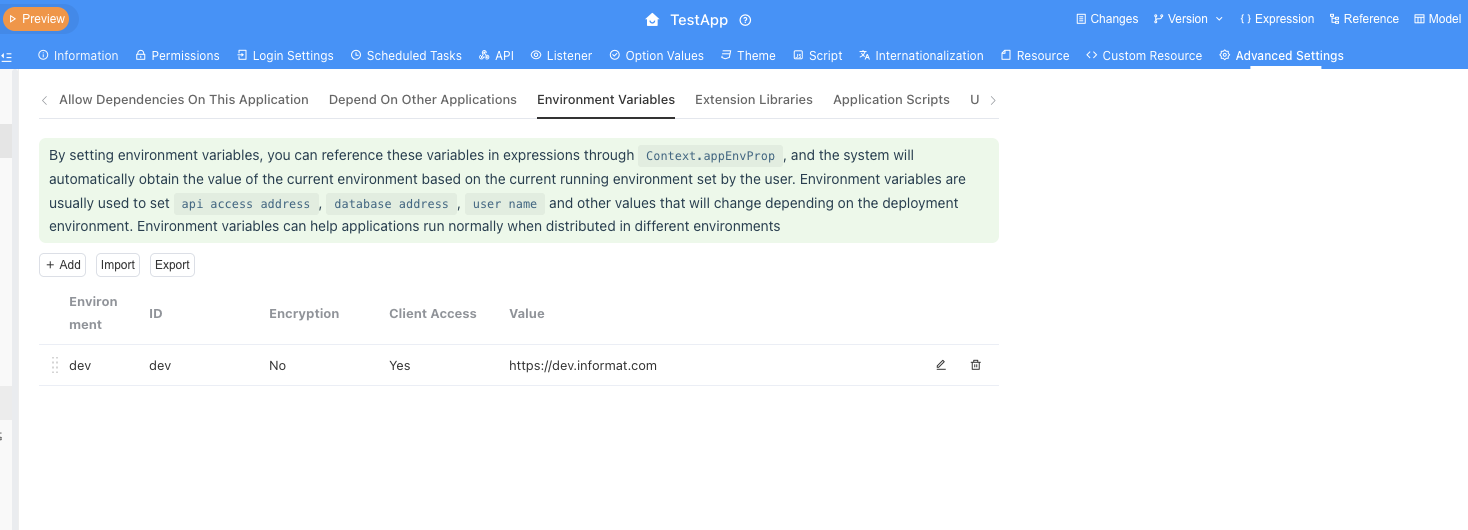
Using Environment Variables
In Informat applications, you can obtain the current environment's variable value through the expression function Context.appEnvProp(propKey). For example:
Use in scripts
const paymentUrl = informat.Context.appEnvProp("paymentUrl");${Context.appEnvProp('paymentUrl')}In the above code, the value of paymentUrl will be automatically adjusted to the corresponding payment service address according to the current environment.
Common Questions
How to ensure the security of environment variables?
To ensure the security of environment variables, it is recommended not to store sensitive information such as passwords or keys in environment variables. If you must store sensitive information, ensure that these information are encrypted during transmission and storage.
Will changes to environment variables take effect immediately?
Changes to environment variables usually take effect immediately, but the specific situation may vary depending on the application's implementation. It is recommended to restart the application after modifying environment variables to ensure that the new configuration takes effect.
Can multiple variables be set for the same environment?
Yes. You can set multiple variables for the same environment, each with a unique key name. You can obtain the corresponding variable value through the Context.appEnvProp(propKey) function in the code.
Through the above steps and precautions, you can easily manage and use environment variables in Informat, ensuring that your applications run normally in different environments.