Child Object
The Child Object field represents the parent-child relationship between models, and stores the path of the parent node of the current record when storing data.
Description
| Item | Content |
|---|---|
| Category | Association Relationship |
| Sortable | No |
| Filterable | Yes |
| Supported Filter Types | Empty, Not Empty, Parent Object Equal, Root Node Equal, Parent Object Contains |
Settings
| Setting | Description |
|---|---|
| Allow empty | Set whether the field is required |
| Placeholder in form when not filled | Text information displayed in the input box when no information is entered in the field |
| Fields to display | Can set the fields displayed by the table in the form page, supports adding buttons in the list |
| Behavior when deleting nodes | Can set the behavior to be executed when deleting a record, option values:Delete all child nodes、Do not allow deletion when there are child nodes |
| Child object name field | Can select a single-line text and function type field in this table as the name of the child object |
Child Table Settings
| Field Setting | Description |
|---|---|
| Returned field list | Set the list of fields returned when querying data |
| Use the following fields as filter conditions | Can use fields in the related table as filter conditions for the table, supporting adding fuzzy filters |
| Combined filter conditions | Set combined filter conditions for the sub-table, which will be displayed as tabs after adding |
| Sorting method | Can use fields in the current table as the sorting method for table data |
| Default number of items per page | Set the number of records loaded per page in the data list |
| Allow clicking to open form page | Set whether to allow viewing the details of records in the related list |
| Maximum list height | Set the maximum height of the child object field displayed in the form |
| Data selection mode | Set the data selection method of the child object field in the form Option values: None、Checkbox、Single Selection |
| Set records meeting the following conditions as non-selectable | Use expressions to control whether records can be selected |
| Display mode | Set the data display method of the child object field in the form Option values: Table、Card、Form |
| Grouping field | Set the default grouping field for the list data in the child object field |
| Display the following fields in the table | Set the list of header fields displayed in the related list |
| Table style | Can set the style of the displayed table, support multiple selections Option values: Show serial number、Show border、Show stripe |
| Table inline edit trigger method | Set the trigger method for inline editing |
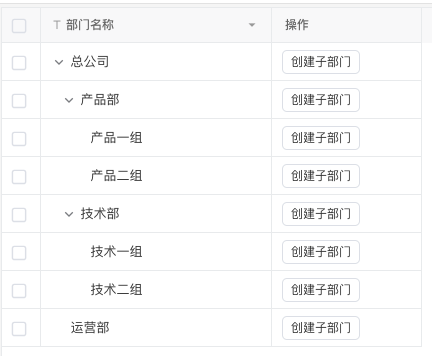
| Child object field | Can select a child object field in the current table, after setting the child object field, the table will be displayed as a tree table |
| Table row height | Can set the table row height of this field on the form page Option values: Small、Medium、Large |
| Maximum table height | Set the maximum height of the field table |
| Cell format | Can set the cell format of the table in the field through rules, supports setting multiple rules |
| Allow clicking to open form page | Set whether to allow clicking on records in the table to view the details of the record |
| Display controls in the sub-table toolbar | Can add custom buttons to the toolbar of the table form page, supporting grouping of buttons |
Operations After Creating Child Table
| Set field values of child table records after main table records are created successfully | Description |
|---|---|
| Field | Fields of child table records set after creation |
| Default value | Field values of child table records set after creation |
Database Storage Format
| Field Type | Description |
|---|---|
| ltree | Tags for data stored in a hierarchical tree structure |
Logical Relationship of Child Objects
Child objects are strings composed of tags and separators, such as: recordId1.recordId2.recordId3
- Tag: The record ID of the parent level
- Path: The tag itself is also the path
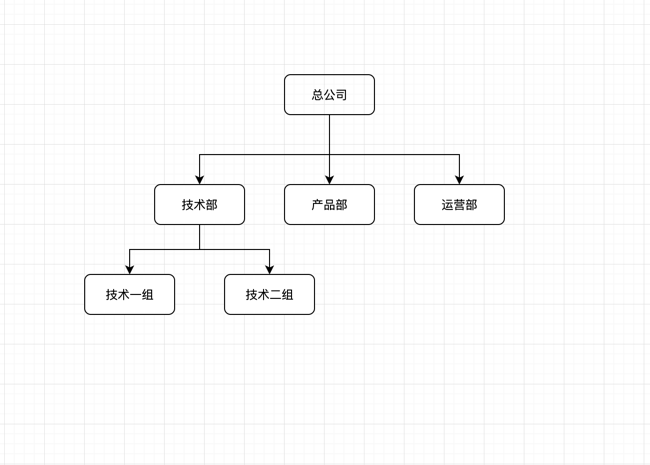
For example, the structure of the data table department is as follows
| Field | Type | Description |
|---|---|---|
| id | String | Record ID |
| name | Single-line Text | Name |
| parent | Child Object | Parent-child relationship between departments |
The data in the table is as follows
| id | name | parent |
|---|---|---|
| 0000 | Headquarters | |
| 0001 | Technical Department | 0000 |
| 0002 | Product Department | 0000 |
| 0003 | Operations Department | 0000 |
| 0004 | Technical Group 1 | 0000.0001 |
| 0005 | Technical Group 2 | 0000.0001 |
The above data table content identifies the parent-child relationship as follows
Event Trigger when Modifying Child Objects
The child object field stores the path of the parent node of the current record. When the parent node of a record changes, the system will automatically modify the child object field of all child nodes of that record. For example, the data in the table is as follows
| id | name | parent |
|---|---|---|
| 0001 | Company 1 | |
| 0002 | Company 2 | |
| 0011 | Technical Department | 0001 |
| 0012 | Technical Group 1 | 0001.0011 |
In the above example, when the Technical Department is moved under Company 2, its parent field will be updated to 0002 and the parent field of Technical Group 1 will also be updated to 0002.0011. The updated data is as follows
| id | name | parent |
|---|---|---|
| 0001 | Company 1 | |
| 0002 | Company 2 | |
| 0011 | Technical Department | 0002 |
| 0012 | Technical Group 1 | 0002.0011 |
It should be noted that the operation of moving a node will only trigger the data table change event of the moved node, and the child nodes of the moved node will not trigger the data table change event.
Display Effect