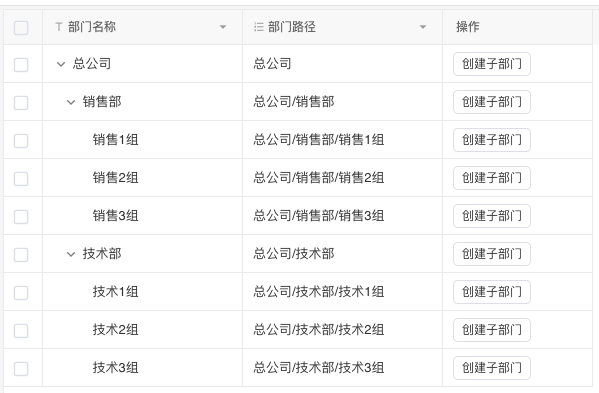
Child Object Index Number
A sequential number generated by the system that supports hierarchical order in tree structures. The child object index number translates the hierarchical structure stored in the Child Object field into a user-readable complete path based on the tag display field in the settings.
For example, the following hierarchical information is stored in the system:
| id | name | parent |
|---|---|---|
| 0000 | Head Office | |
| 0001 | Technology | 0000 |
| 0002 | Product | 0000 |
| 0003 | Operations | 0000 |
| 0004 | Tech Team A | 0000.0001 |
| 0005 | Tech Team B | 0000.0001 |
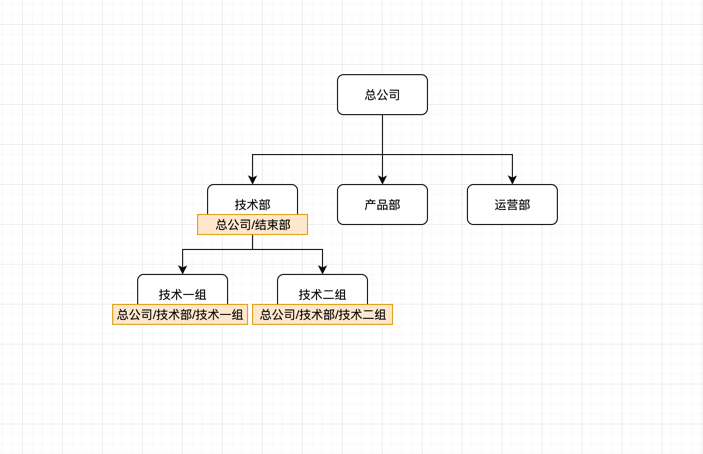
If we want to display the complete hierarchical structure of each department, we can create a Child Object Index Number field and select name as the index display field.
| id | name | parent | path |
|---|---|---|---|
| 0000 | Head Office | Head Office | |
| 0001 | Technology | 0000 | Head Office/Technology |
| 0002 | Product | 0000 | Head Office/Product |
| 0003 | Operations | 0000 | Head Office/Operations |
| 0004 | Tech Team A | 0000.0001 | Head Office/Technology/Tech Team A |
| 0005 | Tech Team B | 0000.0001 | Head Office/Technology/Tech Team B |
Field Description
The child object index number field will append its own name to the end of the path.
Description
| Item | Content |
|---|---|
| Category | Static Field |
| Sortable | Yes |
| Filterable | Yes |
| Supported Filter Types | Contains, Does Not Contain, Equal, Not Equal, Null, Not Null, In List, Not In List |
Database Storage Format
| Field Type | Description |
|---|---|
| text | Can store unlimited length strings |
Field Description
The settings of the child object index number field cannot be modified after creation.
Display Effect