

Users and Organizational Structure
Overview
Informat adopts a multi-tenant architecture, where users in the system are divided into three types: System Account (Account), Team Member (CompanyMember), and Application Member (User).
System accounts are added through registration or the management backend. Each Account can join multiple teams as a CompanyMember, and each CompanyMember can join multiple applications as a User.
Each team member can belong to one or more Departments (Dept), and departments have parent-child relationships. Each department can have one or more CompanyMembers as department heads.
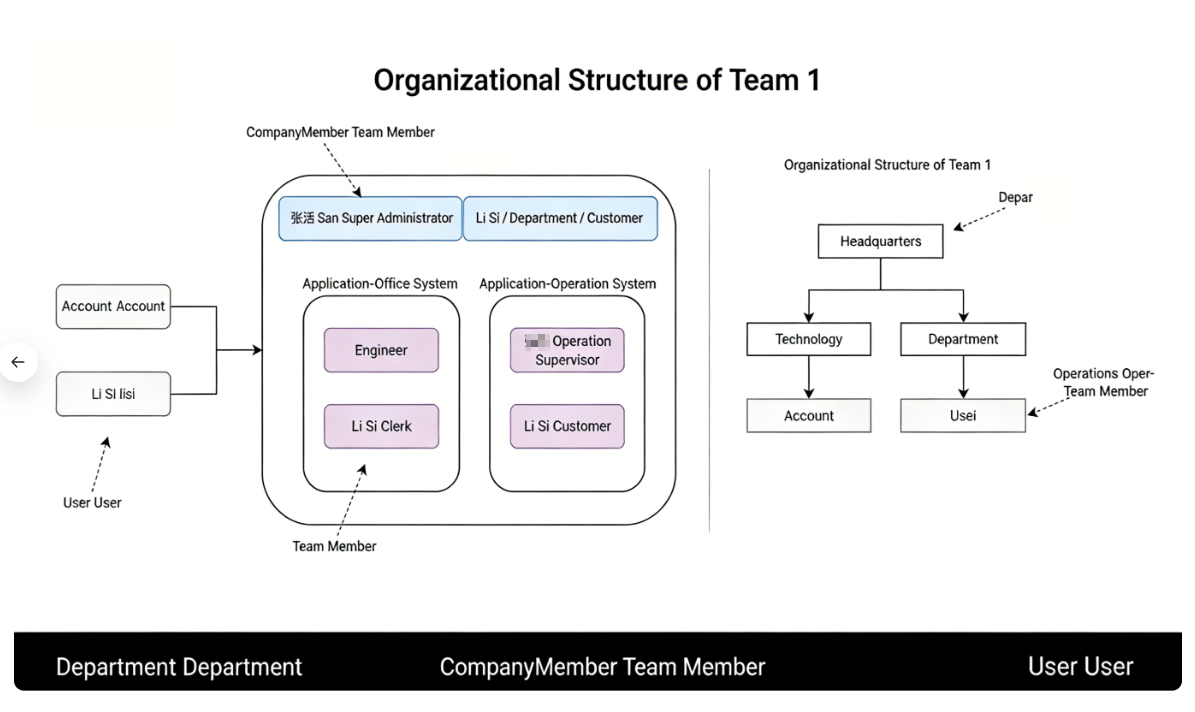
System Account
System accounts can be obtained through the following methods:
- Added by system administrators through the backend
- Added by calling the
informat.system.addAccount()function in scripts
In the management backend, all accounts in the system can be disabled, forced to change passwords, and other operations. System accounts are only credentials for logging into Informat. Without joining a team, no operations can be performed after logging into the system.
Team Member
System accounts can join multiple teams, and in each team, CompanyMember are assigned different team roles. Team roles are associated with operable permissions, and team members can have multiple roles. For role permissions, please refer to Role Permissions. Each team has two default roles:
Administrator: Has all permissions and can design applicationsMember: Only has permission to use applications
When joining a team, the Department (Dept) to which the team member belongs also needs to be set.
Team members can be obtained through the following methods:
- After creating an account, the user creates a team on their own and will join the team with the
Administratorrole - Join the team after accepting an invitation
- Added to the team by the administrator in the management backend
- Added by calling the
informat.company.addCompanyMember()function in scripts
Team members can be removed through the following methods:
- Removed in the management backend
- User exits on their own
- Removed by calling the
informat.company.deleteCompanyMember()function in scripts
Application Member
Team members can join multiple applications, and in each application, User are assigned different application roles. Application roles are associated with operable permissions, and User can have multiple roles.
Each application has a default admin role with all permissions.
Application members can be obtained through the following methods:
- Added to the application by the application administrator
- The application administrator sets the application's authorization method to
authorization by role and department, and theteam member's department or team role is within the authorized scope - Added by calling the
informat.user.addUser()function in scripts
Application members can be removed through the following methods:
- Removed by the application administrator
- If the authorization method when joining is
authorization by role and department, and theteam member's department or team role is not within the authorized scope - Removed by calling the
informat.user.deleteUser()function in scripts