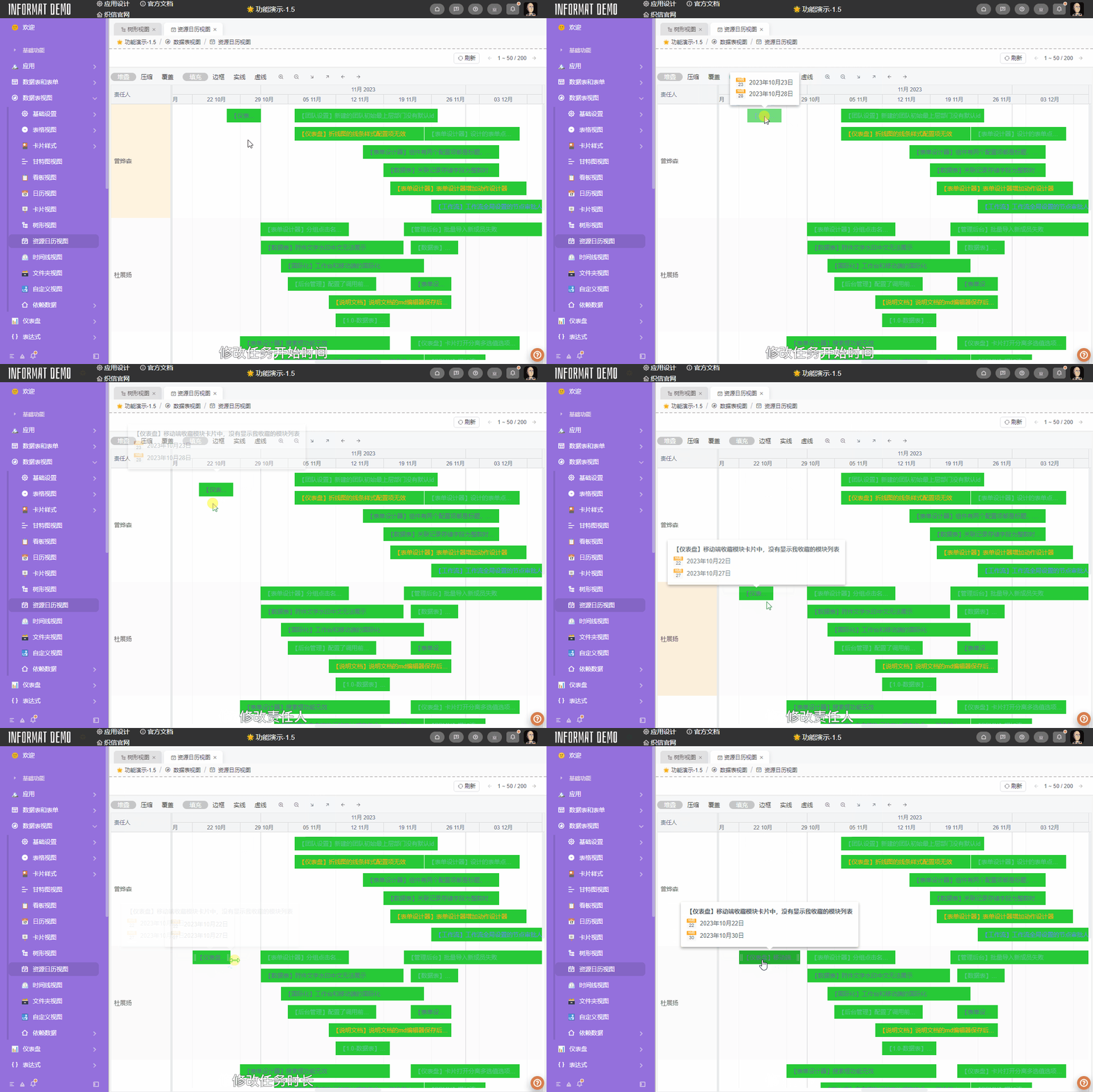
Resource Calendar View
Overview
The Resource Calendar View is a display mode in project management tools or schedule management tools, used to show the availability and arrangement of resources. In the resource calendar view, each resource (member) is assigned to a specific time period or date, and displays their work status during different time periods
Settings
| Setting | Description |
|---|---|
| Name Field | Set the name of the task. The data table must contain a Single Line Text type field. |
| Member Field | Set the grouping field for task human resources. The data table must contain a User Selection type field. If members are multi-select, the option values will be separated. |
| Start Time Field | Set the start time of tasks in the view. The data table must contain a Date type field. |
| End Time Field | Set the end time of tasks in the view. The data table must contain a Date type field. |
| Completion Percentage Field | Set the completion percentage of tasks in the view. The data table must contain a Decimal or Integer type field. |
| Use this Field to Identify Record Color | Set the color of task names in the view. The data table must contain a List Selection or Color type field. |
| Enable Drag to Modify Task Members and Start Time | After enabling, support dragging in the view to change task members and start time. |
| Enable Drag to Modify Task Duration | After enabling, support dragging to change task duration. |
Effect Diagram
The effect diagram will demonstrate behaviors such as modifying task members, modifying start time, and modifying task duration.