

Platform Open Content
Overview
To facilitate data flow between heterogeneous platforms, the Informat Platform opens its internal resources to third-party platforms through APIs, H5, and other forms. The benefits of the open platform include but are not limited to:
- Meeting more personalized usage needs
- Enhancing user experience when embedding between platforms
- Improving development efficiency between platforms
- Reducing the complexity of cross-platform development
API Opening
API allows external systems to interact with applications through the HTTP protocol. Each API has a unique access path. When an HTTP request arrives, it executes the configured automation program or script function, and returns the execution results to the caller in the configured format.
Page Opening
The Informat Platform can quickly build personalized data form displays using data tables, workflows, controls, and other methods through the low-code designer. In this mode, if heterogeneous systems want to write forms and data flow logic based on configuration items, it would be a huge engineering effort. Based on this usage scenario, the Informat Platform opens its internal page links to the outside world. Heterogeneous systems can quickly complete page embedding using page links, ensuring a unified user experience and greatly improving development efficiency.
How to pass values to the parent page when embedding platform pages via Iframe
Platform pages can execute a JS script through [Run Script on Client] in automation, and pass values to the parent page using the window.parent.postMessage method. The parent page can obtain the parameters passed by the platform page by listening to the message event.
Platform User Authentication
To automatically complete user authentication (hereinafter referred to as Token) when Informat Platform page resources are embedded, the __if_token parameter needs to be appended to the page link for redirection or embedding.
For example, embedding the Workflow List Page
- Obtain the user's
Tokenin the Informat Platform throughAPI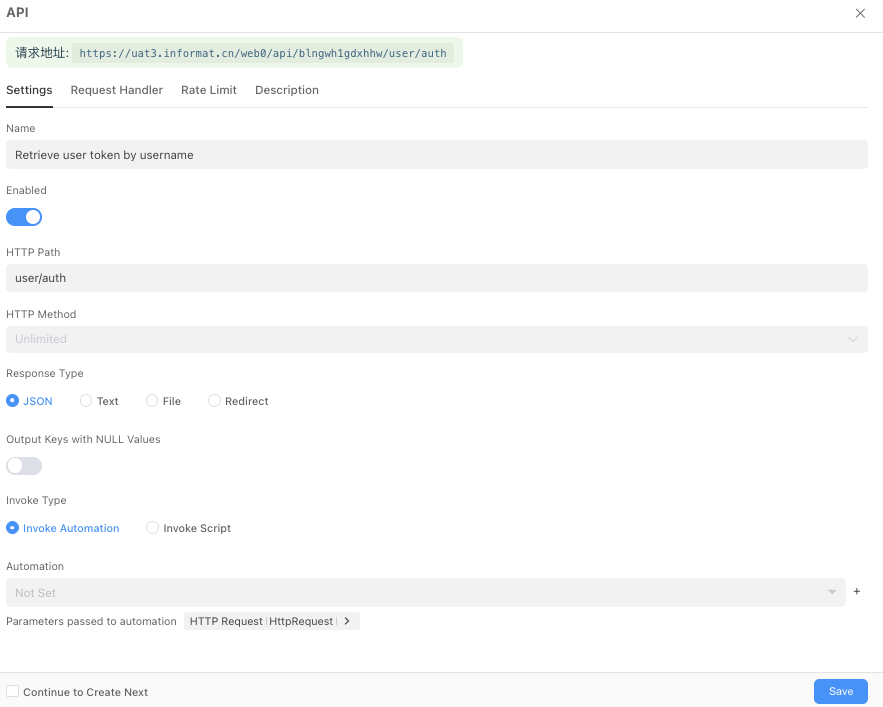 userAuth.js
javascriptexport function auth(ctx) { const { userName } = ctx.query; if (userName == null || `${userName}`.trim().length === 0) { return { code: 400, message: "Parameter userName is required", }; } const accounts = informat.system.queryAccountList({ pageIndex: 1, pageSize: 10, filter: { conditionList: [ { fieldId: "userName", opt: "eq", value: userName, }, ], }, }); if (accounts.length === 0) { return { code: 404, message: `No user with the username ${userName} was found`, }; } const [account] = accounts; const token = informat.system.createToken(account.id, "sso"); return { code: 200, token: token, }; }- Obtain the user's
- Obtain the user's
TokenThrough a post request, theTokenfor the user withuserNameas lisiyu is93bdfe9f6a0c499d82b0231429fb2f07Then theWorkflow List Pagelink is https://ai.ainformat.com//open/bpmn/list?__if_token=93bdfe9f6a0c499d82b0231429fb2f07
- Obtain the user's