

Installation and Deployment
Overview
Informat is a browser-based web application that supports both PC and mobile access.
Resource Downloads
To install Informat using the installer, first download the installer and installation package, then refer to the Installation Documentation to complete the installation process.
To install Informat using Docker images, first download the Docker images, then refer to the Installation Documentation to complete the installation process.
Informat provides some Demo applications to help you quickly understand the system's capabilities and typical scenario configurations. After downloading, you can install them by importing the application through the Application Management menu in the workbench.
Deployment Logic Diagram
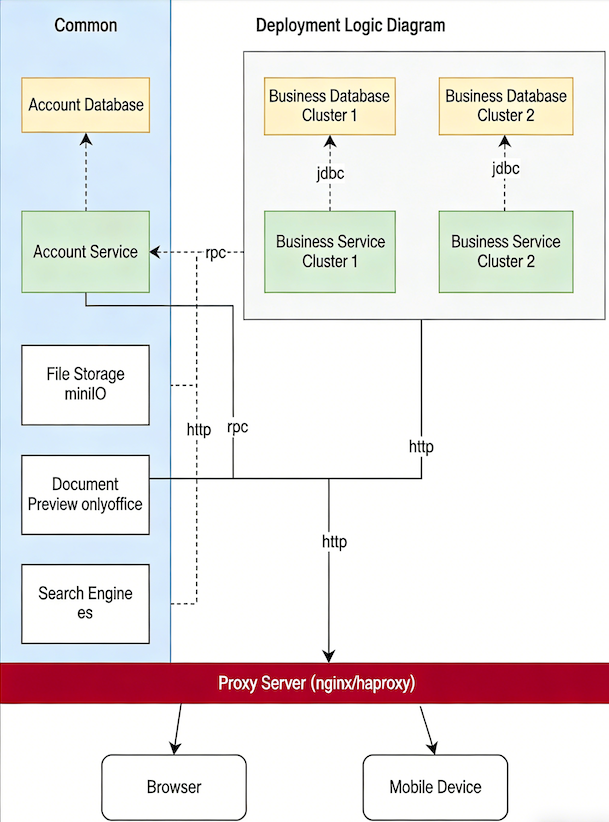
Browser Support
| Type | Supported Versions |
|---|---|
| Google Chrome | Version 63 and above |
| FireFox | Version 70 and above |
| Safari | Version 12 and above |
| Opera | Version 50 and above |
| Edge | Version 88 and above |
| 360 Extreme Browser | Version 11 and above (Chrome kernel version 63 and above) |
Required Servers and Components
| Component | Description | Requirements | Mandatory |
|---|---|---|---|
| Server | Server hardware | Minimum 4-core 16G RAM (recommended 8-core 32G RAM) | Yes |
| Operating System | Operating system | Centos/RedHat 7.5 and above | Yes |
| Network | Server network bandwidth | Configure outgoing bandwidth based on actual number of users, recommended 100M+ | Yes |
| Java | Java runtime environment | Java 11 | Yes |
| Nginx | Reverse proxy, load balancing | Nginx 1.10 and above | Yes |
| Redis | Data caching | Redis 5.0 and above | Yes |
| PostgreSQL | Database | PostgreSQL 13.5 and above | Yes |
| RabbitMQ | Message queue | RabbitMQ 3.9.16 | Yes |
| OnlyOffice | Office document preview and editing | Version 7.1 and above | Yes |
| MinIO | File sharing storage | 2022-09-01 and above | Yes |
| Elasticsearch | Full-text search, search engine | Version 7.0 and above | Yes |
| Domain Name | Access the system via domain name | No | |
| HTTPS Certificate | Required when accessing the system via HTTPS | No | |
| Email Service | SMTP server address, sender account, and sender password need to be configured if using the system's email service | No |
Recommended Server Configurations
| Concurrent Users | Deployment Method | Server Configuration | Component | Quantity | Description |
|---|---|---|---|---|---|
| 0~100 | Standalone Deployment | 8C/32G/50G System Disk/500G Data Disk | All | 1 | All components deployed on one server |
| 100~200 | Standalone Deployment | 16C/64G/50G System Disk/500G Data Disk | All | 1 | All components deployed on one server |
| 200~1000 | Cluster | 4C/8G/50G System Disk/100G Data Disk | Load Balancer | 2 | Nginx, multi-machine deployment with hot backup |
| 8C/32G/50G System Disk/200G Data Disk | Informat Microservices | 2 | Informat microservice cluster, multi-machine deployment with hot backup | ||
| 4C/16G/50G System Disk/200G Data Disk | Cache Service | 2 | Redis, multi-machine deployment with hot backup | ||
| 4C/16G/50G System Disk/2T Data Disk | Middleware Service | 2 | RabbitMQ, Elasticsearch, MinIO, OnlyOffice, multi-machine deployment with hot backup | ||
| 4C/16G/50G System Disk/2T Data Disk | Database | 2 | PostgreSQL, multi-machine deployment with hot backup |
TIP
For requirements exceeding 1000 concurrent users, double the configuration of the 200~1000 range. The data disk size in the above configurations can be adjusted according to the actual business data storage requirements.
License and Deployment Key
Before conducting private deployment, you need to apply for a Deployment Key, which is bound to the server's MAC address and needs to be reapplied if the server is replaced. After successful system installation, use the Deployment Key as the password to log in to the Informat Enterprise Background. You can create teams using the License in the enterprise background.
The License limits the team name, number of applications that can be created, number of members, expiration time, and other information.