API
Overview
The API allows external systems to interact with applications using the HTTP protocol. Each API has a unique access path. When an HTTP request arrives, it executes the configured automation program or script function and returns the execution result in the configured format to the caller. 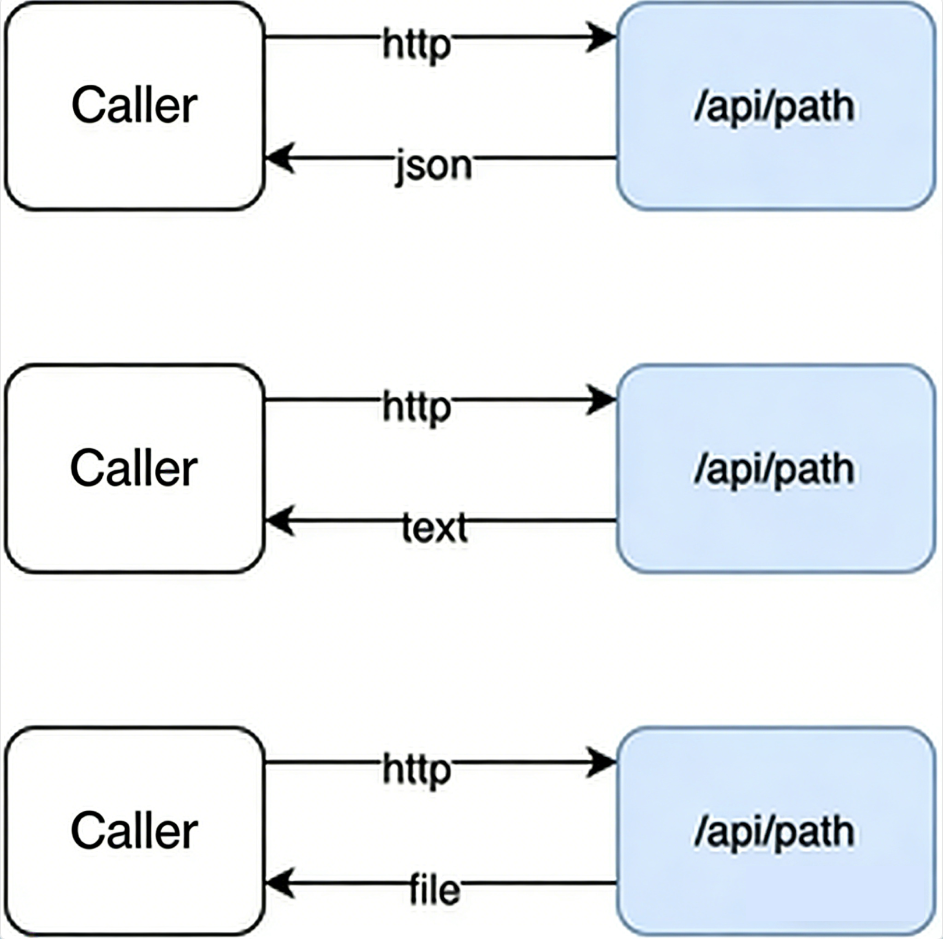
ℹ️ Important Information
The automation program executed by the API must not contain interactive steps
API calls cannot pass headers with names containing
_You need to set
underscores_in_headers on;in nginx. Documentation can be referenced here
Access Path
https://$host/web0/api/${appId}/${path}${path}is the configured path${appId}is the application ID
Preprocessing
If Execute before calling is set, the configured preprocessing script will be executed before calling the script or automation. By setting preprocessing, you can easily implement functions like authentication and auditing. If the preprocessing script throws an exception, the API call will return an error. If the preprocessing script has a return value, the API will directly return this value.
The preprocessing script accepts a parameter of type APIContext
Example
Authentication before API call, checking if the token is valid, and returning an error if it's expired
Configure the example API (test) to call the preprocessing script and script function, such as:
preHandleThe preprocessing script function is as follows:
export function preHandle(ctx) {
  console.log("preHandle", ctx);
  var token = ctx.query["token"];
  console.log("token", token);
  if (token == null) {
    informat.app.abort("token cannot be null");
    return;
  }
  var account = informat.system.getAccountByToken(token);
  if (account == null) {
    informat.app.abort("token expired");
    return;
  }
  ctx.request.setAttribute("account", account); //Subsequent scripts can get access user information via ctx.request.getAttribute('account')
}- Call the API
Case without passing token:
$ curl https://ai.ainformat.com//web0/api/croe0zft168y3/test{
"code": 270001,
"message": "token cannot be null",
"requestId": "v35glpx5vojke"
}Case with expired token:
$ curl https://ai.ainformat.com//web0/api/croe0zft168y3/test?token=796bfe7f246d4ee18c3d1133672e9991{ "code": 270001, "message": "token expired", "requestId": "prkk3dqzgrv34" }Post-processing
If Execute after calling is set, the configured post-processing script will be executed after calling the script or automation. By setting post-processing, you can easily implement functions like auditing. If the post-processing script throws an exception, the API call will return an error. If the post-processing script or automation has a return value, the API will directly return this value.
The post-processing automation or script accepts two parameters. Parameter 1 is the request information passed by the client, with type APIContext. Parameter 2 is the return value of the script or automation, with type Object
Example
Print request user information and return value after API call
Configure the example API (test) to call the post-processing script and script function, such as:
postHandleThe post-processing script function is as follows:
export function postHandle(ctx, retValue) {
  console.log("retValue", retValue);
  var account = ctx.request.getAttribute("account");
  console.log("account", account);
}- Call the API
The printed information is as follows:
retValue {date=Fri May 05 11:02:19 CST 2023}
account {
  "avatar": "c4b936e826fe45b38e1b4072c79a7a79.jpg",
  "companyId": "g09aj7cus3d8s",
  "createTime": 1664196780322,
  "email": "zhangsan@ainformat.com",
  "id": "zhangsan",
  "isValid": true,
  "mobileNo": "19012345678",
  "name": "Zhang San",
  "updateTime": 1683254561000,
  "userName": "zhangsan",
  "valid": true
}Error Handling
When the called script or automation program encounters an error, it returns a 500 error and returns error information in JSON format. The format of the error information is as follows
{
	requestId:String,//Request ID
	message:String,//Error message,
	code:Integer,//Error code when a business error occurs
}If you do not want to return the default information when an error occurs, you need to enable Execute after calling error. After enabling it, when the executed script or automation encounters an error, the error handling script will be executed.
The error handling script accepts two parameters. Parameter 1 is the request information passed by the client, with type APIContext. Parameter 2 is the error information from the script or automation, with structure APIError. The error handling script can call InformatHttpResponse to complete custom return values and status codes.
Example
By default, when an API call encounters an error, the API returns an HTTP status code of 500. In some scenarios, such as integrating with third-party systems, you may want to return a 200 status code instead of 500 when an error occurs. In this case, you can use error handling to complete custom return values and status codes.
1.Configure the example API (test) with error handling to call the script and script function, such as: errorHandle
2.The error handling script function is as follows:
export function errorHandle(ctx, apiError) {
  var json = informat.utils.toJSON(apiError);
  var content = informat.utils.stringToBytes(json, "UTF-8");
  var response = ctx.response;
  response.setContentType("application/json;charset=UTF-8");
  response.setStatus(200);
  response.getOutputStream().write(content);
  response.setContentLength(content.length);
}3.Call the API
If an error occurs, it will return status code: 200, and the return value:
{
  "code": 270001,
  "message": "test error",
  "requestId": "d6iaunfx9vm18"
}Data Structures
The structure of APIContext is as follows:
{
	headers:Object,//Request headers
	cookies:Object,//Request cookies
	query:Object,//Request query parameters
	body:String,//POST request body
	url:String,//Complete request path
	appId:String,//Application ID to which the API belongs
	path:String,//API path
	method:String,//HTTP request method,
	getParts():Part//Uploaded files
	request:InformatHttpRequest,//HTTP request object
	response:InformatHttpResponse,//HTTP response object
}The structure of InformatHttpRequest is as follows:
{
	Object getAttribute(String name);//Get the attribute with the specified name
	Enumeration<String> getAttributeNames();//Get the names of all attributes
	String getCharacterEncoding();//Get the character encoding of the current HTTP request
	String getParameter(String name);//Get the value of the request parameter with the specified name
	Enumeration<String> getParameterNames();//Get an enumeration of all parameter names contained in the current HTTP request
	String[] getParameterValues(String name);//Get all values of the request parameter with the specified name
	Map<String, String[]> getParameterMap();//Get all request parameters as key-value pairs
	String getProtocol();//Get the protocol used by the client (e.g., HTTP/1.1)
	String getScheme();//Get the protocol used by the client (e.g., http or https)
	String getServerName();//Get the hostname of the server where the current Web application is located
	String getRemoteAddr();//Get the IP address of the client that sent the request
	String getRemoteHost();//Get the hostname of the client that sent the request
	int getRemotePort();//Get the port number used by the client that sent the request
	void setAttribute(String name, Object o);//Set the attribute with the specified name to the specified value
	void removeAttribute(String name);//Remove the attribute with the specified name from this request
	boolean isSecure();//Return true if this request is transmitted using a secure protocol (e.g., HTTPS); otherwise, return false
	int getServerPort();//Get the port number of the server where the current Web application is located
	String getContentType();//Get the content type of the HTTP request
	String getAuthType();//Return the name of the authentication scheme used for the request
	Cookie[] getCookies();//Return an array containing all cookies included in this request
	String getHeader(String name);//Get the value of the request header with the specified name
	Enumeration<String> getHeaders(String name);//Get all values of the request header with the specified name
	Enumeration<String> getHeaderNames();//Get an enumeration of all request header names contained in the current HTTP request
	String getMethod();//Get the HTTP method of the request, e.g., GET, POST, etc.
	String getPathInfo();//Get the path in the request URL after the part matched by the Servlet mapping
	String getContextPath();//Return the context path of the web application associated with the request
	String getQueryString();//Get the query string part in the request URL
	String getRemoteUser();//Get the username of the client that sent the request
	java.security.Principal getUserPrincipal();
	String getRequestURI();//Get the URI of the request
	String getServletPath();//Get the Servlet path of the client request
	Collection<Part> getParts();//Get all Part components in the HTTP POST request
}The structure of InformatHttpResponse is as follows:
{
	String getCharacterEncoding();//Return the character encoding of the response
	String getContentType();//Return the content type of the response
	ServletOutputStream getOutputStream();//Return a ServletOutputStream for writing bytes to the response output stream
	PrintWriter getWriter();//Get a PrintWriter object for writing characters to the response output stream
	void setCharacterEncoding(String charset);//Set the character encoding of the response content
	void setContentLength(int len);//Set the length of the response content
	void setContentLengthLong(long len);//Set the length of the response content, similar to the setContentLength method. However, it supports longer response content lengths
	void setContentType(String type);//Set the MIME type of the response content
	boolean containsHeader(String name);//Return whether a header with the specified name has been set
	String encodeURL(String url);//Encode the specified URL for use when sending the response
	void sendError(int sc, String msg);//Send an error code and message to the client, and clear the response buffer
	void sendError(int sc);//Send an error code to the client, and clear the response buffer
	void sendRedirect(String location);//Redirect to the specified URL
	void setHeader(String name, String value);//Set the value of the response header with the specified name
	void addHeader(String name, String value);//Add a header with the specified name and value to the response
	void setDateHeader(String name, long date);//Set a date header with the specified name and value, representing the date the response was sent
	void addDateHeader(String name, long date);//Add a date header with the specified name and value, representing the date the response was sent
	void setIntHeader(String name, int value);//Set an integer header with the specified name and value to the response
	void addIntHeader(String name, int value);//Add an integer header with the specified name and value to the response
	void setStatus(int sc);//Set the response status code
	int getStatus();//Get the response status code
	String getHeader(String name);//Return the value of the response header with the specified name
	Collection<String> getHeaders(String name);//Get all values of the response header with the specified name
	int getBufferSize();//Return the size of the response output buffer
	void setBufferSize(int size);//Set the size of the response buffer
	void flushBuffer();//Flush the response output stream
	void reset();//Clear the response buffer
	void resetBuffer();//Clear the response buffer
	boolean isCommitted();//Return whether the response has been committed
}The structure of Part is as follows:
{
	name:String,//Name specified during upload
	contentType:String,//File type
	size:Integer,//File size
	submittedFileName:String,//Original name of the file,
	save(path),//Save in the local sandbox,
	saveStorage(path),//Save to shared storage
    saveAttachment(tableId,fieldId):TableAttachment//Save the file as an attachment field
}The structure of APIError is as follows:
{
	requestId:String,//Request ID
	message:String,//Error message
	code:Integer//Error code
}Script Function Format
When the call type is Call Script, you need to use the export syntax in the script file to export the call function, and the script function needs to accept a ctx parameter.
For example, to implement a function that returns the current time via API, the call file is apitest.js, which contains a function getTime to get the current time.
apitest.js
export function getTime(ctx) {
  return new Date();
}The ctx parameter is of type APIContext
JSON
When the return value type is JSON, it will return text in JSON format, and the HTTP response's content-type will be set to application/json;charset=UTF-8. The called automation program or script function needs to return an object format, and the system will automatically serialize the object into a JSON string.
Here is an example of using a script to return user input parameters
export function returnJSON(ctx) {
  const ret = {
    input: ctx.query.input,
    date: new Date(),
  };
  return ret;
}https://ai.ainformat.com//web0/api/croe0zft168y3/returnJSON?input=abc{ "input": "abc", "date": 1670157677104 }ℹ️ Tip
Date types will be returned as timestamps
Text
When the return value type is Text, plain text will be returned, and the HTTP response's content-type will be set to text/plain;charset=UTF-8. The called automation program or script function can return any format. If the return value is an object format, the system will call the object's toString method to convert it to a string. If the return value is null, an empty string will be returned.
Here is an example of using a script to return user input parameters
export function returnText(ctx) {
  const list = [];
  for (const key in ctx.query) {
    list.push(key + "=" + ctx.query[key]);
  }
  return list.join(",");
}https://ai.ainformat.com//web0/api/croe0zft168y3/returnText?a=1&b=2a=1,b=2File Download
When the return value type is File, a file stream is returned. The structure that the called automation program or script function needs to return is as follows:
{
    path: String, // Path in the local storage sandbox
    storagePath: String, // Path in shared storage
    name: String, // File name
    contentDisposition: String, // File display mode, optional values: inline, attachment, default: attachment
}When contentDisposition is attachment, the browser will automatically download the file. When it is inline, the browser will use the built-in editor to preview the file. If path is empty or the specified file does not exist, a 404 error will be returned. If both path and storagePath are specified, the file from path will be used first.
Here is an example of downloading a file:
export function returnFile(ctx) {
  return {
    path: "path/test.jpg",
    name: "test.jpg",
    contentDisposition: "attachment",
  };
}https://ai.ainformat.com//web0/api/croe0zft168y3/returnFile?a=1&b=2Returns an imageHere is an example of returning a file obtained via HTTP:
export const getFilePath = () => {
  const req = {
    url: "https://app.ainformat.com/file/5bf495fd7c9d4df5896d186cc2707264_p.jpg",
  };
  const rsp = informat.http.request(req);
  rsp.saveBodyAsFile("api/demo.jpg");
  return {
    path: "api/demo.jpg", // Path in the local storage sandbox
    name: "FileName.jpg", // File name
    contentDisposition: "inline", // File display mode, optional values: inline, attachment, default: attachment
  };
};After the request, the browser will preview demo.jpg online
Page Redirection
When the return value type is Redirect, it will return HTTP CODE 302. The called automation program or script function needs to return the redirect URL address in string format.
Here is an example of redirection:
export function returnRedirect(ctx) {
  return "https://ainformat.com";
}https://ai.ainformat.com//web0/api/croe0zft168y3/returnRedirectAfter the request, the browser will be redirected to `https://ainformat.com`File Upload
When you need to upload files, use ctx.getParts() to retrieve the files uploaded by the user and store them in the local sandbox. Here's an example of file upload:
export function uploadFile(ctx) {
  const result = [];
  ctx.getParts().forEach((p) => {
    p.save(p.submittedFileName);
    result.push(p.name + "/" + p.contentType + "/" + p.size + "/" + p.submittedFileName);
  });
  return result.join(",");
}curl -X POST -H "Content-Type: multipart/form-data" -F "data=@logo1.png" -F "data2=@logo2.jpg" https://ai.ainformat.com//web0/api/croe0zft168y3/uploadFile[
{ "contentType": "image/png", "name": "data", "size": 5684, "submittedFileName": "logo1.png" },
{ "contentType": "image/jpeg", "name": "data2", "size": 7757, "submittedFileName": "logo2.jpg" }
]Rate Limiting
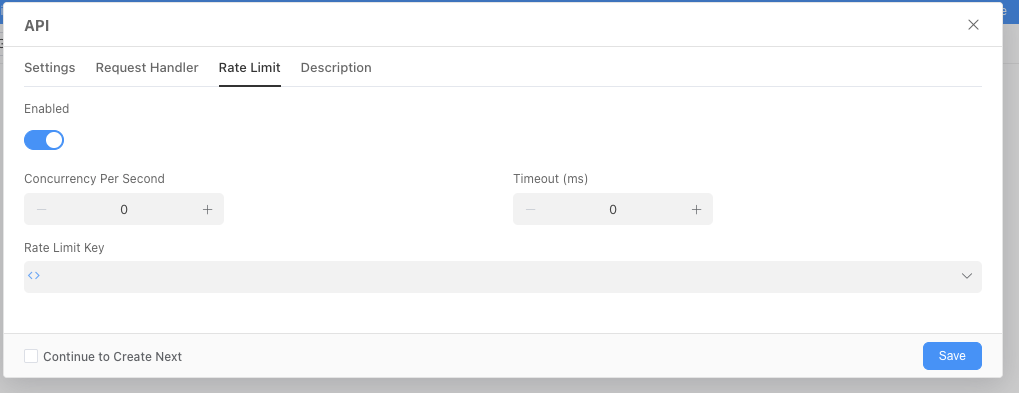
Rate Limiting is a technology that controls API request rates to prevent excessive use or abuse of server resources. By setting rate limiting rules, the stability and reliability of API services can be ensured. The platform allows enabling request rate limiting for each API. The configurable parameters are as follows:
- Concurrent Requests Per Second: The number of requests that can be processed within one second. 0 means no limit.
- Timeout Duration (milliseconds): The maximum waiting time for a request. Negative values are treated as zero.
- Rate Limiting Identifier: A unique identifier for the rate limiting rule. It is recommended to use the requester's IP as the rate limiting identifier.
Example
API Rate Limiting: The same IP can only call once per second. You can test it using jmeter or the curl command.
for i in {1..10}; do
  echo "Request $i"
  curl -i -X POST {API URL} \
     -H "Content-Type: application/json" \
     -d '{"key": "value"}'
  sleep 0.1
done