

Frequently Asked Questions
Does Informat generate code?
Informat uses a designer to generate configurations. Applications are dynamically rendered based on these configurations at runtime. No code is generated during the application building process.
Is there a mobile version?
Informat supports mobile access and can be embedded in WeChat Work, DingTalk, Feishu and other clients.
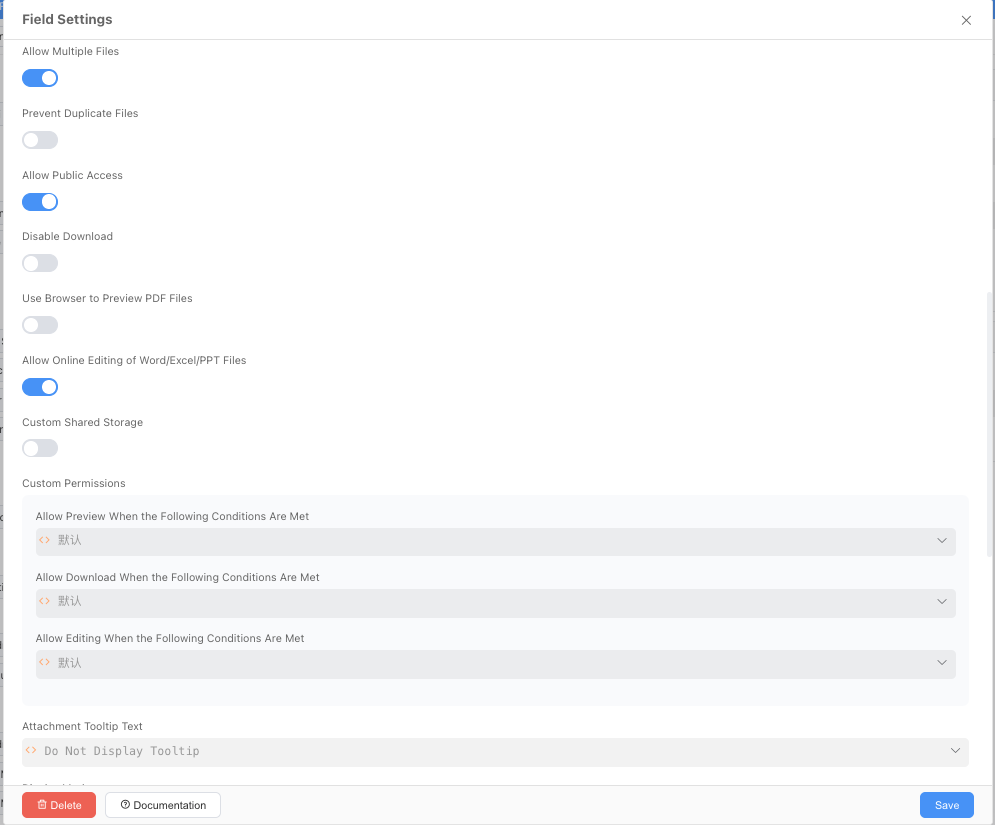
Data table supports exporting images from attachment fields
When using the platform's Excel export function, images from attachment fields are stored as remote image links in Excel columns.
Therefore, if the exported data contains attached images, you need to enable the Allow Public Access option in the attachment field settings.
Informat cannot open more than 6 tabs
Informat uses EventSource technology to implement server-to-client data push. You need to enable the HTTP2 protocol to solve this issue.
For detailed instructions and configuration, please refer to the SSE Server Push section.
How to hide the menu bar, navigation bar, and history access bar
| Parameter | Value | Description |
|---|---|---|
| nonav | yes | Hide menu bar, leave empty or omit to show |
| noVisitHistory | yes | Hide history access bar, leave empty or omit to show |
| noBreadcrumbNav | yes | Hide navigation breadcrumbs, leave empty or omit to show |
Example: Hide menu bar, navigation breadcrumbs, and history access bar
https://ai.ainformat.com//app/msucfeq7305cn/table/witt65t1er62q?nonav=yes&noVisitHistory=yes&noBreadcrumbNav=yesDatabase execution is waiting indefinitely
If two database transactions update the same record simultaneously or when adding a field to a large table, lock waits can occur. lock_timeout is a parameter in PostgreSQL that controls the timeout for queries or transactions waiting for locks. If a query or transaction waits for a lock longer than the set lock_timeout, a timeout error will be thrown to avoid infinite waiting that could cause database unresponsiveness.
By default, lock_timeout=0, which means infinite waiting. You can modify the lock_timeout parameter and restart the database to solve this issue.
View current configuration
db_informat2_biz_prd_0=# SHOW lock_timeout;

lock_timeout
--------------
30s
(1 row)How to modify:
- Find /data/pgsql/data/postgresql.conf
- Use vi to edit postgresql.conf, find the lock_timeout line, remove the #, and change it to lock_timeout = 30s
- Save postgresql.conf and restart the database
Application publishing process gets stuck
During publishing, database DDL statements are executed. If there are other operations involving this application's tables (such as data synchronization or other large transactions) that haven't completed before this publishing, it can cause the current application publishing to get stuck (blocked). The solution is to stop other transactions:
Steps:
- Find running processes Execute the following SQL in the database client:
SELECT * FROM pg_stat_activity where state!='idle'Locate other large transactions through the query column in the results - Abort processes Using the process ID (pid) obtained in the previous step, execute:
select pg_terminate_backend(pid)to end the process.
Attachment and signature fields cannot be displayed when the data table data source comes from a script
Due to platform restrictions on access rules for data table attachment fields, preview images for attachment and signature fields cannot be displayed in views. In this case, we need to process the data and add the following fields to the attachment and signature fields:
| Field Identifier | Name |
|---|---|
| appId | Application ID where the field value comes from |
| tableId | Data Table Identifier where the field value comes from |
| fieldId | Field Identifier where the field value comes from |
For detailed instructions, please refer to the Issue with Attachment and Signature Fields Not Displaying When Data Table Data Source Comes from Script section.
Support for importing images or files into data tables using Excel
The platform supports importing images and files when importing Excel files.
The attachment column supports:
- Images inserted through Excel
- Using HTTP links
Set up the mapping between Excel columns and attachment fields in the import window.
Once mapping is complete, files will be automatically uploaded to the attachment field.
Notes
- When using links, you can use
,to separate multiple files for import - When using links, the links must be unauthenticated or carry authentication information
- If the attachment field is set to single selection, the import operation will select the first successfully imported file and ignore the file size limit set for the field
- If the attachment field is set to multiple selection, the import operation will ignore the maximum number of files and file size limit set for the attachment field
- Issue with importing images inserted in WPS
- You can see the WPS image cell
- To solve this issue, simply change the embedded cell images in WPS spreadsheets to [Floating Images]. Operation method: [Select all problematic images] → [Right-click] → [Switch to floating image]
- Re-upload the Excel file to import normally
Data precision issues
For an explanation of why precision issues occur, please refer to IEEE 754.
- Server-side
- Integer fields are stored using Long type Data range: -9,223,372,036,854,775,808 ~ 9,223,372,036,854,775,807
- Decimal fields are stored using double type Data range: -2^1024 ~ +2^1024, which is -1.79E+308 ~ +1.79E+308
- Client-side
- Integer type Data support range: -9007199254740991 ~ 9007199254740991
- Floating-point type Data support range: 5e-324 ~ 1.7976931348623157e+308
In simple terms, floating-point numbers lose precision during conversion to binary, and lose precision again when converting back from binary to decimal.
Duplicate ID records appear in data table views
By default, data tables (whether in grid views or other views) do not have duplicate IDs, but duplicates may occur in the following cases:
- When using related records where the associated field is not the ID but a field that may have duplicates
- When using related record fields with a matching method that uses other fields for matching
How to obtain the server's MAC address
- Log in to the server
- Run the
ifconfigcommand, the value of ether is the MAC address:52:54:00:9a:c0:83
Message queue service exception
In some cases, the message queue service may fail to work properly, such as when host name is modified or data directory is accidentally cleared. In such cases, you need to manually restore the message queue data.
For specific operations, please see Message Queue Service Maintenance.
Disk space insufficient error during service operation
As the service runs, the system generates log files (which are cleaned up periodically). During periods of high business volume, disk space issues may cause service errors.
no space left on device
For specific operations, please see Insufficient Disk Space.
Management backend expression ${url.protocol} cannot obtain the correct https value
This issue is caused by an Nginx proxy problem. The solution is as follows:
server {
  listen 443 ssl http2;
  listen [::]:443 ssl http2;

  proxy_set_header Host $host;
  proxy_set_header X-Real-IP $remote_addr;
  proxy_set_header X-Forwarded-For $remote_addr;
  proxy_set_header X-Forwarded-Server $host;
  # add http request origin scheme header transport
  proxy_set_header X-Forwarded-Scheme $scheme; // [!code focus]
}Resource and component designer modules using Git SSH key synchronization error
InformatException,200037,git@example.com:example-group/example-project.git
: invalid privatekey: [B@775bf231The platform uses jgit for remote Git repository synchronization at the bottom. The private key must be in PEM format.
Solutions:
- Switch to using
username and passwordauthentication - Add a private key in
PEMformatshellssh-keygen -t rsa -m PEM -C "example@example.com"
Troubleshooting Informat service lag issues
By default, Informat Biz service log files are located at: /informat-next/log
1. Query slow SQL
grep 'SlowSQL' /informat-next/log/informat-biz.logSlow SQL queries may be one of the main causes of lag. Optimizing slow queries or adding indexes helps improve performance.
2. Query logs for requests with response time exceeding 1 second
grep 'using:[0-9]\{4,\}ms' /informat-next/log/informat-biz.logCheck all request logs with response times exceeding 1 second to help locate performance bottlenecks.
3. Query logs for requests with response time exceeding 10 seconds
grep 'using:[0-9]\{5,\}ms' /informat-next/log/informat-biz.logIf some requests have response times exceeding 10 seconds, they require special attention.
Biz service log search
Biz service system logs use Logback, with each log line formatted as follows:
[%d{yyyy-MM-dd HH:mm:ss.SSS}] [%-10.10(%thread{9})] %-5level [%X{appId}] [%X{requestId}-%X{ip}%X{userId}-%X{context}] [%-29.29(%logger{24} %line]) - %msg%nExample:
[2025-02-28 16:09:39.741] [kndp6oyjz] DEBUG [] [zcfjkndp6oyjz-183.14.135.213--] [i.c.r.RedisCacheService 78] - redis cache hit using:2msRequestId location: zcfjkndp6oyjz in the log segment [zcfjkndp6oyjz-183.14.135.213--]
How to query logs by requestId
Each log line carries a requestId, which can be used to query all logs for the entire request, making it easier to locate issues.
grep zcfjkndp6oyjz /informat-next/log/biz-service.logThe creation time of records in the data table is 8 hours behind the current time
- You can access the following address to get the JVM time zone:
https://ai.ainformat.com//web0/main/time_zone - If it's not
Asia/Shanghai, you can set the JVM time zone in the Informat startup script:-Duser.timezone=Asia/Shanghai
Docker installation of Informat pgsql database fails to start
# systemctl restart  postgresql-13.service
# ERROR:systemctl:the ExecStartPre control process exited with error codeReason: Insufficient permissions for the host /data directory. You need to execute chmod 755 /data.
Export application error: token expire
This occurs when informat-account and informat-biz are deployed on two different servers with inaccurate dates.
How to quickly export large applications
When exporting large applications, it may take a long time. To avoid blocking other system functions, you can use the command method to export applications as follows:
- Write a shell script
  curl -X POST \
  -F 'arg0=System token (can be obtained by capturing packets in the web page)' \
  -F 'arg1=Export application ID' \
  -F 'arg2={"exportData":true,"editable":true,"exportAllTable": true}' \
  Your domain name/web0/invoke/DesignerAction.exportApplication \
-o /Path/to/save/file/ExportFileName.imr- Execute the written script in the computer's system command line tool
Nginx related content
The Informat platform uses Nginx as a reverse proxy. For issues related to file uploads, network request timeouts, load balancing strategies, CORS, and HTTPS certificate configuration, please refer to Nginx Related Content.
The creation time of records in the data table is 8 hours behind the current time
You can access the following address to get the JVM time zone: https://ai.ainformat.com//web0/main/time_zone
If it's not Asia/Shanghai, you can set the JVM time zone in the Informat startup script: -Duser.timezone=Asia/Shanghai