

Scripts
The form designer script refers to Vue's Mixin mechanism during system module design. After the form is rendered, the frontend will mix the form's script content into the current page as a Mixin.
This means that in the page's lifecycle, prop, data, computed, watch, and methods can all be managed by Vue.
Special Note
Lifecycle execution
Since the designed form will introduce the script content into the form component in Mixin mode, the script lifecycle functions will be executed before the form component's lifecycle. If you want to execute logic after the form component lifecycle is triggered, you need to wrap the logic to be executed with setTimeout.
Script syntax standard
During the script Mixin process, the script is introduced into the form component in its original form, and there is no syntax standard conversion process. If compatibility issues are encountered, it is necessary to consider writing in ES5 syntax within the script to obtain higher compatibility.
Page Lifecycle
Designers can execute some specific business logic at different stages of the lifecycle.
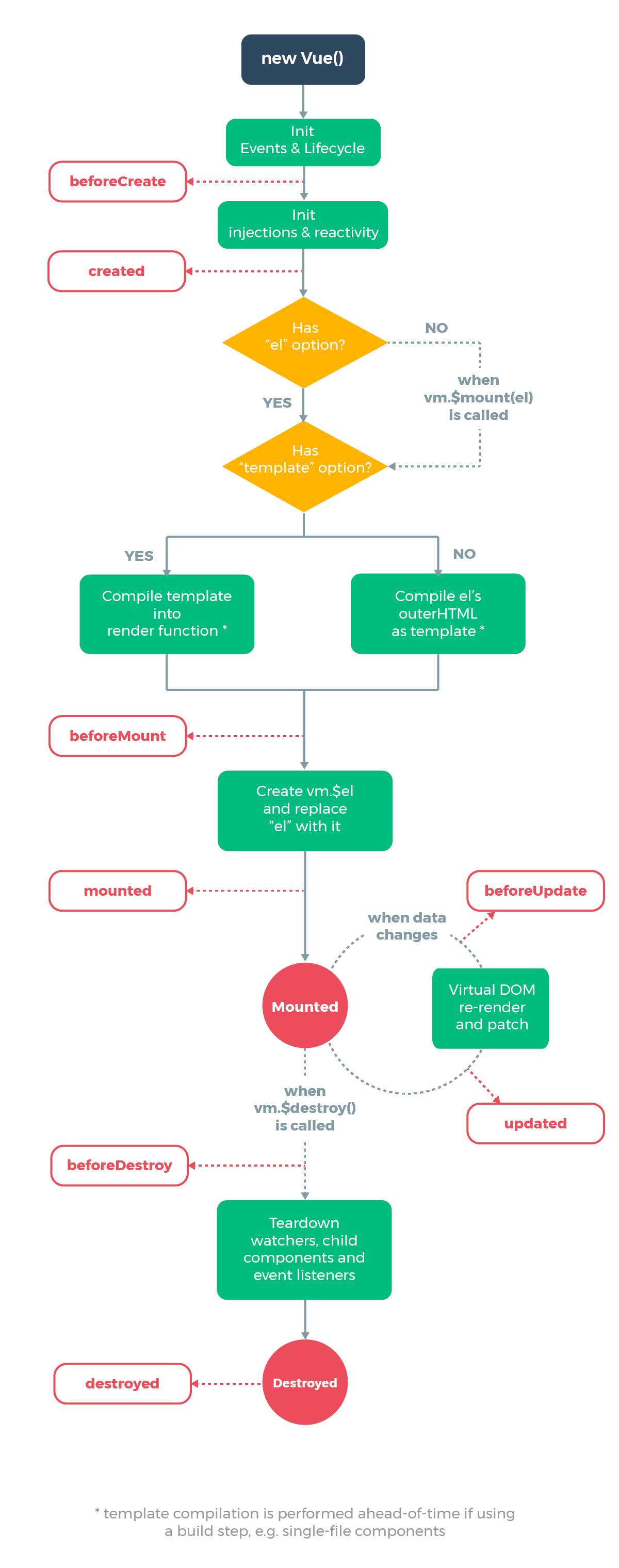
Complete Example
{
    props: {
        // Define page properties
        uname:{
            type:String;
        }
    },
    data: function () {
        return {
            // Define the optional data item list for the dropdown box
            sexList: [
                {
                    key: 'f',
                    label: 'Male'
                },
                {
                    key: 'm',
                    label: 'Female'
                }
            ]
        };
    },
    // When the page component creates an instance
    created: function () {

    },
    // Execute business logic after the page is mounted
    mounted: function () {
        var that = this;
        setTimeout(function() {
            that.setup();
        }, 0);
    },
    // Before the page component is destroyed
    beforeDestroy: function () {

    },
    methods: {
        // Execute custom processing after the page is mounted
        setup: function () {
            var that = this;
            // Output the properties of the context
            console.log(this.uname);
            // Set the data of the current form field (name)
            that.form.name = 'Zhang San';
            // Call the API function bound by the script
            informat.system.getToken().then(res => {
                console.log(res);
            });
            // Globally monitor page field data changes
            that.onEvent('onChange', function (data) {
                console.log('onChange', data);
            });
            // Monitor page button (buttonSubmit) click event
            that.onEvent('onClick', function (data) {
                that.getData(true).then((res) => {
                    informat.app.callAutomatic({
                        automaticId: 'formdesignerInvoker',
                        args: [res]
                    });
                    // console.log('onClick.getData',res);
                });
            }, 'buttonSubmit');
            // Monitor page button (buttonAdd) click event, then pop up a dialog box (dialog_e2duygzp)
            that.onEvent('onClick', function (data) {
                that.dialogOpen('dialog_e2duygzp');
            }, 'buttonAdd');
            // Monitor page button (buttonCancel) click event, then reset the form
            that.onEvent('onClick', function (data) {
                that.reset();
            }, 'buttonCancel');
            // Specify to monitor page field (name) data changes
            that.onceEvent('onChange', function (data) {
                console.log('onNameChange', data);
                // Get all current form data
                console.log('onNameChange.form', this.form);
            }, 'name');
            // Specify to monitor page dialog box (dialog_e2duygzp) click cancel time
            that.onceEvent('onDialogCancel', function (data) {
                console.log('onDialogCancel', data);
                that.dialogClose('dialog_e2duygzp');
            }, 'dialog_e2duygzp');
        }
    }
}