

AI Script Agent
Overview
The AI Script Generation feature of the Informat platform is an intelligent automated script creation tool that can quickly generate script code that meets customer needs by integrating user requirements with the AI model configured by the Informat team. This feature is mainly targeted at developers, test engineers, and automated operation and maintenance personnel, aiming to improve work efficiency and reduce repetitive coding work.
Using AI Script Agent to Generate Scripts
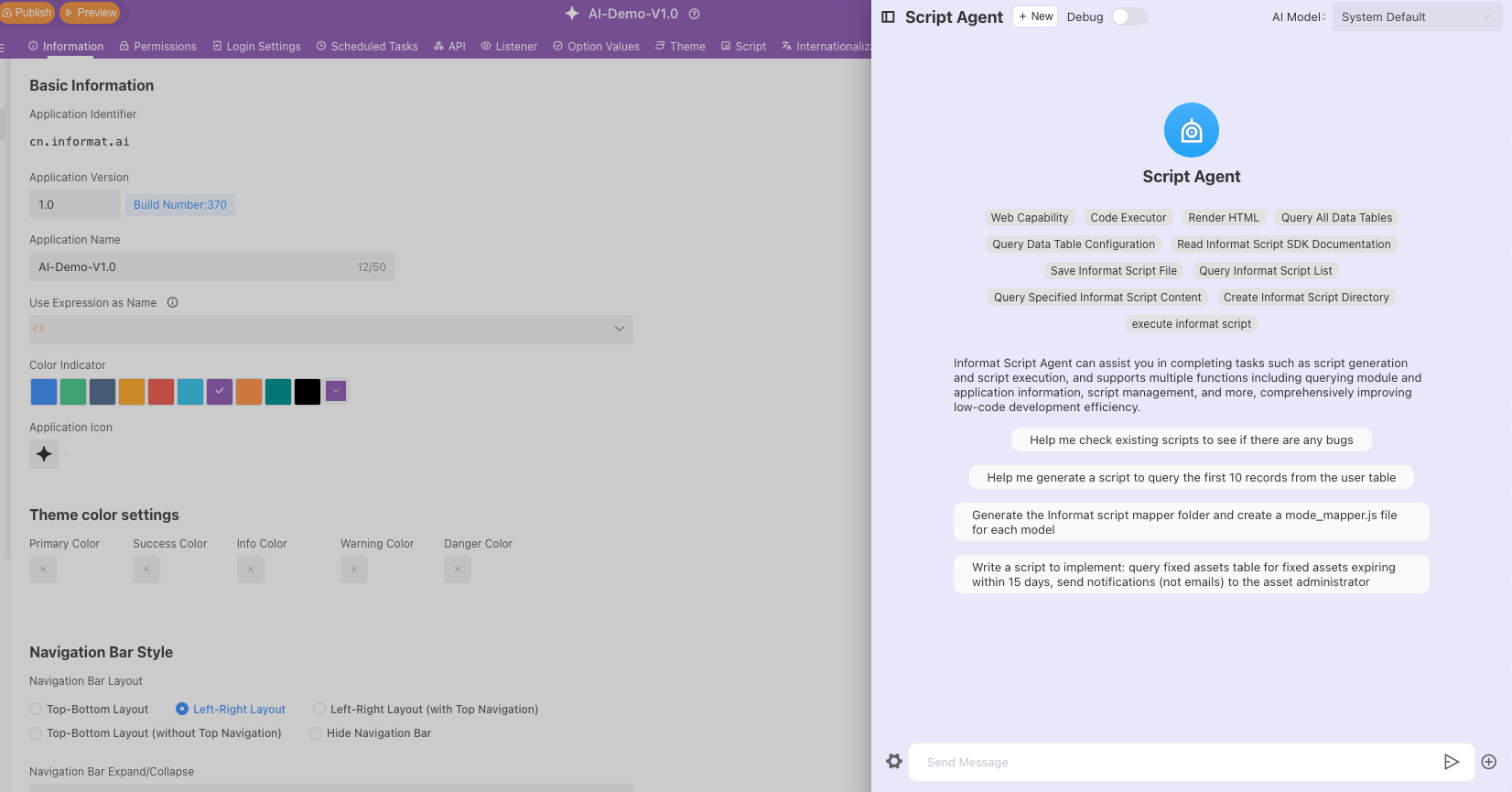
In the [Application Designer]'s [AI] module, click [Script Agent] to switch to the script agent dialogue.
Please note that the configured model needs to support
function call.
Application Cases
1. Automatically Generate Tool Scripts
- Application scenario: Generate some tool methods about users to quickly determine whether they are department heads or in the specified department list
- Generated script content (part)
/**
 * Determine whether the current user has the specified application role
 * @param {Array<string>} roleIds - Role ID array
 * @returns {boolean} Returns true if the current user has any of the roles, otherwise returns false
 */
export function isCurrentUserHasRoles(roleIds) {
  try {
    const currentUserId = informat.app.userId();
    if (!currentUserId || !roleIds || !Array.isArray(roleIds)) {
      return false;
    }

    // Get current user information
    const user = informat.user.getUser(currentUserId);
    if (!user || !user.roleList) {
      return false;
    }

    // Check if the user has the specified role
    return roleIds.some((roleId) => user.roleList.includes(roleId));
  } catch (error) {
    console.error("Error occurred when judging user roles:", error);
    return false;
  }
}
/**
 * Determine whether the current user is the head of the specified department
 * @param {string} deptId - Department ID
 * @returns {boolean} Returns true if it is the department head, otherwise returns false
 * @example
 * // Determine whether the current user is the head of the department with ID "dept123"
 * const isLeader = isCurrentUserDeptLeader("dept123");
 * if (isLeader) {
 *   console.log("Current user is the head of this department");
 * } else {
 *   console.log("Current user is not the head of this department");
 * }
 */
export function isCurrentUserDeptLeader(deptId) {
  //
}

/**
 * Get current user information
 * @returns {Object|null} User information object, returns null if acquisition fails
 */
export function getCurrentUserInfo() {
  //
}

/**
 * Get all leader user information of the specified department
 * @param {string} deptId - Department ID
 * @returns {Array} Leader user information array
 */
export function getDeptLeaders(deptId) {
  //
}

/**
 * Determine whether the current user is in the specified department list
 * @param {Array<string>} deptIds - Department ID array
 * @returns {boolean} Returns true if the current user is in any department, otherwise returns false
 */
export function isCurrentUserInDepts(deptIds) {
  //
}2. Read Data Tables in the Application
AI can automatically read the structure of data tables in the application and quickly generate scripts for specific business scenarios through scripts provided by Informat
- Application scenario: Read the user table and insert salary records for each employee from January to August 2025 into the salary table
- Generated script content (part)
/**
 * Query the employee table and create salaries for each employee from January to August 2025 in the employee salary payment records
 */
export function createStaffSalaryRecordsOptimized() {
  try {
    // Query all employees
    const staffList = informat.table.queryList("staff", {
      pageIndex: 1,
      pageSize: -1,
      includeFields: ["id", "name", "salary"],
    });

    console.log(`Query found ${staffList.length} employees`);

    let totalCreated = 0;
    let skipped = 0;

    // Create salary records for each employee from January to August 2025
    for (const staff of staffList) {
      const staffId = staff.id;
      const staffName = staff.name;
      const monthlySalary = staff.salary || 0;

      console.log(`Processing employee ${staffName}...`);

      // Create salary records from January to August
      for (let month = 1; month <= 8; month++) {
        // Check if the record already exists
        if (checkSalaryRecordExists(staffId, 2025, month)) {
          console.log(`- Salary record for ${staffName} in month ${month} already exists, skipped`);
          skipped++;
          continue;
        }

        const salaryRecord = {
          staff: staffId,
          year: 2025,
          month: month,
          salary: monthlySalary,
        };

        // Insert salary record
        const recordId = informat.table.insert("staffSalaryPaymentRecord", salaryRecord);

        if (recordId) {
          totalCreated++;
          console.log(`✓ Successfully created salary record for ${staffName} in month ${month}`);
        } else {
          console.log(`✗ Failed to create salary record for ${staffName} in month ${month}`);
        }
      }
    }

    console.log(`Salary record creation completed!`);
    console.log(`- Newly created: ${totalCreated} records`);
    console.log(`- Skipped: ${skipped} existing records`);

    return {
      success: true,
      message: `Salary record processing completed, ${totalCreated} new records created, ${skipped} existing records skipped`,
      staffCount: staffList.length,
      createdCount: totalCreated,
      skippedCount: skipped,
    };
  } catch (error) {
    console.error("Error occurred when creating salary records:", error);
    return {
      success: false,
      message: `Failed to create salary records: ${error.message}`,
      error: error.message,
    };
  }
}
/**
 * Check if there is already a salary record for a certain employee in a certain year and month
 * Avoid duplicate creation
 */
export function checkSalaryRecordExists(staffId, year, month) {
  const existingRecords = informat.table.queryList("staffSalaryPaymentRecord", {
    pageIndex: 1,
    pageSize: 1,
    filter: {
      conditionList: [
        { fieldId: "staff", opt: "eq", value: staffId },
        { fieldId: "year", opt: "eq", value: year },
        { fieldId: "month", opt: "eq", value: month },
      ],
    },
  });

  return existingRecords.length > 0;
}3. Generate Multiple Scripts Simultaneously
AI can automatically generate folders and create or edit scripts in specified folders by reading user instructions
- Application scenario: Create an organizational structure synchronization directory, and generate scripts in that directory to synchronize the organizational structure and members of WeChat Work, DingTalk, and Feishu to the organizational structure and members of the Informat platform
- Generated script content (part)
Generated directory structure

Organizational Structure Synchronization
├── Main Synchronization Script.js
├── WeChat Work Organizational Structure Synchronization.js
├── Feishu Organizational Structure Synchronization.js
└── DingTalk Organizational Structure Synchronization.js/**
* Feishu Organizational Structure Synchronization Script
* Function: Synchronize organizational structure and members from Feishu to Informat platform
*/
// Get Feishu access token
const feishuToken = informat.app.feishuAccessToken();
// Get Feishu department list
function getFeishuDepartments() {
const url = `https://open.feishu.cn/open-apis/contact/v3/departments?department_id_type=department_id&fetch_child=true&page_size=100`;
const request = {
url: url,
method: "GET",
headers: {
Authorization: `Bearer ${feishuToken}`,
"Content-Type": "application/json",
},
timeout: 10000,
};
const response = informat.http.request(request);
if (response.statusCode() === 200) {
const data = JSON.parse(response.body());
if (data.code === 0) {
return data.data.items || [];
} else {
informat.app.abort(`Failed to get Feishu department: ${data.msg}`);
}
} else {
informat.app.abort(`HTTP request failed: ${response.statusCode()}`);
}
}
// Get Feishu department members
function getFeishuDepartmentUsers(departmentId) {
const url = `https://open.feishu.cn/open-apis/contact/v3/users/find_by_department?department_id_type=department_id&department_id=${departmentId}&page_size=100`;
const request = {
url: url,
method: "GET",
headers: {
Authorization: `Bearer ${feishuToken}`,
"Content-Type": "application/json",
},
timeout: 10000,
};
const response = informat.http.request(request);
if (response.statusCode() === 200) {
const data = JSON.parse(response.body());
if (data.code === 0) {
return data.data.items || [];
} else {
console.log(`Failed to get members of department ${departmentId}: ${data.msg}`);
return [];
}
} else {
console.log(`HTTP request failed: ${response.statusCode()}`);
return [];
}
}
// Synchronize department to Informat
function syncDepartmentToInformat(feishuDept) {
try {
// Query whether the department already exists
const existingDepts = informat.dept.queryDeptList({
filter: {
conditionList: [{ fieldId: "oid", opt: "eq", value: feishuDept.department_id }],
},
});
let parentId = null;
if (feishuDept.parent_department_id && feishuDept.parent_department_id !== "0") {
// Find parent department
const parentDepts = informat.dept.queryDeptList({
filter: {
conditionList: [{ fieldId: "oid", opt: "eq", value: feishuDept.parent_department_id }],
},
});
if (parentDepts.length > 0) {
parentId = parentDepts[0].id;
}
}
const deptData = {
name: feishuDept.name,
shortName: feishuDept.name,
oid: feishuDept.department_id,
parentId: parentId,
remark: `Feishu synchronization - ID: ${feishuDept.department_id}`,
};
if (existingDepts.length > 0) {
// Update department
deptData.id = existingDepts[0].id;
informat.dept.updateDept(deptData);
console.log(`Updated department: ${feishuDept.name}`);
return existingDepts[0].id;
} else {
// Add new department
const deptId = informat.dept.addDept(deptData);
console.log(`Added new department: ${feishuDept.name}`);
return deptId;
}
} catch (error) {
console.log(`Failed to synchronize department ${feishuDept.name}: ${error.message}`);
return null;
}
}
// Synchronize user to Informat
function syncUserToInformat(feishuUser, deptId) {
try {
// Query whether the user already exists
const existingAccounts = informat.system.queryAccountList({
filter: {
conditionList: [{ fieldId: "oid", opt: "eq", value: feishuUser.user_id }],
},
});
let accountId;
if (existingAccounts.length > 0) {
// Update account
const account = existingAccounts[0];
account.name = feishuUser.name;
account.mobileNo = feishuUser.mobile || "";
account.email = feishuUser.email || "";
account.avatar = feishuUser.avatar || "";
informat.system.updateAccount(account);
accountId = account.id;
console.log(`Updated user: ${feishuUser.name}`);
} else {
// Add new account
const accountData = {
name: feishuUser.name,
userName: feishuUser.user_id,
mobileNo: feishuUser.mobile || "",
email: feishuUser.email || "",
avatar: feishuUser.avatar || "",
oid: feishuUser.user_id,
needUpdatePassword: true,
};
accountId = informat.system.addAccount(accountData);
console.log(`Added new user: ${feishuUser.name}`);
}
// Add to team members
if (accountId && deptId) {
try {
informat.company.addCompanyMember(accountId, [deptId], []);
console.log(`User ${feishuUser.name} added to department`);
} catch (error) {
console.log(`Failed to add user to department: ${error.message}`);
}
}
return accountId;
} catch (error) {
console.log(`Failed to synchronize user ${feishuUser.name}: ${error.message}`);
return null;
}
}
// Main synchronization function
function syncFeishuOrganization() {
console.log("Starting Feishu organizational structure synchronization...");
try {
// Get Feishu department list
const feishuDepartments = getFeishuDepartments();
console.log(`Retrieved ${feishuDepartments.length} departments`);
// Synchronize departments
const deptMap = {};
for (const dept of feishuDepartments) {
const deptId = syncDepartmentToInformat(dept);
if (deptId) {
deptMap[dept.department_id] = deptId;
}
}
// Synchronize users
let totalUsers = 0;
for (const dept of feishuDepartments) {
const users = getFeishuDepartmentUsers(dept.department_id);
console.log(`Department ${dept.name} has ${users.length} members`);
for (const user of users) {
const deptId = deptMap[dept.department_id];
if (deptId) {
syncUserToInformat(user, deptId);
totalUsers++;
}
}
}
console.log(`Synchronization completed! A total of ${totalUsers} users processed`);
// Add operation log
informat.system.addOptLog({
module: "Organizational Structure Synchronization",
operation: "Feishu Synchronization",
content: `Successfully synchronized ${feishuDepartments.length} departments and ${totalUsers} users`,
result: "Success",
});
} catch (error) {
console.log(`Synchronization failed: ${error.message}`);
// Add error log
informat.system.addOptLog({
module: "Organizational Structure Synchronization",
operation: "Feishu Synchronization",
content: `Synchronization failed: ${error.message}`,
result: "Failed",
});
throw error;
}
}
// Export functions for other scripts to call
export { syncFeishuOrganization };4. Fix Bugs in Existing Scripts
- Scenario: There are potential bugs in the script, use AI to fix these bugs
Requirement description: Find bugs in the script and modify these bugs
5. Run Methods in Scripts
WARNING
Need to enable [Support Script Execution] Please do not check this option in the production environment to avoid risks caused by executing untested scripts
- Scenario: Read the createStaffSalaryRecords method in createStaffSalaryRecords.js and execute this method
- Script content
/**
 * Query the employee table and create salaries for each employee from January to August 2025 in the employee salary payment records
 */
export function createStaffSalaryRecords() {
  try {
    // Query all employees
    const staffList = informat.table.queryList("staff", {
      pageIndex: 1,
      pageSize: -1, // -1 means query all data
      includeFields: ["id", "name", "salary"],
    });

    console.log(`Query found ${staffList.length} employees`);

    let totalCreated = 0;

    // Create salary records for each employee from January to August 2025
    for (const staff of staffList) {
      const staffId = staff.id;
      const staffName = staff.name;
      const monthlySalary = staff.salary || 0; // Get employee salary, set to 0 if none

      console.log(`Creating salary records for employee ${staffName}...`);

      // Create salary records from January to August (fixed: month <= 8 instead of month <= 100)
      for (let month = 1; month <= 8; month++) {
        const salaryRecord = {
          staff: staffId, // Associate employee
          year: 2025, // Year
          month: month, // Month
          salary: monthlySalary, // Salary amount
        };

        // Insert salary record
        const recordId = informat.table.insert("staffSalaryPaymentRecord", salaryRecord);

        if (recordId) {
          totalCreated++;
          console.log(`✓ Successfully created salary record for ${staffName} in month ${month}`);
        } else {
          console.log(`✗ Failed to create salary record for ${staffName} in month ${month}`);
        }
      }
    }

    console.log(`Salary record creation completed! A total of ${totalCreated} salary records created`);
    return {
      success: true,
      message: `Successfully created ${totalCreated} salary records for ${staffList.length} employees`,
      staffCount: staffList.length,
      recordCount: totalCreated,
    };
  } catch (error) {
    console.error("Error occurred when creating salary records:", error);
    return {
      success: false,
      message: `Failed to create salary records: ${error.message}`,
      error: error.message,
    };
  }
}