

Basics
In the basic learning stage of Informat, we mainly introduce the core functions and concepts of Informat. After mastering these, users can implement simple data structure and business process construction, such as an employee information management system.
Team
In Informat, a "team" is equivalent to a company or group. A team is bound to a single Licenses authorization. A team contains a set of organizational structure data (organizations/users), which can be referenced by applications under the team.
Application
An application in Informat is equivalent to a system in traditional code development mode. For example, an employee information management application corresponds to an employee information management system in code development mode.
An application in the Informat platform is a combined entity that contains data, logic, processes, pages, and other resources used to implement the functions of a specific business system. In addition to supporting global configuration content such as role permissions, option value dictionaries, scheduled tasks, environment variables, and internationalization, the application supports the application based on
The Informat platform supports multi-application mode, and applications support data project dependencies between each other.
Data Table
A data table in Informat is equivalent to a database table in traditional code development mode.
Data tables are used to store and display data. After creating a data table, the system automatically generates a table in the database to store data. Users can use the system-generated table views and forms to view and modify data on the front end. If you have more personalized requirements for the default table and form styles of the system, you can customize the development through the system's component designer and form designer tools. Data tables can be referenced as data sources by modules such as table views, dashboards, workflows, form designers, and questionnaires.
Data Table Configuration
- Configure form comment behavior, field change records, behavior when deleting records, forms support multiple display modes including labels displayed above, labels displayed on the left, table layout, and form designer rendering, dynamic styles based on form context, and forms support adding controls.
- Data table records support configuration of record-level permission control.
- Data table forms support listening to events such as form initialization and field value changes.
- When a data table is referenced by a workflow, it supports displaying workflow task information in the data form and synchronously deleting associated workflow instances when data is deleted.
- Data tables support adding unique and regular indexes for fields, and support data partitioning by range, value, and HASH.
Data Table Fields
The Informat platform data table supports 33 different types of fields.
Fields can be configured with required, display style, dynamic value, validation, edit control, hidden control, and change records. Informat provides rich control items for field settings of different types.
- Including conventional types such as text, number, date, and selection
- Association types such as related records (one-to-one relationship), related lists (one-to-many relationship), and lookup lists (one-to-many relationship)
- Custom types such as functions, static text and controls, and custom component fields.
Data Table Data Sources
- Default: Data tables use the default data source by default. The default data source is the built-in database of the Informat platform, and the default values, required fields, etc. of data table fields can be configured through data table configuration.
- From other application data tables: By relying on data tables from other applications, centralized management and data reuse of data can be achieved.
- External database: External databases can be called through Postgres's FDW capability, and external database data operations are equivalent to Informat platform data table data operations.
- Javascript script: Supports calling heterogeneous systems as data sources through interfaces, jdbc, etc.
- Database view data source: Supports writing SQL to query data from existing data tables in the system as data sources, and also supports materialized views to persist view data.
Usage Tip
For data tables using the default data source, the system automatically provides a table view and data form based on the module and field configuration after the module is created.
Table View
Views are used to display and manage data, providing functions such as pagination and search. A view in Informat is equivalent to a data list on a page in traditional code development mode.
Informat's table views support custom sorting, grouping, filtering, pagination, export, print, export as image, export as word, export as pdf, export as excel, etc.
- Tree structure: Through the use of child object fields, a data list displayed in a tree hierarchy can be configured
- View data supports dynamic range filtering and data post-processing (such as data decryption, desensitization, etc.) through pre-processing and post-processing of data queries.
- The view supports configuring different event listeners, and different business processing scenarios can be configured according to the event type.
Supported View Types
- Supports multiple formatted views such as tables, kanban, gantt charts, calendars, and maps.
- For view scenarios outside the provided types, the Informat platform supports implementation through website pages or component designers.
Controls
Controls on the Informat platform are equivalent to the button concept in traditional code development mode. Based on button interactive controls, the Informat platform provides display controls including cards, rich text, text, groups, separators, etc.
- Controls support user-defined interactive actions, support calling business functions such as data tables, workflows, workflow tasks, and automation, and realize complex business scenarios through function combination.
- Controls can be referenced by forms, views, dashboard cards, and workflows. Based on different usage scenarios, different display content or interactive actions can be configured.
Dashboard
The dashboard is an important tool for visual data display provided within Informat. It can configure various component types including charts, data tables, controls, containers, etc. in the form of cards. It is often used to display business progress and support decision-making. It supports docking with different types of data sources.
Chart Types
- Data cards with multiple chart types such as line charts, bar charts, pie charts, and radar charts
- Data types such as data tables, pivot tables, and tables, and control types such as rich text, countdown, and controls
- Container types such as tabs, collapse panels, and card containers.
Data Sources
- Application data table data sources: The Informat platform provides query statistics for data in application data tables, which can quickly implement business data display through configuration.
- Automation or script data sources: The Informat platform provides calls to data such as automation, scripts, and APIs to realize dynamic data display of data cards.
Usage Scenarios
- Application workbench: A customized work interface for specific roles, such as sales teams viewing daily performance, to-do items, etc.
- Data kanban: Real-time updated key business data display to help management grasp the overall operation status.
- Data report: Multi-dimensional data analysis, supporting on-demand generation of sales reports divided by department, region, or time period
Usage Tip
Build data portals or data dashboards by combining different types of dashboard cards.
Workflow
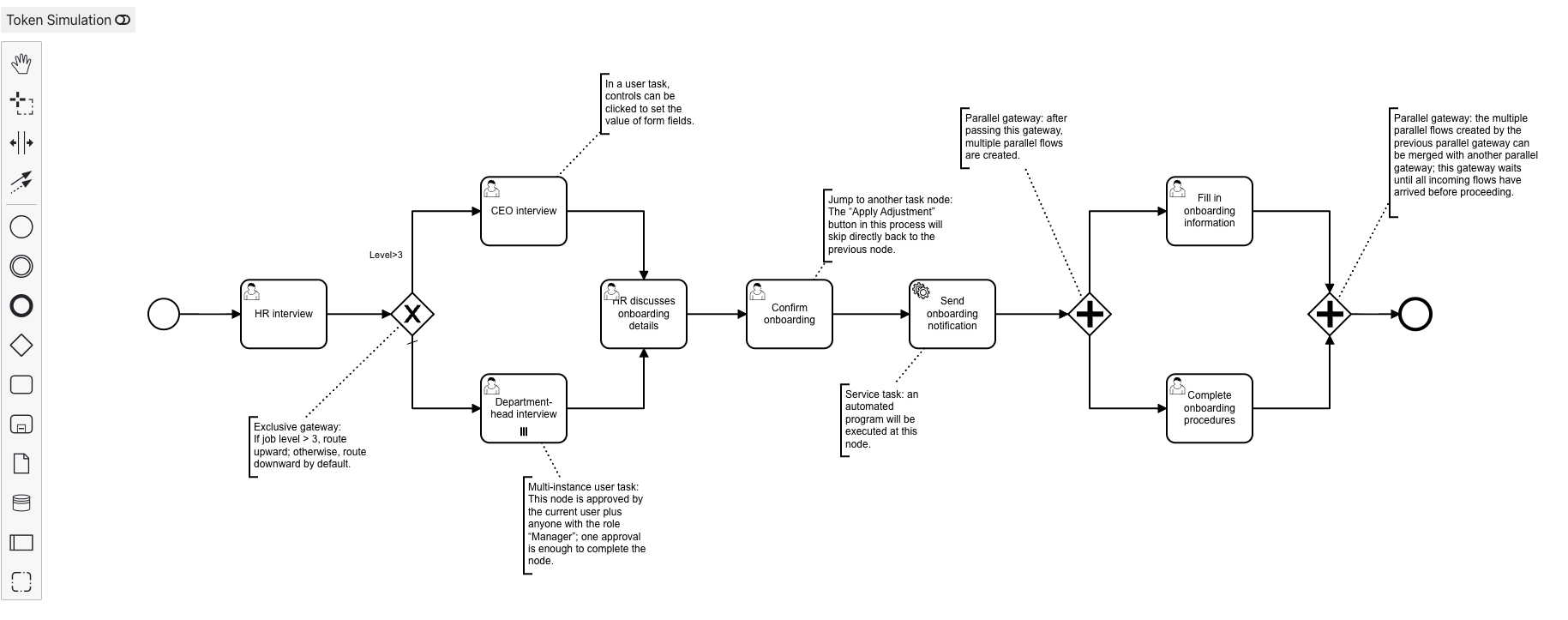
The Informat platform integrates a standard workflow engine to implement workflow module functions. The workflow module supports configuration of business flows or approval flows.
The Informat platform workflow supports visual configuration to achieve workflow process definition, combined with data tables, form designers, automation, scripts, controls and other functions to achieve workflow task display, data processing, node transfer, etc. At the same time, the Informat platform workflow supports multi-version and start-stop control, which is convenient for flexible control according to business scenarios.
Usage Scenarios
- Approval process automation: Complex approval processes such as budget and contract approval can automatically assign paths according to conditions. Support rejection, jump, add sign, reduce sign, competitive sign, joint sign, voting sign, forward or backward collection, automatic completion
- Procurement process automation: For procurement scenarios with multiple suppliers, the system can automatically trigger procurement requests when inventory is low, select appropriate suppliers and generate contracts, providing a transparent and efficient procurement process.
- Cross-departmental collaboration process: In cross-departmental processes such as project initiation, the workflow module can automatically assign tasks to relevant departments to ensure coordinated promotion of various departments and improve business connection efficiency
Role Permissions
The Informat platform provides refined permission control, supporting permissions from team level >> application level >> module level >> record level >> field level >> control level.
Informat adopts the RBAC role permission mode to manage user access permissions, enabling Informat to effectively manage user permissions and ensure system security and flexibility.
Informat has designed basic permission definitions for each module, such as querying data and creating data permissions for data tables, but in the actual development process, more detailed permission management may be required, and custom permission definitions need to be added through the permission management function at this time.
Usage Tip
In addition, the Informat platform supports custom roles and permissions, and complex permission control can be achieved through the combination of pre-defined role permissions.
Questionnaire
Questionnaires in the Informat platform are mainly used for data collection, such as collecting user feedback. Questionnaires support anonymous and system account methods for data collection. The creation of questionnaires needs to rely on a data table with a default data source, and the data filled in the questionnaire will be automatically written into the corresponding data table.
Questionnaire Design
The design process involves building the questionnaire form, selecting the questionnaire source data table, and setting the form content and display method. This process only generates questionnaire configurations, and questionnaire distribution must be done through questionnaire creation.
Questionnaire Creation
Create questionnaire instances for the designed questionnaire. A questionnaire design can have multiple questionnaire instances. Different questionnaire instances can set different default form data and the start and end time of the questionnaire.
Usage Scenarios
- Customer feedback collection
- Employee satisfaction survey
- Training effect evaluation
- Market information collection
- Evaluate product or service quality
- Business opportunity collection
Publish Preview
Content built through the designer in the Informat platform needs to be published to take effect on the user side. This ensures that building and using are separated.