

Server-side Scripts
Overview
Informat uses javascript as its scripting language. Scripts in Informat can implement advanced features that cannot be configured through the interface. You can use system-provided functions by accessing the informat object in scripts. Scripts run on the server side, and their runtime states are isolated by application. For complex application scenarios, scripts offer greater flexibility than automation programs and have better performance. It is recommended to use scripts in API or complex calculation scenarios.
Terminate Script Execution
If a script takes too long to execute or has a logical dead loop, you can terminate its execution through the application running status monitoring function.
Modularity
Informat supports using javascript ES6 syntax. It does not support asynchronous operations like Promise and setTimeout. All function calls are synchronous. Note that although Informat's script engine is similar to nodejs in usage, they are completely different implementations. You cannot use browser objects like window or document in Informat scripts as they run on the server side.
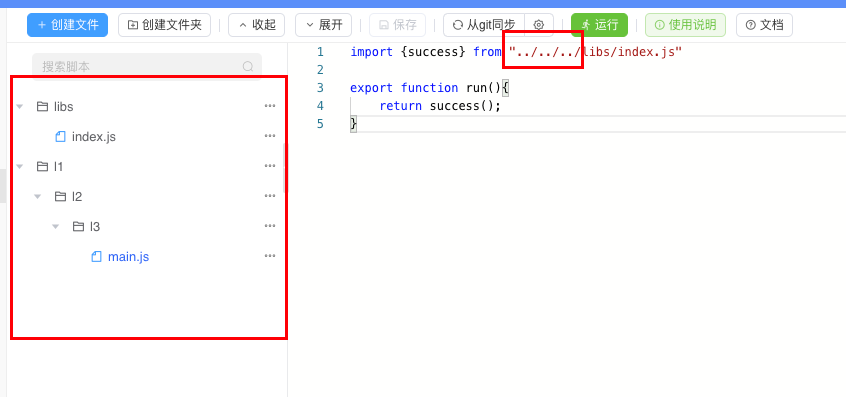
For large projects, it is recommended to group script files with different functions by folder. Scripts can be imported and exported using import and export syntax. The following example demonstrates this usage:
npm Package Management
In Informat, you can use the npm package manager to load packages from the npmjs.com repository. Using npm can greatly expand the capabilities of scripts. In addition to using high-quality code developed by the community, developers can also package their own common scripts into npm packages and publish them to the repository for reference in multiple applications.
Libraries referenced through npm packages need to be imported using the require syntax. Here's an example:
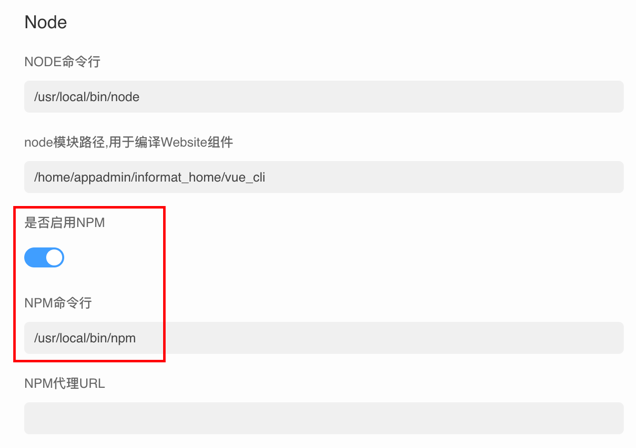
- Enable NPM configuration in enterprise background management
Enable NPM configuration in enterprise background management
Configuration path: System Information => Parameter Settings
- Create a package.json file in the script root directory to manage dependent packages
{
  "dependencies": {
    "crypto-js": "4.1.1"
  }
}- Use the require method to reference packages in scripts
Informat's support for npm packages is not yet complete. If a package references Node.js built-in libraries such as fs and events, these packages cannot run normally. Additionally, npm packages do not support importing using the import syntax.
Using Java Objects
You can use Java objects in scripts. The following documentation shows you how to achieve interoperability with Java and possible JavaScript to Java embedding scenarios.
Class Access
To access Java classes, the script engine supports the following Java.type(typeName) function:
var FileClass = Java.type("java.io.File");By default, Java classes are not automatically mapped to global variables, for example, there is no global java property in the script engine. Existing access code like java.io.File should be rewritten to use the Java.type(name) function:
//script engine compliant syntax
var FileClass = Java.type("java.io.File");Constructing Java Objects
Java objects can be constructed with JavaScript's new keyword:
var FileClass = Java.type("java.io.File");
var file = new FileClass("myFile.md");Field and Method Access
Static fields of Java classes or fields of Java objects can be accessed like JavaScript properties:
var JavaPI = Java.type("java.lang.Math").PI;Java methods can be called like JavaScript functions:
var file = new (Java.type("java.io.File"))("test.md");
var fileName = file.getName();Method Parameter Conversion
JavaScript is defined to operate on double numeric types. For performance reasons, the script engine may internally use other Java data types (e.g., int).
When calling Java methods, value conversion may be required. This happens when a Java method expects a long parameter and an int is provided by the script engine. If this conversion results in a lossy conversion, a TypeError is thrown:
//Java
void longArg   (long arg1);
void doubleArg (double arg2);
void intArg (int arg3);//JavaScript
javaObject.longArg(1); //widening, OK
javaObject.doubleArg(1); //widening, OK
javaObject.intArg(1); //match, OK
javaObject.longArg(1.1); //lossy conversion, TypeError!
javaObject.doubleArg(1.1); //match, OK
javaObject.intArg(1.1); //lossy conversion, TypeError!Method Selection
Java allows method overloading by parameter types. When calling from JavaScript to Java, the method with the narrowest available type that the actual parameter can be converted to without loss is selected:
//Java
void foo(int arg);
void foo(short arg);
void foo(double arg);
void foo(long arg);//JavaScript
javaObject.foo(1); // will call foo(short);
javaObject.foo(Math.pow(2, 16)); // will call foo(int);
javaObject.foo(1.1); // will call foo(double);
javaObject.foo(Math.pow(2, 32)); // will call foo(long);To override this behavior, you can use the javaObject['methodName(paramTypes)'] syntax to select an explicit method overload. Parameter types need to be comma-separated without spaces, and object types need to be fully qualified (e.g., 'get(java.lang.String,java.lang.String[])').
javaObject["foo(int)"](1);
javaObject["foo(long)"](1);
javaObject["foo(double)"](1);Note that parameter values must still fit the parameter types. You can use custom target type mapping to override this behavior.
Explicit method selection is also useful when method overloading is ambiguous and cannot be automatically resolved, as well as when you want to override the default selection:
//Java
void sort(`List<Object>` array, Comparator<Object> callback);
void sort(`List<Integer>` array, IntBinaryOperator callback);
void consumeArray(`List<Object>` array);
void consumeArray(Object[] array);//JavaScript
var array = [3, 13, 3, 7];
var compare = (x, y) => (x < y ? -1 : x == y ? 0 : 1);
// throws TypeError: Multiple applicable overloads found
javaObject.sort(array, compare);
// explicitly select sort(List, Comparator)
javaObject["sort(java.util.List,java.util.Comparator)"](array, compare);
// will call consumeArray(List)
javaObject.consumeArray(array);
// explicitly select consumeArray(Object[])
javaObject["consumeArray(java.lang.Object[])"](array);Note that it is currently not possible to explicitly select constructor overloads.
Array Access
The script engine supports creating Java arrays from JavaScript code. Two patterns are supported:
//pattern 1
var JArray = Java.type("java.lang.reflect.Array");
var JString = Java.type("java.lang.String");
var sarr = JArray.newInstance(JString, 5);

//pattern 2
var IntArray = Java.type("int[]");
var iarr = new IntArray(5);Created arrays are Java types but can be used in JavaScript code:
iarr[0] = iarr[iarr.length] * 2;Map Access
In the script engine, you can create and access Java Maps, such as java.util.HashMap:
var HashMap = Java.type("java.util.HashMap");
var map = new HashMap();
map.put(1, "a");
map.get(1);The script engine supports iterating over such maps:
for (var key in map) {
  print(key);
  print(map.get(key));
}List Access
In the script engine, you can create and access Java Lists, such as java.util.ArrayList:
var ArrayList = Java.type("java.util.ArrayList");
var list = new ArrayList();
list.add(42);
list.add("23");
list.add({});

for (var idx in list) {
  print(idx);
  print(list.get(idx));
}String Access
The script engine can create Java strings with Java interoperability. The length of the string can be queried via the length property (note that length is a value property and cannot be called as a function):
var javaString = new (Java.type("java.lang.String"))("Java");
javaString.length === 4;Note that the script engine internally uses Java strings to represent JavaScript strings, so the code above and the JavaScript string literal "Java" are actually indistinguishable.
Iterating Properties
Properties (fields and methods) of Java classes and Java objects can be iterated using JavaScript for..in loops:
var m = Java.type("java.lang.Math");
for (var i in m) {
  print(i);
}
// > E
// > PI
// > abs
// > sin
// > ...Complete Example of Using Java Objects in Scripts
//Call Java graphics to draw a rectangular image and return the base64 encoded image
export function createImage() {
  let width = 100;
  let height = 100;
  var BufferedImage = Java.type("java.awt.image.BufferedImage");
  var ByteArrayOutputStream = Java.type("java.io.ByteArrayOutputStream");
  var ImageIO = Java.type("javax.imageio.ImageIO");
  var Base64 = Java.type("java.util.Base64");
  var Color = Java.type("java.awt.Color");
  //
  var image = new BufferedImage(100, 100, BufferedImage.TYPE_INT_BGR);
  var graphics = image.getGraphics();
  graphics.setColor(new Color(255, 0, 0));
  graphics.fillRect(1, 1, width - 1, height - 1);
  var os = new ByteArrayOutputStream();
  ImageIO.write(image, "jpg", os);
  let content = os.toByteArray();
  let base64 = Base64.getEncoder().encodeToString(content);
  return base64;
}Notes
- When referencing file dependencies, the
.jssuffix must be included
- When referencing file dependencies, the
- It is recommended to use relative paths when referencing dependencies, so that there is no need to modify existing development content if
npmsupport is used later
- It is recommended to use relative paths when referencing dependencies, so that there is no need to modify existing development content if
Supplementary Instructions
When developing scripts with VsCode or WebStorm, download https://ai.ainformat.com//types/informat.d.ts to obtain the function description file to resolve code error issues.
When syncing with git, hidden files starting with
.will not be synchronized.After importing the downloaded informat.d.ts into the editor, if you still receive informat call errors, you can create an empty jsconfig.json file in the project root directory and restart the editor. The file content should be an empty object as follows:
json{}