

Application Upgrade and Installation
Installation Process
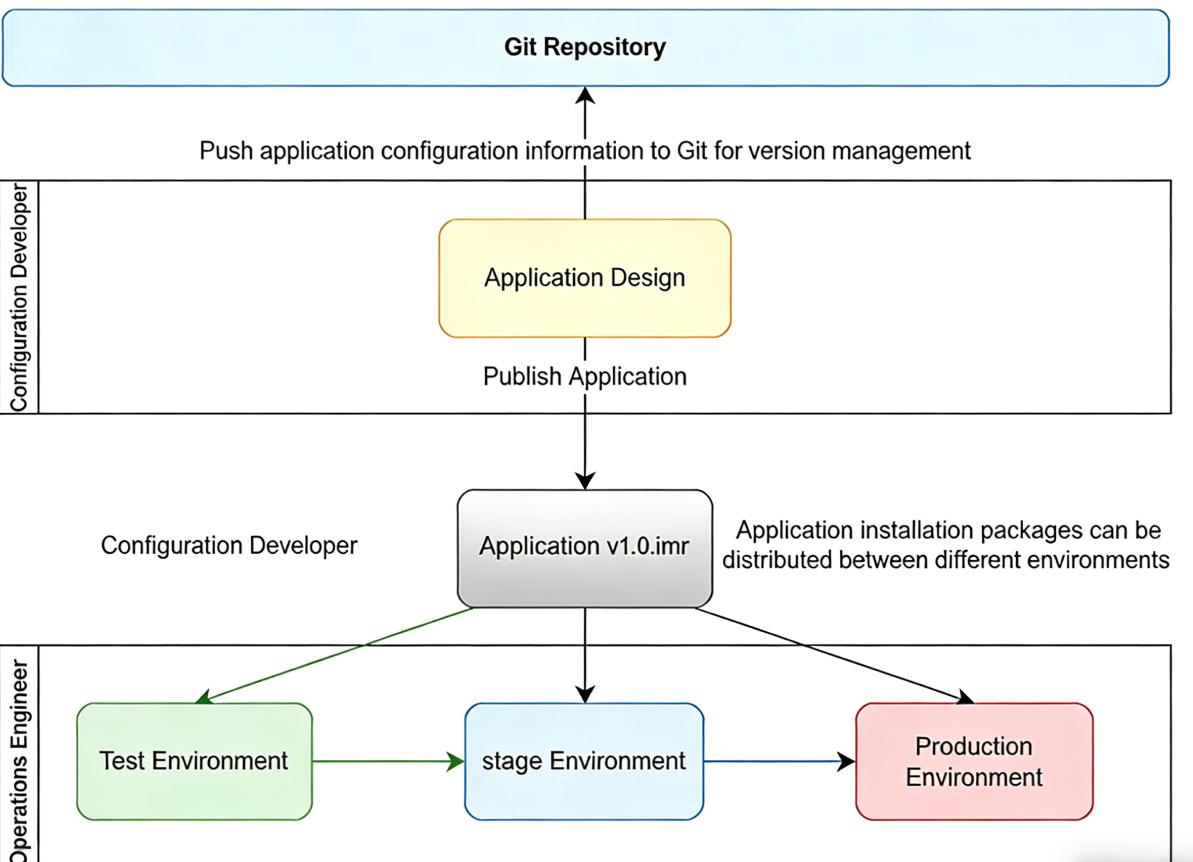
After completing the application design in the application designer, you need to export the application as an imr (InforMat aRchive) installation file. The imr installation file contains all the application's configuration items, such as data table structures, automation rules, scripts, and controls. By distributing the imr file across different environments, you can deploy it in various environments (such as development, testing, pre-production, and production environments).
A typical installation and deployment process is as follows:
- Export imr file: After completing the application design, export the application's imr file.
- Distribute imr file: Distribute the imr file to the target environment (such as a testing environment).
- Import imr file: Import the imr file in the target environment to complete the application deployment.
To ensure data security, we strongly recommend backing up the imr file and storing it in a repository each time you release to the production environment.
Execution Process
During the application installation and upgrade process, the system automatically analyzes the differences between the current version and the upgrade version, and converts these differences into execution actions. The following are possible execution actions:
- Configuration file update: The system updates data table style settings, automation rules, scripts, and controls according to the configuration items of the new version.
- Database changes: The system makes corresponding database adjustments based on the data table structure of the new version, such as creating new data tables, adding, modifying, or deleting fields, creating database views, and creating indexes.
- Message queue changes: The system makes corresponding adjustments based on the message queue configuration of the new version, such as creating or modifying message queues.
- BPMN changes: The system makes corresponding adjustments based on the BPMN process configuration of the new version, such as adding, modifying, or deleting BPMN processes.
Note
Please note that database changes may take a long time, especially when there is a large amount of data in the existing system. Operations such as changing fields or adding indexes to data tables may take a long time. To reduce the impact on users, we recommend stopping user access to the system during deployment.
INFO
During the application release process, all operations from the user side will be rejected
Given the uncertainty of the execution time, we strongly recommend making a reasonable time plan when releasing a version. Pause user access before release and publish an announcement to notify users of the release plan. After the release is complete, restore user access to the system.
Backup of Production Systems
Due to uncertainties during the release process, especially potential data conversion operations, to ensure the stability of production systems, we strongly recommend taking the following backup measures before each production system release:
- Full database backup: Perform a full database backup before release. This includes all data tables, stored procedures, triggers, views, etc. Ensure that the database can be quickly restored to the pre-release state in case of problems.
- Full shared storage backup: Backup files in shared storage. This helps with version rollback in case of problems.
If version rollback is needed during the release process, you can restore to the pre-release state using the backed-up data and files:
- Restore database: Restore the database snapshot backed up before release to the target environment. This ensures data security and avoids potential data loss during the release process.
- Restore shared storage: Restore the shared storage files backed up before release.
For environments using virtualization technology, we recommend taking disk snapshots, which can be restored when needed.
After the release is complete, please conduct comprehensive testing on the new version to ensure its functionality and performance meet expectations. If issues are found during testing, please communicate with the development team in a timely manner for prompt fixes. After a successful release, restore user access to the system and publish an announcement to inform users of the release result. At the same time, closely monitor system operation status and user feedback to promptly resolve any potential issues.
Archive Application
In the application management interface, you can set the application status to Archived. Archived applications will not be displayed in the application list. For applications that are temporarily offline, setting the status to Archived can temporarily prevent user access.
Maintenance Status
In the application management interface, you can set the application status to Under Maintenance. When users access an application that is Under Maintenance, a maintenance status notification will be displayed.