

Basic Concepts of Applications
What is an Application
In the low-code platform, an Application is an independent entity that contains a set of functional modules and data resources to implement specific business requirements. An application can be regarded as a complete software system through which users can complete specific business processes and operations.
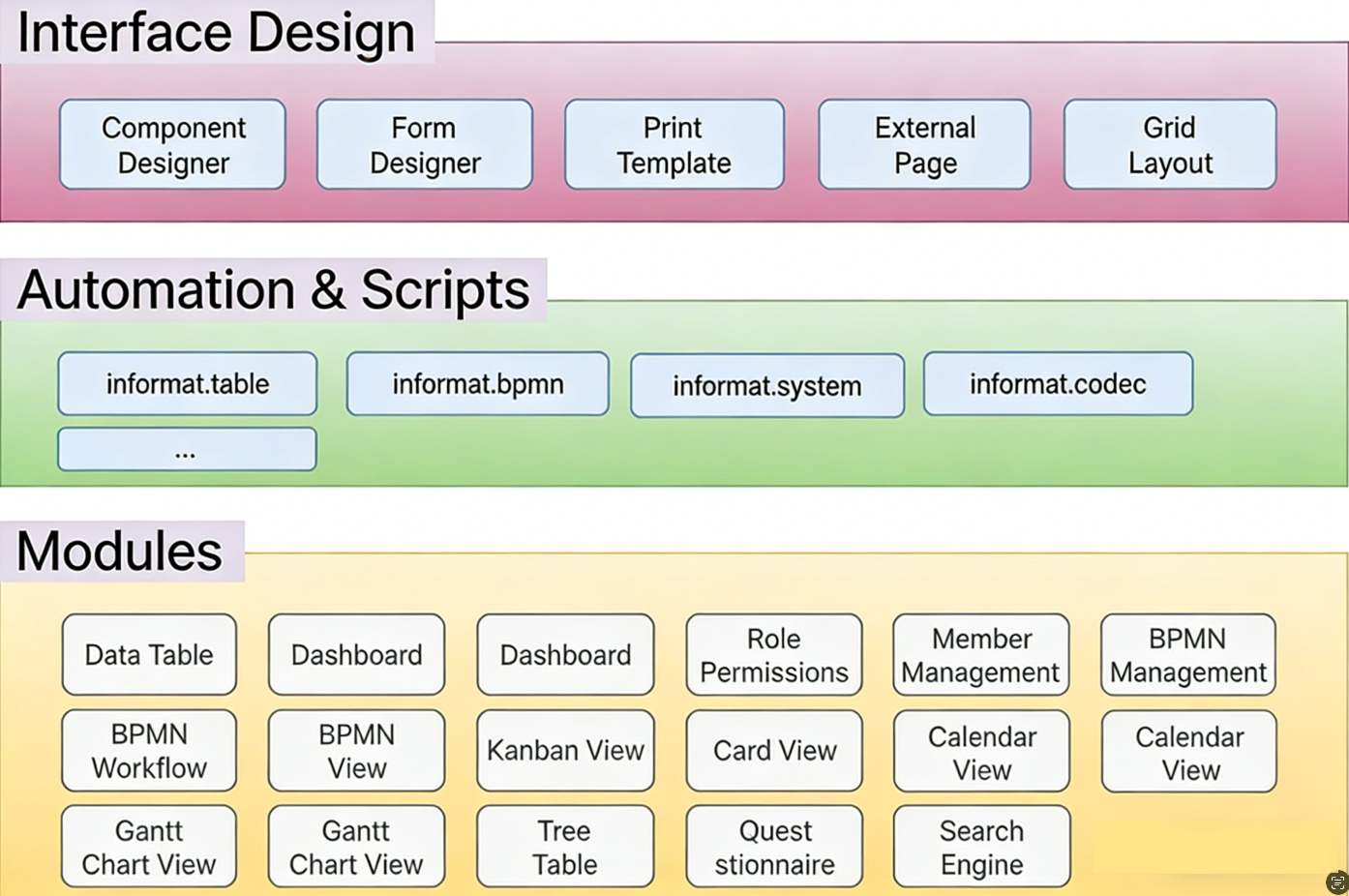
An application usually consists of the following parts:
Module:
- A module is a functional unit of an application, where each module implements specific functions or business logic. For example, customer management modules, order processing modules, etc.
- Modules can be data tables, interfaces, dashboards, forms, etc.
Interface:
- Interfaces are windows for users to interact with applications, including forms, lists, dashboards, etc. Users can view and operate data through interfaces.
- Interfaces can be quickly built by dragging components and configuring properties through the component designer.
Automation & Script:
- Automation is used to implement automated processing of business processes, such as scheduled tasks, event triggers, etc.
- Automation can implement complex business scenarios through configured steps and conditions.
Application Lifecycle
Create Application:
- Users can quickly create a new application through the wizard or template provided by the low-code platform.
- During the creation process, you can select the required modules, data tables, and interfaces.
Configure Application:
- After creating an application, you can further configure detailed information about the application, including module settings, data table fields, interface layouts, etc.
- Quick configuration can be achieved by dragging components and configuring properties.
Publish Application:
- After configuration is complete, you can publish the application for end users to use.
- After publishing, users can access the application through its URL or use it on mobile devices.
Maintain and Update Application:
- After an application is published, it may need maintenance and updates to adapt to changes in business requirements.
- The low-code platform provides a convenient update mechanism for quick modifications and publishing.
Application Designer Interface
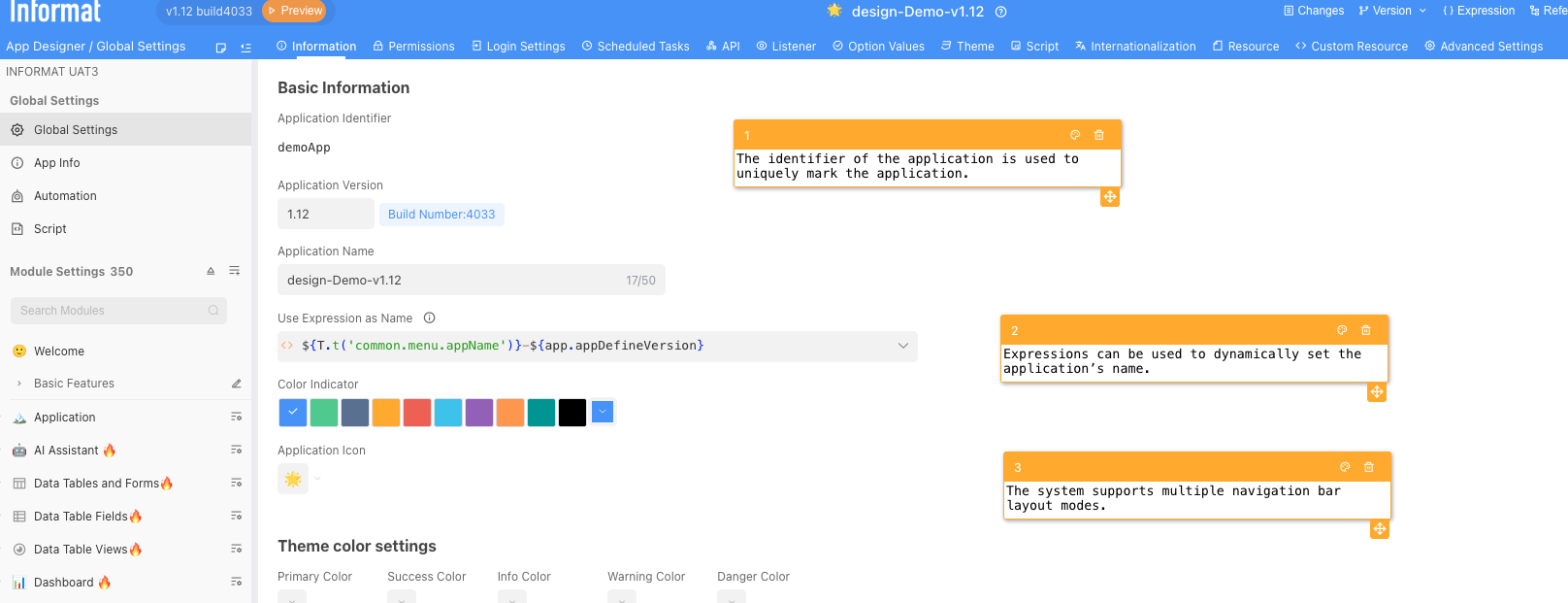
The Informat AI Low-Code Platform Application Designer page is a powerful tool that allows users to design and configure applications without writing a lot of code. Here is a detailed introduction to each part of the page:
Left Navigation Bar The left navigation bar provides quick access to various modules and settings of the application. It mainly includes the following parts:
- Global Settings: Set global configurations for the entire application.
- Application Information: View and edit basic information about the current application.
- Automation: Configure automated processes for the application.
- Script: Configure scripts for the application.
- Module Settings: Manage and configure various modules in the application.
Top Function Menu The top function menu provides quick access to various functions of the application designer. It mainly includes the following functions:
- Version Management: Manage and publish application versions.
- References: View and manage references in the application.
- Logs: View operation logs of the application.
- Models: Quickly view model information.
Real-time Logs
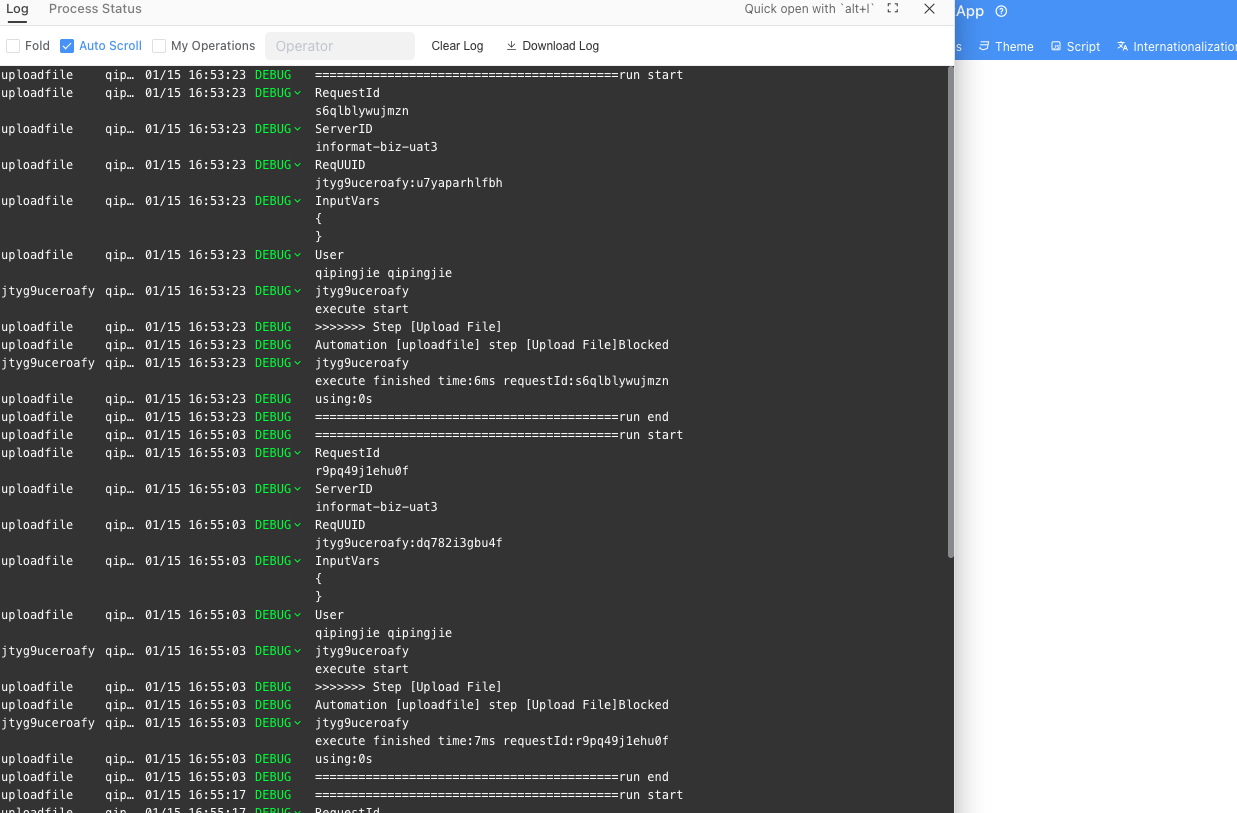
During application configuration, you can view application logs through the log window, and you can view currently running scripts, scheduled tasks, automation, APIs, etc. on the Running Status page. You can manually terminate running code.
Log Levels
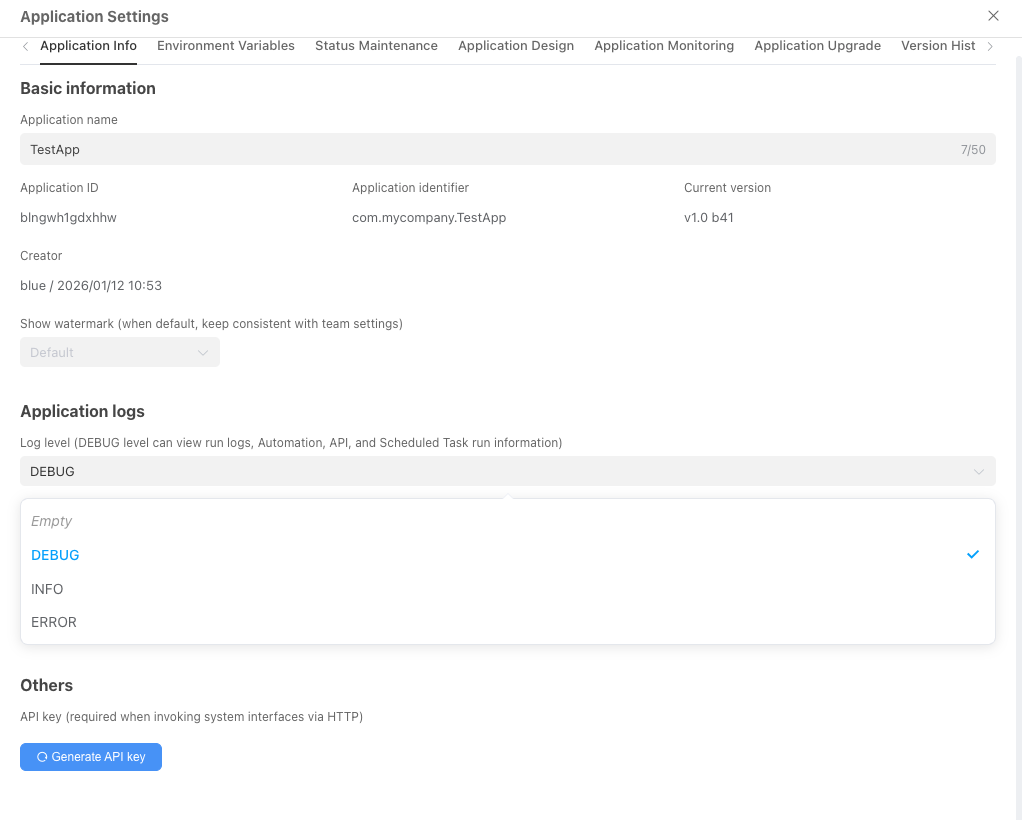
The log level of an application can be modified in the Workbench - Application Management - Application Settings interface. In the development environment, it is recommended to set the log level to DEBUG to facilitate debugging and development. In the production environment, it is recommended to set the log level to ERROR to improve performance.
Log Limitations
In the Informat Designer, you can view log information during the current application running process through the real-time log window. Real-time logs only record the latest 1000 log entries, and you can debug low-code applications through real-time logs during the application design process.
For performance considerations, the maximum size of a single log entry output in real-time logs is 10k. Exceeding parts will be truncated. If truncation occurs, you can view detailed log information in the log files.
Log Files
For each application, Informat also uses the file system to record historical log information. By default, the log system records logs separately for each application, generating two log files per day, and the system retains log files for the last 15 days. The switch for log files is configured in application settings:
- Output logs to files (text)
- Output logs to files (JSON)
Log files are stored in the Informat installation directory, with the storage path:
INFORMAT_HOME/applog/${appId}/app.log
INFORMAT_HOME/applog/${appId}/app_json.logThe format of log files is as follows:
[DATE][LEVEL][THREAD][APPID][REQUESTID][CONTEXT] MESSAGEDATEformat is yyyy-MM-dd HH:mm:ss:SSSLEVELoptional values are DEBUG, INFO, WARNING, ERRORTHREADis the identifier of the current threadAPPIDis the identifier of the applicationREQUESTIDis the unique identifier for the current call, formatted as a 13-digit random numberCONTEXTis the identifier of the current automation, script, or scheduled taskMESSAGErecords the detailed content of this log entry
Below is an example of text log content:
[2023-03-10 15:21:09.595] [INFO ] [82-exec-1] [product] [rstn9gikaxp0v] [automatic-console] execute start
[2023-03-10 15:21:09.598] [DEBUG] [82-exec-1] [product] [rstn9gikaxp0v] [automatic-console] {"age":20}
[2023-03-10 15:21:09.599] [INFO ] [82-exec-1] [product] [rstn9gikaxp0v] [automatic-console] execute finished time:5ms
[2023-03-10 15:37:32.676] [INFO ] [82-exec-2] [product] [zqqa5fxc26zon] [automatic-console] execute start
[2023-03-10 15:37:32.682] [DEBUG] [82-exec-2] [product] [zqqa5fxc26zon] [automatic-console] {"age":20}
[2023-03-10 15:37:32.687] [INFO ] [82-exec-2] [product] [zqqa5fxc26zon] [automatic-console] execute finished time:11msBelow is an example of JSON log content:
{"timestamp":"2023-03-10T07:21:09.595Z","level":"INFO","thread":"http-nio-8882-exec-1","mdc":{"context":"automatic-console","requestId":"rstn9gikaxp0v","appId":"croe0zft168y3","appDefineId":"product"},"message":"\"execute start\""}
{"timestamp":"2023-03-10T07:21:09.598Z","level":"DEBUG","thread":"http-nio-8882-exec-1","mdc":{"context":"automatic-console","requestId":"rstn9gikaxp0v","appId":"croe0zft168y3","appDefineId":"product"},"message":"{\"age\":20}"}
{"timestamp":"2023-03-10T07:21:09.599Z","level":"INFO","thread":"http-nio-8882-exec-1","mdc":{"context":"automatic-console","requestId":"rstn9gikaxp0v","appId":"croe0zft168y3","appDefineId":"product"},"message":"\"execute finished time:5ms\""}Data Analysis and Mining
Log files can be used for log data collection, integration, analysis, and visualization. Informat does not provide these functions. We recommend using mature log analysis frameworks such as ELK, Splunk, etc. to send Informat application logs to such systems for analysis.
Version Management
Version management is a feature implemented based on git. You can push local application configuration files and resource files to a remote repository for management, and you can pull application configuration files from the repository in different environments to achieve quick version switching. This feature provides your development team with an efficient and secure way to manage changes to application configuration files.
Benefits of Version Management
Efficient version control: By using
git-based version management tools, you can easily track, manage, and control versions of configuration files. Each change to the configuration file can be recorded as a commit, allowing developers to understand the purpose and content of each change.Timely defect repair: When defects or errors appear in your program's configuration files, you can quickly roll back to a previous version and make repairs. By viewing the commit history, you can find the specific commit that introduced the issue and restore the code in the remote repository to the state before that commit. This way, you can quickly fix problems and push the repaired version back to the remote repository to ensure the stability and correctness of configuration files.
Branch management and merging: Through branches, you can develop different functions in parallel or make experimental changes without affecting the main configuration files. You can create new branches to try out new features without breaking the existing stable version. Once feature development is complete, you can merge the branch back to the main branch to ensure the overall consistency of configuration files.
Secure backup and recovery: Pushing configuration files to a remote repository achieves secure backup of configuration files. Even if the local machine is damaged or lost, you can still recover the latest version of configuration files from the remote repository. This provides you with a reliable way to protect your configuration files from data loss risks.
Platform Version
When the Platform Version is lower than the platform version required by the application, you need to enable the Allow platform version lower than application version option when pulling files from the remote repository.
Pushed Directory Structure
Files pushed to the remote repository are divided into three parts: App, Module, and package.json. The specific file structure is as follows:
App/
    1. Automation configuration
    2. Resource files
    3. Global settings such as role permissions, scheduled tasks, APIs, etc.
Module/
    1. Configuration files for each module
    2. Files for resource and component designer modules
package.json Application version, identifier, and other informationPlatform Version
The git version used must be 2.3.0 or higher. The recommended git version is 2.39.0.
If you encounter issues with git not connecting to the remote repository when using version management tools, please use the ssh command to connect to the remote repository. It is recommended to execute the git config --global diff.renames false command on the git server (such as GitLab) to ensure that the git server does not compare two completely different files when comparing version differences.
URL Format
In applications, you can use the following URL format to access pages in the application:
https://ai.ainformat.com//app/${appId}/${moduleType}/${moduleId}appIdis the unique ID of the application, automatically generated by the system after installing the application. It is worth noting thatappIdis globally unique - even for the same application, theappIdwill be different in different teams.moduleTypeis the module type identifier of the applicationmoduleIdis the module ID of the application, which can be viewed through the module information page
Global URL Parameters
If you want to hide the navigation bar, you can add the nonav=true parameter to the address. This makes it easy to embed Informat pages into other systems.