AI Assistant
Overview
The AI Assistant integrates multiple large language models, allowing for quick switching and use of different language models through simple configuration. While fully leveraging the advantages of large language models, the AI Assistant also supports deep interaction with the system through custom plugins, enabling more complex and practical assistants that fit actual usage scenarios.
AI Agent
The automation process includes steps to call the AI Assistant. Combining automation with the AI Assistant can achieve complex AI Agents
Configuration
Basic Settings
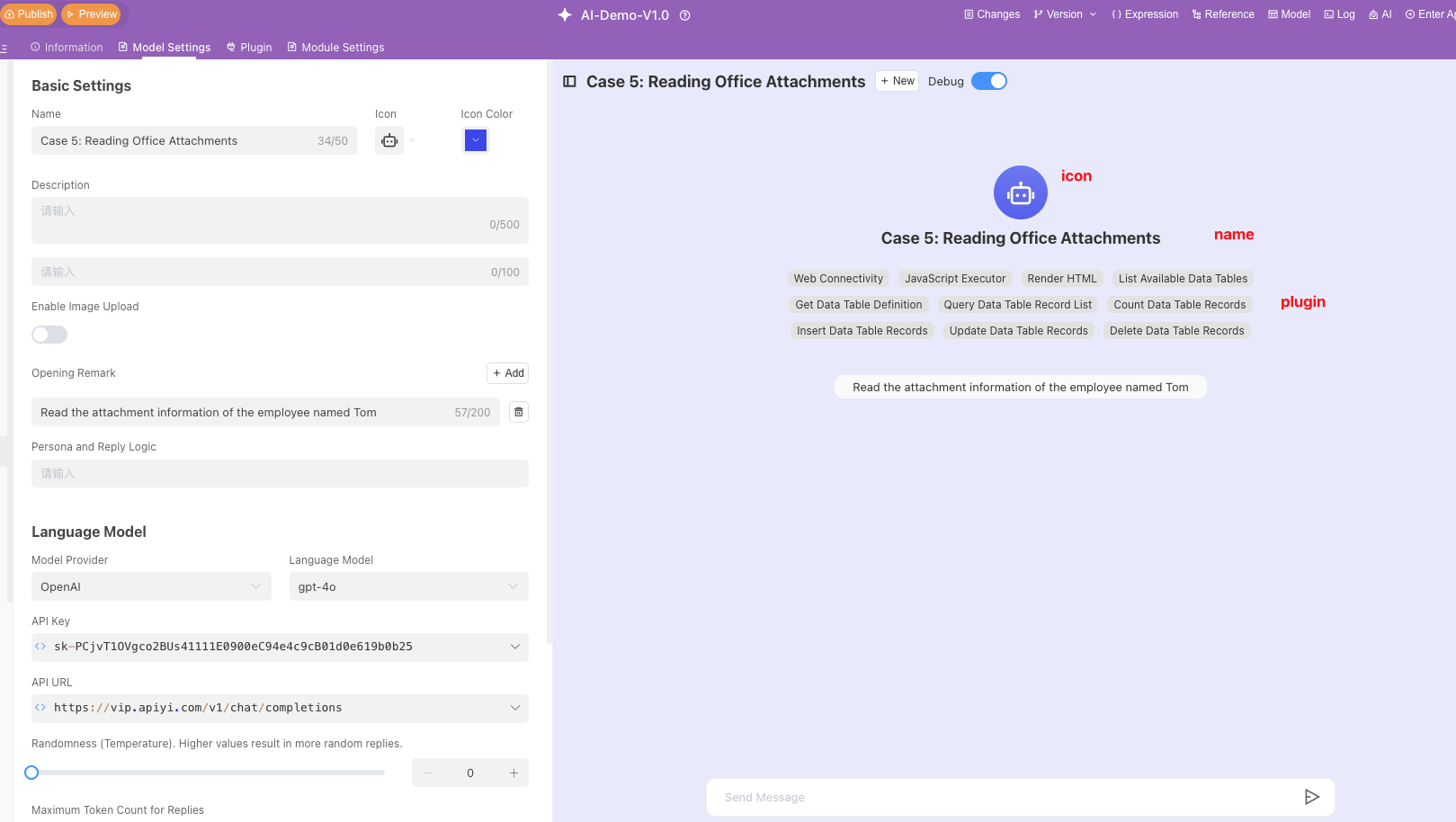
On the Basic Settings page, you can name the AI Assistant, select an icon and icon color, and write a description.
- Name: Set the name of the AI Assistant. For example: "GPT"
- Icon: Choose an icon to represent your AI Assistant.
- Icon Color: Select the background color of the icon to distinguish between different models.
- Description: Briefly describe the functions and purpose of the AI Assistant. For example: "I am a large language model developed by OpenAI, and I can help you answer questions."
Scenario Guidance Questions
You can preset common questions and language model response strategies to help users quickly understand and use the model.
- Input Box Placeholder: Enter placeholder text, for example: "Enter your question"
- Add Question: Click the "Add" button to add common questions and their brief descriptions. For example:
- "How to plan life" (6/200 characters)
- "Help me write a job resume" (9/200 characters)
Q&A Logic Settings
In the Persona and Response Logic settings, you can set the model's response strategy.
For example: "You are an office assistant and need to answer questions based on user queries. When users ask questions that require you to think, think step by step, and then call external tools after you have clarified your thoughts."
In this way, the AI Assistant will, based on the set [Persona and Response Logic], act as an office assistant, think multiple times before calling external tools.
Writing Suggestions
To ensure a better experience with the AI Assistant, it is recommended to include the following content when writing prompts:
- Define Persona: Describe the role or responsibilities of the AI Assistant and its response style.
Example: You are a project management assistant and need to answer user questions accurately. - Describe Functions and Workflow: Describe the functions and workflow of the AI Assistant, specifying how the AI Assistant should answer user questions in different scenarios.
Example:When users query tasks by number, call the "get_task_by_code" tool to query the task.
Although the AI Assistant will automatically select plugins based on the prompt content, it is still recommended to emphasize in natural language in which scenarios and which tools to call to enhance the binding force on the AI Assistant, select more expected plugins to ensure response accuracy.
Example:When users ask about the latest unfinished tasks of ongoing projects, call "get_projects" to search for ongoing projects, then call "get_tasks" to query the unfinished tasks of ongoing projects, and finally organize all data for the user.
Additionally, you can provide examples of response formats for the AI Assistant. The AI Assistant will imitate the provided response format to reply to users.
Example:
Please respond according to the following format:
**Task Name**
Start Time: yyyy-MM-dd hh:mm
End Time: yyyy-MM-dd hh:mm
Task Description: Task description within 20 characters- Instruct AI Assistant to Answer Within Specified Range: If you want to limit the response range, directly tell the AI Assistant what should be answered and what should not be answered.
Example:Refuse to answer topics unrelated to project management; if no results are found, tell users that you did not find relevant data instead of fabricating content.
Language Model Settings
In this section, you can select the language model provider and specific model version, as well as configure model parameters.
| Setting Item | Description |
|---|---|
| Model Provider | Select or input the model provider, such as OpenAI |
| Language Model | Select or input the specific language model, such as gpt-4-turbo |
| API Key | API Key required to call the model interface |
| API Address | Select the address of the language model API, such as https://api.openai.com/v1/chat/completions |
| Randomness | A value between 0-2. The higher the Temperature value, the more random the response; the lower the value, the less randomness and the more certain the result. When the value approaches zero, the model becomes deterministic and repetitive. |
| Maximum Token Count for Response | 0 means unlimited. The maximum number of tokens generated by the prompt and response together. Different models have different token limits. Specifying the maximum length can prevent overly long or irrelevant responses and control costs. |
| Topic Freshness | The larger the presence_penalty value, the more likely it is to expand to new topics |
| Frequency Penalty | The larger the frequency_penalty value, the more likely it is to reduce repeated words |
| Number of Dialogue Turns Carried | The number of context messages the model can remember for each query |
Supported Models List
| Model Name | Official Documentation Address | API Key Application Address |
|---|---|---|
| DeepSeek | https://deepseek.com/ | https://platform.deepseek.com/api_keys |
| VolcEngine Ark Model | https://www.volcengine.com/ | https://console.volcengine.com/ark/region:ark+cn-beijing/apiKey |
| Tongyi Qianwen | https://tongyi.aliyun.com/ | https://bailian.console.aliyun.com/?spm=5176.29619931.J_SEsSjsNv72yRuRFS2VknO.2.74cd10d7DbAknf&tab=app#/api-key |
| Zhipu ChatGLM | https://chatglm.cn/ | https://chatglm.cn/developersPanel/apiSet |
| Ollama Local Model | https://ollama.com/ | - |
| OpenAI | https://openai.com/ | https://platform.openai.com/account/api-keys |
| Claude | https://claude.ai/ | https://console.anthropic.com/account/api-keys |
How to Define Plugins
If the language model is the brain of AI, then plugins are equivalent to AI organs, providing AI with more input or output capabilities. Informat provides one-click system plugins for the AI Assistant, giving it basic capabilities. It also provides custom plugins for designers to create richer and more diversified AI capabilities.
Plugin Definition
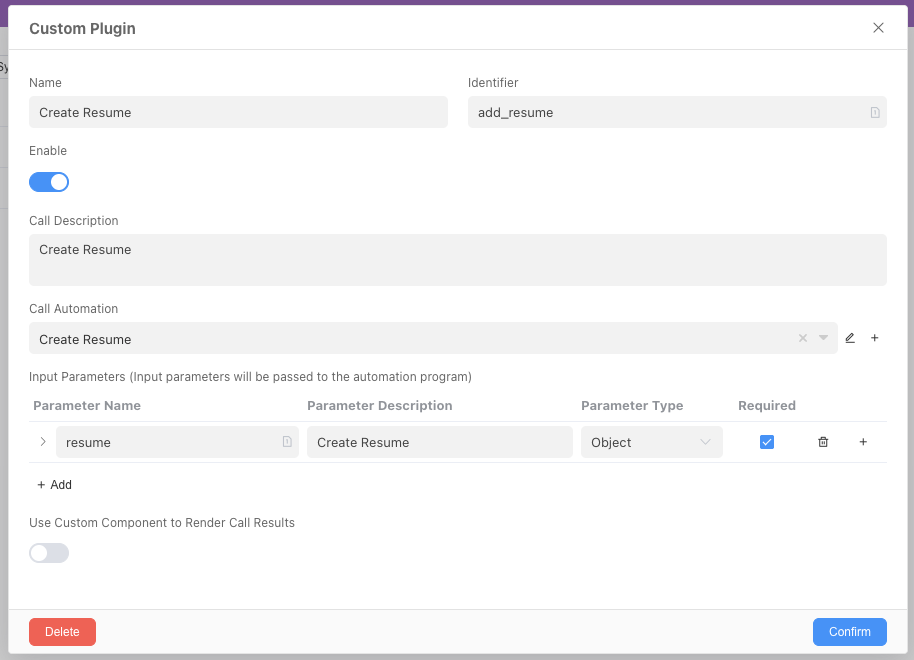
- Name: The name of the plugin.
- Identifier: The unique identifier of the plugin.
- Enabled: Control whether the plugin is enabled in the AI Assistant.
- Call Instructions: Description of the plugin's functions.
- Call Automation: The automation executed when the AI Assistant calls the plugin.
System Plugins
System plugins provide the AI Assistant with the ability to deeply interact with the system, implementing core functions such as time retrieval and data operations. The specific plugin list is as follows:
| Name | Identifier | Call Instructions |
|---|---|---|
| Get Current Time | _get_current_time | Get current time, AI model needs to call this method before query |
| Query Available Data Tables | _query_all_table_list | Get the list and basic information of all data tables in the current application |
| Query Specified Data Table Configuration | _query_table_define | Get the complete structure definition of the specified data table (including all field information) |
| Query Data Table Record List | _query_table_record_list | Query data table records by condition, supporting filtering, pagination, sorting, etc. |
| Query Data Table Record List Count | _query_table_record_list_count | Count the number of data table records that meet the conditions |
| Send System Email | _send_system_email | Use system email to send emails |
| Query Application Member Account Basic Information | _query_app_user_list | Get member account basic information (including account ID, email, etc.) |
| Internet Access Capability | _web_content | Get web page content through URL, allowing access to network resources |
| Code Executor | _javascript_eval | Execute JavaScript code, suitable for complex calculations and data processing |
| Render HTML | -render_html | Render HTML code as a visual interface, supporting interactive content display |
| Insert Specified Data Table Records | _table_record_batch_insert | Batch insert records into the specified data table |
| Edit Specified Data Table Records | _table_record_batch_update | Modify record content in the specified data table |
| Delete Specified Data Table Records | _table_record_batch_delete | Delete records in the specified data table according to conditions |
| Query All Search Engine Modules | _query_all_textindex_list | Get all search engine module information (including data source configuration) |
| Call Search Engine to Search and Retrieve Data | _textindex_search | Call the search engine to perform data retrieval operations |
| Send Notification | _send_notification | Call script to send notifications to web, WeCom, DingTalk, Feishu and other platforms |
| Read Office Files | _read_office_file | Support reading content from PDF and Word files |
| Generate Informat Script | _generation_informat_script | Generate Informat script based on context |
| Query Informat Script File List | _query_informat_script_list | Get the list of Informat script files |
| Query Specified Informat Script File Content | _query_informat_script_content | Get script content by script ID |
| Execute Informat Script | _execute_informat_script | Execute Informat script by script ID and function name |
| Query Designer Data Table Definition | _designer_query_table_define | Query data table definition in unpublished applications |
| Create Data Table Module | _create_table_module | Create data table module, supporting creation of related records and related record fields |
Custom Plugins
Call Automation
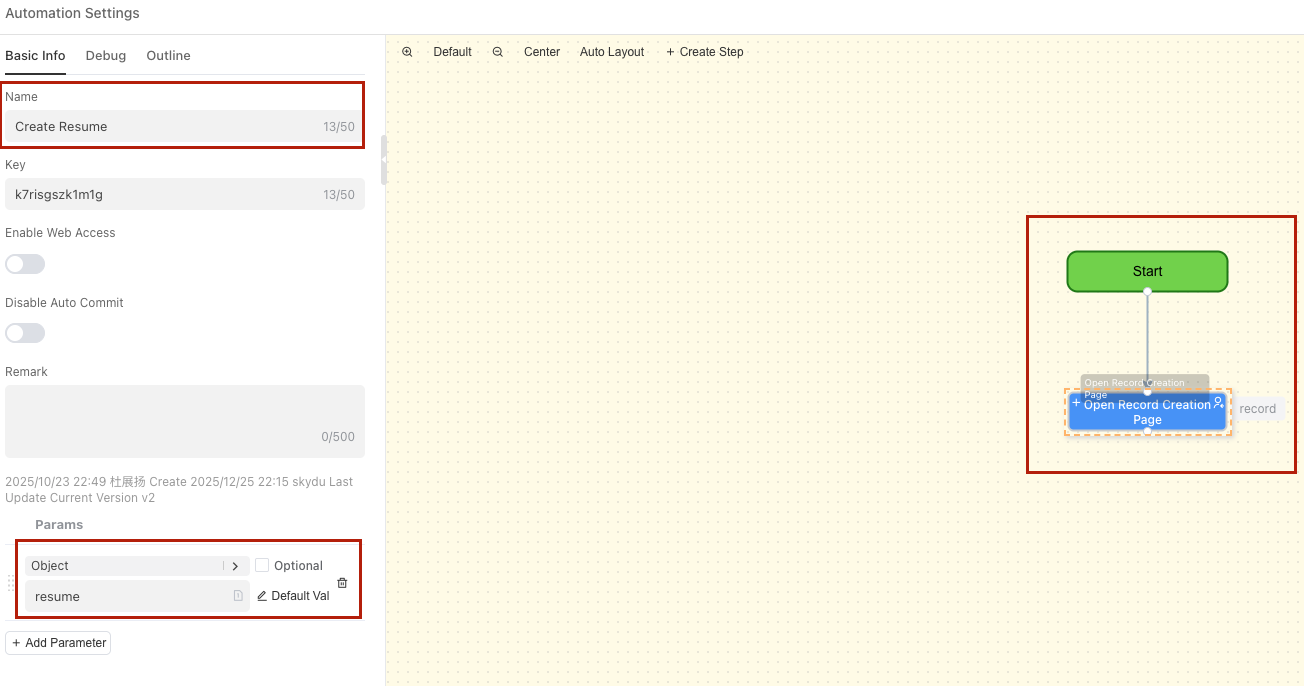
When a custom plugin is called, it will execute a preset automation process to meet personalized needs.
Plugin Definition Example
Suppose you want to define a plugin to help create tasks, the definition is as follows:
- Plugin Definition
- Called Automation
Enable MCP Server Service
One-click deployment as MCP Server, supporting cross-model call empowerment
MCP Server Address: ${host}/web0/aiagent/${appId}/${moduleId}/event
X-INFORMAT-APIKEY: Supports default application apiKey and custom apiKey
Example: TRAE Add Mcp
AI Assistant Debugging
During the construction of the AI Assistant, you need to continuously optimize and iterate prompts based on the actual performance of the AI Assistant to achieve the expected experience.
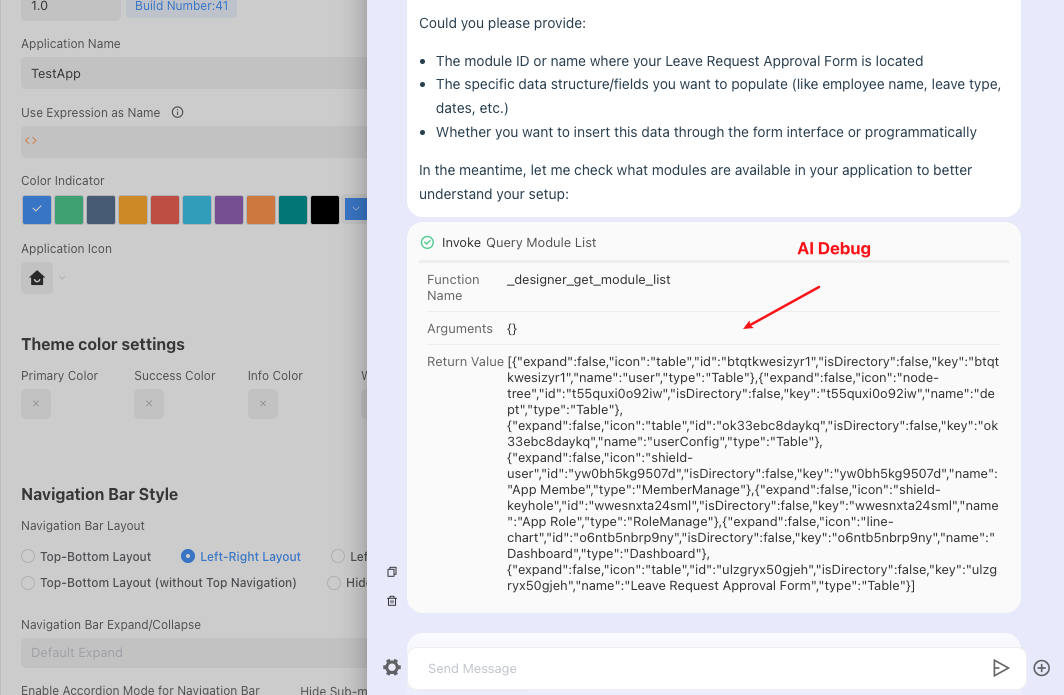
In the Preview and Debug area, test the actual performance of the Bot. If it does not meet expectations, analyze the reasons according to the Bot's goals and continuously adjust and optimize the response logic.