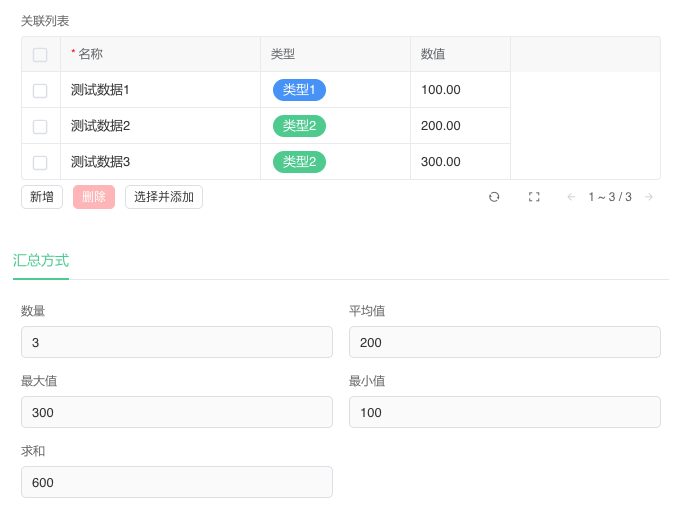
Relation Rollup
Relation Rollup uses aggregate functions Count, Sum, Average, Maximum, Minimum to calculate values from specific fields in a Relation List.
Description
| Item | Content |
|---|---|
| Category | Association Relationships |
| Sortable | Yes |
| Filterable | Yes |
| Supported Filter Types | Equal, Not Equal, Is Empty, Is Not Empty, Less Than, Greater Than, Less Than or Equal, Greater Than or Equal, In Range, Not In Range |
Settings
| Setting | Description |
|---|---|
| Relation List Field | Select a [Relation List] field in the current table for data aggregation |
| Aggregation Method | Set the aggregation method. Options: Count, Sum, Maximum, Minimum, Average |
| Aggregation Field | Select a field from the relation list for aggregation. This configuration item is not displayed when the aggregation method is Sum Available field types: Integer, Decimal, Rating, Function, Relation Rollup, Lookup Rollup |
| Formatting Prefix | Set a prefix for the field |
| Formatting Suffix | Set a suffix for the field |
| Precision | Set the display precision for the aggregation result. Options: Integer Only, 0.1, 0.01, 0.001, 0.0001, 0.00001 |
| Display Style | Set the display style for integers. Options: Number, Currency, Progress Bar |
Storage Format in Database
| Field Type | Description |
|---|---|
| float8 | Double-precision floating-point number (8 bytes) |
Aggregation Principle
Calculations for Relation Rollup are triggered by changes in records within the Relation List. Recalculation occurs when records are added to or deleted from the Relation List, or when the value of the aggregated attribute in records within the Relation List is modified.
Display Effect