

Function
You can use functions to combine other fields to calculate a result. Function fields are not actually stored, and results are dynamically calculated at runtime.
Description
| Item | Content |
|---|---|
| Category | Control Class |
| Sortable | Yes |
| Filterable | Yes |
| Supported Filter Types | Equal, Not Equal, Empty, Not Empty, Less Than, Greater Than, Less Than or Equal, Greater Than or Equal, In List, Not In List |
Field Settings
| Setting | Description |
|---|---|
| Placeholder in form when not filled | Text information displayed in the input box when no information is entered in the field |
| Function | Set the content of the function |
| Use expression as function value on create page | Use expression to calculate function value on create page |
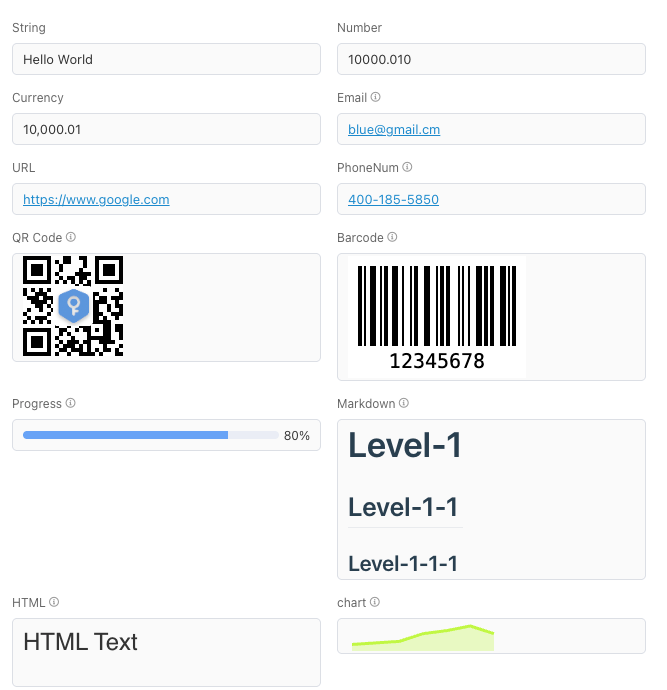
| Display format | Set the display format of date fields Options: Text, Decimal, Currency, Email, URL, Phone Number, QR Code, Barcode, Progress Bar, Image, Markdown, HTML, Trend Chart |
| Format prefix | Display prefix before function value |
| Format suffix | Display suffix after function value |
Database Storage Format
Not stored in database
Usage Instructions
Get Object Value
If the referenced field is sub-object, attachment, signature, user selection, etc., you can use the ->> expression to get the value in the object. For the storage methods of these types of objects, please refer to Storage Method
user->>'name' //Assuming the identifier of the user selection field is user, get the name of the stored user selection
attachment->>'path' //Assuming the identifier of the attachment field is attachment, get the stored pathAddition
Field1 + Field2, add two numeric fields to sum, direct addition of two strings is not supported.
Notes
- Both items to be added must be numeric type
- Functions cannot reference functions of related record fields
Subtraction
Field1 - Field2, subtract two numeric fields to get the difference
Notes
- Both items to be subtracted must be numeric type
- Functions cannot reference functions of related record fields
Multiplication
Field1 * Field2, multiply two numeric fields to get the product
Notes
- Both items to be multiplied must be numeric type
- Functions cannot reference functions of related record fields
Division
Field1 / Field2, divide two numeric fields to get the value
Notes
- Both items to be divided must be numeric type
- The divisor cannot be 0. If you are not sure whether the divisor is 0, you can use DIVISION.
- If two integers are divided, an integer is returned. If you want to return a decimal, you need to multiply the divisor or dividend by 1.0. If you are not sure about the type of the two numbers, you can use DIVISION.
UPPER
UPPER(input), convert all letters in the input string input to uppercase and output
Notes
Only supports operations on string type fields
LOWER Convert to Lowercase
LOWER(input), convert all letters in the input string input to lowercase and output
Notes
Only supports operations on string type fields
CHAR_LENGTH
CHAR_LENGTH(input), calculate the length of the character input
Notes
- Only supports operations on
string type fields - Only counts characters (one Chinese character is also counted as one character)
CONCAT
CONCAT(s1,s2...sn), merge multiple input strings into one string
Notes
Only supports operations on string type fields
CONCAT_WS
CONCAT_WS(s,s1,s2...sn), merge multiple input strings into one string according to the separator s
Notes
Only supports operations on string type fields
LPAD
LPAD(s1,len,s2), pad the left side of string s1 with string s2 to make the string length reach len
Notes
- Only supports operations on string type fields
- When the padding length is less than the string length, it is truncated from the left to meet the length
RPAD
RPAD(s1,len,s2), pad the right side of string s1 with string s2 to make the string length reach len
Notes
- Only supports operations on
string type fields - When the padding length is less than the string length, it is truncated from the left to meet the length
TRIM
TRIM(s), remove all spaces on the left and right of string s
Notes
Only supports operations on string type fields
LTRIM
LTRIM(s), remove all spaces on the left of string s
Notes
Only supports operations on string type fields
RTRIM
RTRIM(s), remove all spaces on the right of string s
Notes
Only supports operations on string type fields
REPEAT
REPEAT(s,n), repeat the string s n times
Notes
Only supports operations on string type fields
REPLACE
REPLACE(s,s1,s2), replace string s1 with string s2 in string s
Notes
- Only supports operations on
string type fields - Characters are case-sensitive, only replace exact matches
REVERSE
REVERSE(s), return the reverse of string s
Notes
Only supports operations on string type fields
SUBSTR
SUBSTR(s, start, length), extract a substring of length from string s starting at position start
Notes
- Only supports operations on
string type fields - Position values start from
1
STRPOS
STRPOS(s,s1), return the position where string s1 first appears in s
Notes
- Only supports operations on
string type fields - Position values start from
1
LEFT
LEFT(s,n), return the leftmost n characters of string s
Notes
- Only supports operations on
string type fields - If the specified length exceeds the string length, the entire string is returned
RIGHT
RIGHT(s,n), return the rightmost n characters of string s
Notes
- Only supports operations on
string type fields - If the specified length exceeds the string length, the entire string is returned
MD5
MD5(s), return the hexadecimal result of the MD5 hash of string s
Notes
Only supports operations on string type fields
CAST
CAST ('s' AS targetType), convert the numeric string s to the target type
Notes
- Only supports operations on
string type fields - Available targetType values: INTEGER (integer type), FLOAT (floating point type), NUMERIC (numeric type), TEXT (text type), BOOLEAN (boolean type)
ABS
ABS(x), return the absolute value of x
Notes
Only supports operations on numeric type fields
FLOOR
FLOOR(x), return the largest integer less than or equal to x
Notes
Only supports operations on numeric type fields
CEIL
CEIL(x), return the smallest integer greater than or equal to x
Notes
Only supports operations on numeric type fields
GREATEST
GREATEST(expr1, expr2, expr3, ...), return the maximum value in the list
Notes
Only supports operations on numeric type fields
LEAST
LEAST(expr1, expr2, expr3, ...), return the minimum value in the list
Notes
Only supports operations on numeric type fields
POWER
POWER(x,y), return x raised to the power of y
Notes
Only supports operations on numeric type fields
RANDOM
RANDOM(), return a random number between 0 (inclusive) and 1 (exclusive)
SQRT
SQRT(x), return the square root of x
Notes
Only supports operations on numeric type fields
CBRT
CBRT(x), return the cube root of x
Notes
Only supports operations on numeric type fields
PI
PI(), return the constant value of pi
MOD
MOD(x,y), return the remainder when x is divided by y
Notes
Only supports operations on numeric type fields
DIVISION
DIVISION(x,y), return the quotient of x divided by y
Notes
- Only supports operations on
numeric type fields - This function returns a decimal value. Even when both x and y are integers, it returns a decimal
- If the divisor is 0 or null, this function returns 0
ROUND
ROUND(x,y), return x rounded to y decimal places
Notes
Only supports operations on numeric type fields
SIGN
SIGN(x), return the sign of x (-1, 0, 1)
Notes
Only supports operations on numeric type fields
DATE
DATE(d) + n, calculate the date n days after the start date d
Notes
- Only supports operations on
date type fields nmust be an integer
DATE
DATE(d) - n, calculate the date n days before the start date d
Notes
- Only supports operations on
date type fields nmust be an integer
CURRENT_DATE
CURRENT_DATE, get the current date
LOCALTIME
LOCALTIME(0), return the current time, 0 indicates time precision, can pass other values (between 0-6)
LOCALTIMESTAMP
LOCALTIMESTAMP(0), return the current date and time, 0 indicates time precision, can pass other values (between 0-6)
DATE(d1) - DATE(d2)
DATE(d1) - DATE(d2), calculate the number of days between dates d1 and d2
Notes
Only supports operations on date type fields
TO_CHAR
TO_CHAR(d, f), display date d according to the format specified in expression f.
SELECT TO_CHAR(CURRENT_TIMESTAMP, 'YYYY-MM-DD HH24:MI:SS:MS')Notes
Only supports operations on date type fields
| Format Value | Description |
|---|---|
| HH | Hour of day (01-12) |
| HH12 | Hour of day (01-12) |
| HH24 | Hour of day (00-23) |
| MI | Minute (00-59) |
| SS | Second (00-59) |
| MS | Millisecond (000-999) |
| US | Microsecond (000000-999999) |
| SSSS | Seconds since midnight (0-86399) |
| AM, am, PM or pm | Meridian indicator (without periods) |
| A.M., a.m., P.M. or p.m. | Meridian indicator (with periods) |
| Y,YYY | Year with comma (4 or more digits) |
| YYYY | Year (4 or more digits) |
| YYY | Last three digits of year |
| YY | Last two digits of year |
| Y | Last digit of year |
| IYYY | ISO 8601 week-numbering year (4 or more digits) |
| IYY | Last three digits of ISO 8601 week-numbering year |
| IY | Last two digits of ISO 8601 week-numbering year |
| I | Last digit of ISO 8601 week-numbering year |
| BC, bc, AD or ad | Era indicator (without periods) |
| B.C., b.c., A.D. or a.d. | Era indicator (with periods) |
| MONTH | Full uppercase month name (padded with blanks to 9 characters) |
| Month | Full capitalized month name (padded with blanks to 9 characters) |
| month | Full lowercase month name (padded with blanks to 9 characters) |
| MON | Abbreviated uppercase month name (3 characters in English, variable length in localized) |
| Mon | Abbreviated capitalized month name (3 characters in English, variable length in localized) |
| mon | Abbreviated lowercase month name (3 characters in English, variable length in localized) |
| MM | Month number (01-12) |
| DAY | Full uppercase day name (padded with blanks to 9 characters) |
| Day | Full capitalized day name (padded with blanks to 9 characters) |
| day | Full lowercase day name (padded with blanks to 9 characters) |
| DY | Abbreviated uppercase day name (3 characters in English, variable length in localized) |
| Dy | Abbreviated capitalized day name (3 characters in English, variable length in localized) |
| dy | Abbreviated lowercase day name (3 characters in English, variable length in localized) |
| DDD | Day of year (001-366) |
| IDDD | Day of ISO 8601 week-numbering year (001-371; day 1 of the year is Monday of the first ISO week) |
| DD | Day of month (01-31) |
| D | Day of week, Sunday (1) to Saturday (7) |
| ID | ISO 8601 day of week, Monday (1) to Sunday (7) |
| W | Week of month (1-5) (first week starts on the first day of the month) |
| WW | Week number of year (1-53) (first week starts on the first day of the year) |
| IW | ISO 8601 week number of year (01 - 53; the first Thursday of the new year is in week 1) |
| CC | Century (2 digits) (21st century starts on 2001-01-01) |
| J | Julian day (integer days since noon UTC on November 24, 4714 BC) |
| Q | Quarter |
| RM | Uppercase Roman numeral month (I-XII; I is January) |
| rm | Lowercase Roman numeral month (i-xii; i is January) |
| TZ | Uppercase timezone abbreviation (only supported in to_char) |
| tz | Lowercase timezone abbreviation (only supported in to_char) |
| OF | Timezone offset from UTC (only supported in to_char) |
DATE_PART
DATE_PART(type, d1), return the value of the specified date part type from date d1
Notes
- Only supports operations on
date type fields - type definition values
Type Value Description DOW Day of week, from Sunday (0) to Saturday (6) DOY Day of year (1 - 365/366) QUARTER Quarter of the year (1 - 4) YEAR Year component of the date WEEK Week number of the year DAY Day component of the date HOUR Hour component of the date MONTH Month component of the date (1 - 12) MINUTE Minute component of the date SECOND Second component of the date EPOCH Number of seconds since 1970-01-01 00:00:00(result may be negative)
Date String Conversion
| Operator | Description | Example | Output |
|---|---|---|---|
| DATE(dateString) | Convert date, return date type value of dateString (without time part) | DATE('2020-11-09 16:33:30') | 2020-11-09 |
| dateString::DATE | Convert date, return date type value of dateString (without time part) | '2020-11-09 16:33:30'::DATE | 2020-11-09 |
| dateString::TIMESTAMP | Convert date and time, return date type value of dateString (with time part) | '2020-11-09 16:33:30'::TIMESTAMP | 2020-11-09 16:33:30 |
| dateString::TIME | Convert time, return time type value of dateString (only time part) | '2020-11-09 16:33:30'::TIME | 16:33:30 |
| timeString::TIME | Convert time, return time type value of dateString (only time part) | '16:33:30'::TIME | 16:33:30 |
Display Format
Usage Examples
Calculate Birth Date from ID Card
Existing ID card field, type: single-line text, identifier: idCard. Add a birthday field, type: function, identifier: birthday
Calculate Constellation from String Birthday Field
Existing birthday field, type: string, identifier: birthday; add a constellation field, type: function, identifier: constellation
Calculate Constellation from Date Birthday Field
Existing birthday field, type: date, identifier: birthday; add a constellation field, type: function, identifier: constellation