

Data Filter
Overview
The data filter combines data table fields or function expressions with logical relationships to implement combined data filtering. The data filter is equivalent to the condition combination after the where clause in SQL statements during traditional code development.
The platform uses a tree-like nested structure to implement visual configuration of condition combinations. Each layer can independently set the combination filtering method between conditions at that layer. Field filtering conditions involve comparing a single field and can use raw values, expressions, or function calculation results for the data after the = in SQL assembly.
When the filter is used, the platform's underlying layer dynamically generates the corresponding data filtering SQL based on the configuration.
Filters can be used in scenarios such as data table data filtering and sorting, combined filtering conditions, automation, etc.
Basic Concepts and Usage
Example model:
Data Reporting (dataModelReport)
| Identifier | Field | Type |
|---|---|---|
| name | Name | Single Text |
| detail | Reporting Details | Multi-line Text |
| user | Reporter | User Selection |
| dept | Reporting Department | Department Selection |
| date | Reporting Date | Date |
| status | Reporting Status | List Selection |
Meet All Conditions
All conditions under the current layer must be met simultaneously. The platform's underlying layer uses and to connect multiple conditions when assembling SQL.
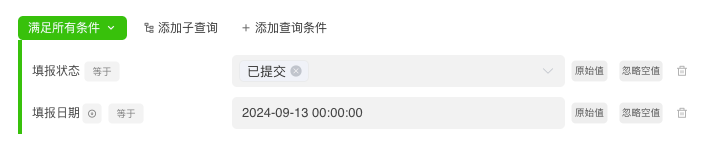
select * from data_model_report dmr where 1=1
    and
    (                                           // [!code focus]
            dmr."status" = 'submit'             // [!code focus]
        and                                     // [!code focus] // [!code highlight]
            dmr."date"='2024-09-13 00:00:00'    // [!code focus]
) // [!code focus]Meet Any Condition
Any condition under the current layer must be met. The platform's underlying layer uses or to connect multiple conditions when assembling SQL.
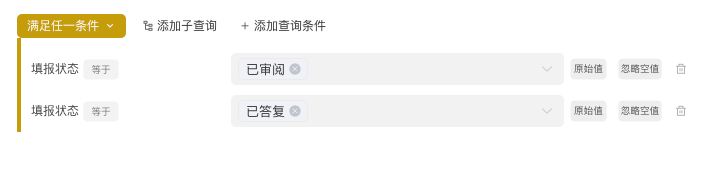
select * from data_model_report dmr where 1=1
    and
    (                                   // [!code focus]
            dmr."status" = 'reviewed'   // [!code focus]
        or                              // [!code focus] // [!code highlight]
            dmr."status" = 'replied'    // [!code focus]
) // [!code focus]Raw Value
Compare the current condition with a fixed value.
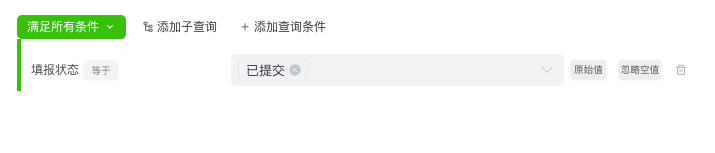
select * from data_model_report dmr where 1=1
    and
    (                                   // [!code focus]
            dmr."status" = 'submit'     // [!code focus] // [!code highlight]
) // [!code focus]Expression
Compare the current condition with a changing value. The comparison value will be obtained by running an expression using the expression engine based on the context when the platform assembles SQL.


Function
Compare the current condition with a changing value.
When assembling SQL, the platform performs the following steps:
- Calculate the content in the input box using the
expression engine
- Calculate the content in the input box using the
- Assemble the calculation result of the expression engine as the comparison value into SQL and submit it to the
databasefor comparison
- Assemble the calculation result of the expression engine as the comparison value into SQL and submit it to the


Notes
During the process of concatenating expression calculation results, the platform directly concatenates the calculated values. If the expression calculation result is a string or other data type that cannot be recognized by the database, data conversion processing needs to be added.
Allow Null Values
The processing method when the condition's comparison value is empty. When "Allow Null Values" is selected, if the comparison value is empty when the platform assembles SQL, it will not concatenate this comparison.
Function Expression
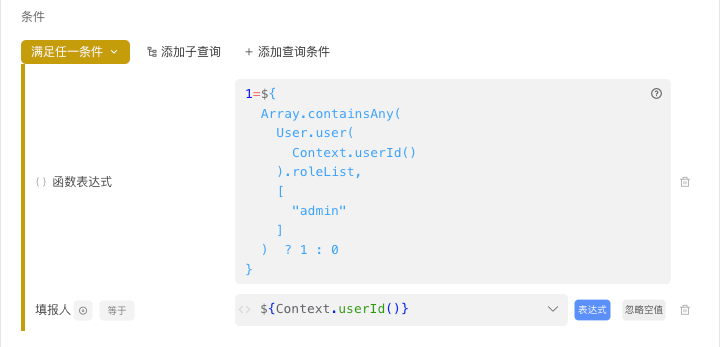
Function expression: The comparison process is completely set by the user. This method supports users to compare using one or more fields of this table simultaneously or compare with data from other tables.
For this type of setting, the platform performs the following steps when assembling SQL:
- Calculate the content in the input box using the
expression engine
- Calculate the content in the input box using the
- Assemble the calculation result of the expression engine as the comparison value into SQL and submit it to the
databasefor comparison
- Assemble the calculation result of the expression engine as the comparison value into SQL and submit it to the
Example: Administrators can see all reporting records. If not an administrator, only one's own reporting records can be viewed.

Filter Based on Other Table Data
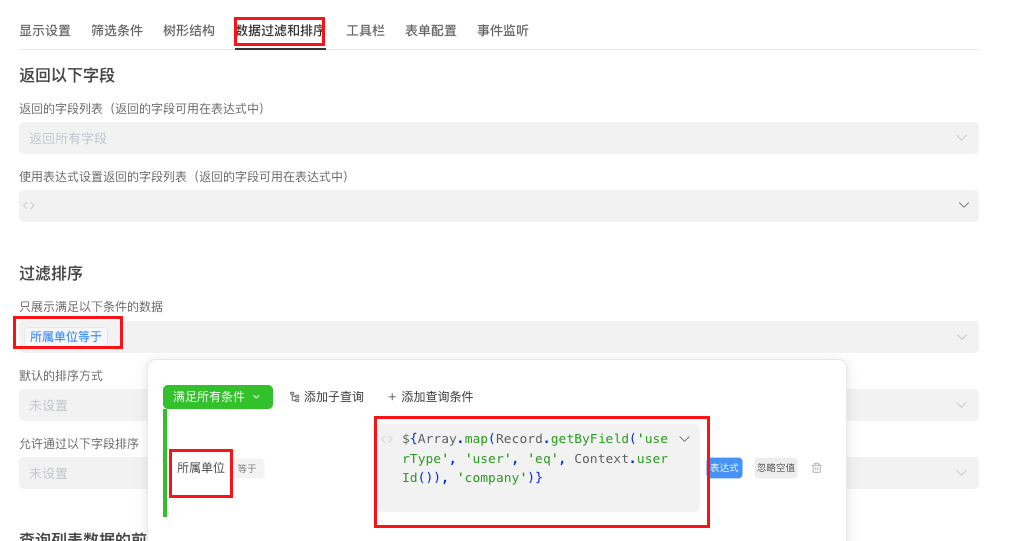
Requirement description: The current user can only view data of the unit where the user is located. User information and unit information are stored in the user table.
Solution approach:
· Query the current user
· Query the unit where the current user is located in the user table
· Use the filter to compare the project's unit with the user's unit
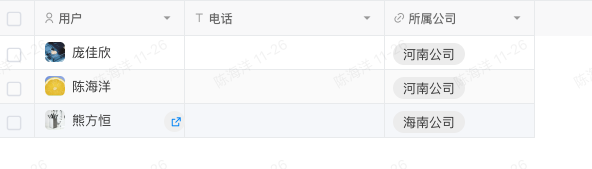

For instructions on using expressions and functions, please refer to the Expression - Function Documentation