

Custom login and registration page
Some enterprises lack a unified authentication system, yet have many internal users; gathering account credentials is costly, so they want to let people access the system through a custom login/registration flow. You can use the component designer to build pages that include both login and registration, then replace the system’s default login page.
rendering / mock-up / visual
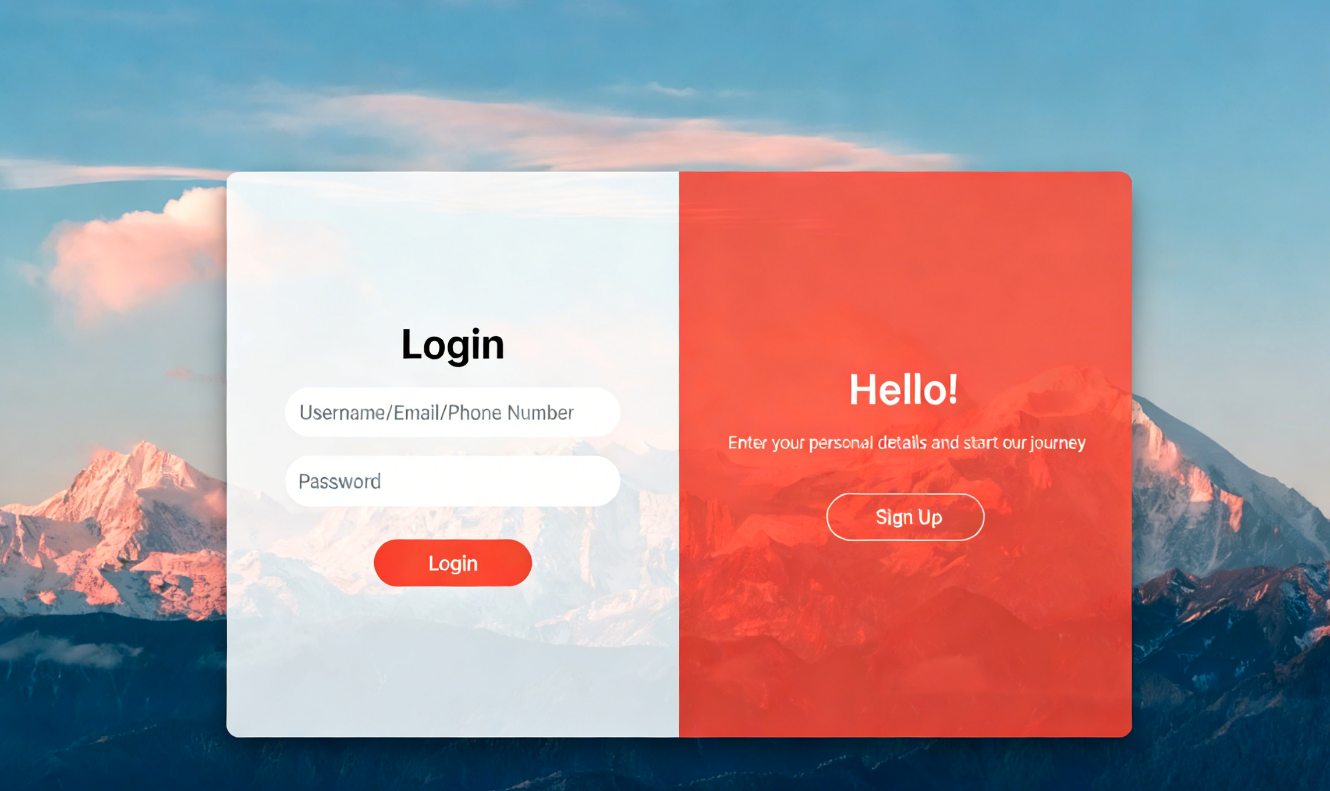
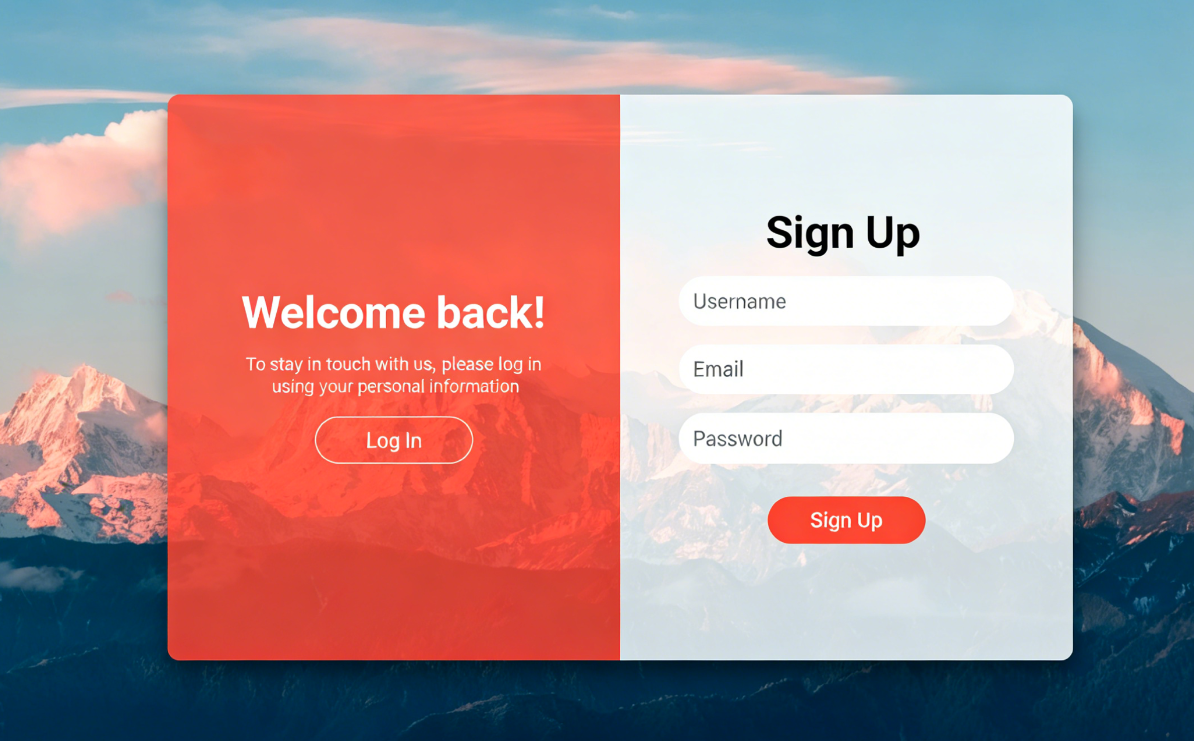
Component Settings
Create a Component Designer module and set its access URL as the login URL in the admin console’s “Login URL” field; this will replace the system’s default login page.
<div class="container" :class="{'active': type != 'login'}">
    <div class="form-container sign-up-container">
        <div class="form">
            <h2>
                Registration
            </h2>
            <input v-model="regForm.userName" type="text" name="username" id="username" placeholder="Username"></input>
            <input v-model="regForm.email" type="email" name="email" id="email" placeholder="Email"></input>
            <input v-model="regForm.password" type="password" name="password" id="password" placeholder="Password"></input>
            <button class="signUp" v-on:click="reg">
                Registration
            </button>
        </div>
    </div>
    <div class="form-container sign-in-container">
        <div class="form">
            <h2>
                Login
            </h2>
            <input v-model="loginForm.userName" type="text" name="username" id="email" placeholder="Username/Email/Phone Number"></input>
            <input v-model="loginForm.password" type="password" name="password" id="password" placeholder="Password"></input>
            <button class="signIn" v-on:click="login">
                Login
            </button>
        </div>
    </div>
    <div class="overlay_container">
        <div class="overlay">
            <div class="overlay_panel overlay_left_container">
                <h2>
                    Welcome Back!
                </h2>
                <p>
                    To keep connected with us, please log in with your personal info
                </p>
                <button id="sign-in" v-on:click="switchType('login')">
                    Login
                </button>
            </div>
            <div class="overlay_panel overlay_right_container">
                <h2>
                    Hello!
                </h2>
                <p>
                    Enter your personal details and start our journey
                </p>
                <button v-on:click="switchType('register')">
                    Registration
                </button>
            </div>
        </div>
    </div>
</div>2
3
4
5
6
7
8
9
10
11
12
13
14
15
16
17
18
19
20
21
22
23
24
25
26
27
28
29
30
31
32
33
34
35
36
37
38
39
40
41
42
43
44
45
46
47
48
49
50
51
52
53
* {
  margin: 0;
  padding: 0;
  box-sizing: border-box;
}

body {
  display: flex;
  justify-content: center;
  align-items: center;
  height: 100vh;
  background: url(bg.jpg) center / cover no-repeat;
}

h2 {
  margin-bottom: 10px;
  font-size: 32px;
  text-transform: capitalize;
}

.container {
  position: relative;
  width: 768px;
  height: 480px;
  box-shadow:
    0 14px 28px rgba(0, 0, 0, 0.25),
    0 10px 10px rgba(0, 0, 0, 0.2);
  border-radius: 10px;
  overflow: hidden;
}

.form-container {
  position: absolute;
  top: 0;
  width: 50%;
  height: 100%;
  background-color: rgba(255, 255, 255, 0.8);
  transition: all 0.6s ease-in-out;
}

.form {
  display: flex;
  flex-direction: column;
  justify-content: center;
  align-items: center;
  height: 100%;
  width: 100%;
  padding: 0 50px;
}

input {
  width: 100%;
  margin: 8px 0 !important;
  padding: 12px;
  background-color: #fff;
  border: none;
  border-radius: 30px;
}

.forget-password {
  display: inline-block;
  height: 20px;
  text-decoration: none;
  color: #bbb;
  text-transform: capitalize;
  font-size: 12px;
}

.forget-password:hover {
  color: lightslategray;
  border-bottom: 2px solid #ff4b2b;
}

button {
  background: #ff4b2b;
  padding: 10px 50px;
  border: 1px solid transparent;
  border-radius: 20px;
  text-transform: uppercase;
  color: white;
  margin-top: 20px !important;
  outline: none;
  transition: transform 80;
  cursor: pointer;
}

button:active {
  transform: scale(0.95);
}

.overlay_container {
  position: absolute;
  top: 0;
  width: 50%;
  height: 100%;
  z-index: 100;
  right: 0;
  overflow: hidden;
  transition: all 0.6s ease-in-out;
}

.overlay {
  position: absolute;
  width: 200%;
  height: 100%;
  left: -100%;
  background-color: rgba(255, 75, 43, 0.8);
}

.overlay_panel {
  position: absolute;
  display: flex;
  flex-direction: column;
  justify-content: center;
  align-items: center;
  width: 50%;
  height: 100%;
  color: white;
  padding: 0 40px;
  text-align: center;
}

.overlay_panel button {
  background-color: transparent;
  border: 1px solid white;
}

.overlay_panel p {
  font-size: 12px;
  margin: 10px 0 15px 0;
}

.overlay_right_container {
  right: 0;
}

.container .sign-up-container {
  opacity: 0;
}

.container .sign-in-container {
  opacity: 1;
}

.container.active .sign-up-container {
  transform: translateX(100%);
  z-index: 5;
  opacity: 1;
}

.container.active .sign-in-container {
  transform: translateX(100%);
  opacity: 0;
}

.container.active .overlay_container {
  transform: translateX(-100%);
}

.container.active .overlay {
  transform: translateX(50%);
}2
3
4
5
6
7
8
9
10
11
12
13
14
15
16
17
18
19
20
21
22
23
24
25
26
27
28
29
30
31
32
33
34
35
36
37
38
39
40
41
42
43
44
45
46
47
48
49
50
51
52
53
54
55
56
57
58
59
60
61
62
63
64
65
66
67
68
69
70
71
72
73
74
75
76
77
78
79
80
81
82
83
84
85
86
87
88
89
90
91
92
93
94
95
96
97
98
99
100
101
102
103
104
105
106
107
108
109
110
111
112
113
114
115
116
117
118
119
120
121
122
123
124
125
126
127
128
129
130
131
132
133
134
135
136
137
138
139
140
141
142
143
144
145
146
147
148
149
150
151
152
153
154
155
156
157
158
159
160
161
162
export default {
  data() {
    return {
      type: "login",
      loginForm: {
        userName: null,
        password: null,
      },
      regForm: {
        userName: null,
        email: null,
        password: null,
      },
    };
  },
  mounted() {
    const params = this.getQueryParams();
    this.rdUrl = params.rdUrl || "/";
  },
  methods: {
    switchType(type) {
      this.type = type;
    },
    async reg() {
      const { userName, email, password } = this.regForm;
      try {
        const resp = await informatweb.callAutomatic({
          automaticId: "reg",
          args: [userName, email, password],
        });
        const data = resp.returnValue;
        if (data.success) {
          alert("Registration successful! Please log in to your account");
          this.loginForm.userName = this.regForm.userName;
          this.switchType("login");
        } else {
          alert(data.message || "Unknown error");
        }
      } catch (e) {
        alert(e);
      }
    },
    async login() {
      const { userName, password } = this.loginForm;
      try {
        const resp = await informatweb.callAutomatic({
          automaticId: "login",
          args: [userName, password, "index"],
        });
        this.loginResult(resp);
      } catch (e) {
        alert(e);
      }
    },
    getQueryParams() {
      let params = {};
      let url = window.location.search.substring(1);
      let queryString = url.split("&");

      queryString.forEach((param) => {
        let keyValue = param.split("=");
        let key = decodeURIComponent(keyValue[0]);
        let value = decodeURIComponent(keyValue[1]);
        params[key] = value;
      });

      return params;
    },
    addURLParam(url, param, value) {
      let separator = url.indexOf("?") !== -1 ? "&" : "?";
      return url + separator + param + "=" + encodeURIComponent(value);
    },
    loginResult(resp) {
      const result = resp.returnValue;
      if (!result.success) {
        alert(`loginError${result.message || "err msg"}`);
        return;
      }
      window.location.href = this.addURLParam(this.rdUrl, "_token", result.token);
    },
  },
};2
3
4
5
6
7
8
9
10
11
12
13
14
15
16
17
18
19
20
21
22
23
24
25
26
27
28
29
30
31
32
33
34
35
36
37
38
39
40
41
42
43
44
45
46
47
48
49
50
51
52
53
54
55
56
57
58
59
60
61
62
63
64
65
66
67
68
69
70
71
72
73
74
75
76
77
78
79
80
81
82
Automation Settings
In the login/registration component script we invoke two automations—login and reg—through the Zhixin Web Runtime. Both automations handle their business logic with pure code snippets. The source code is below.
TIP
Since the component uses the informat Web Runtime,” which is invoked via HTTP, the automations must have the “Allow automation to be called via HTTP” option enabled.
It verifies whether the supplied username and password are correct for authentication; upon successful authentication, it creates a token using the user’s ID and returns it to the frontend.
Automation input parameters
| Parameter | Type | Required | Description |
|---|---|---|---|
| userName | String | Yes | Username |
| password | String | Yes | Password |
| type | String | Yes | Login type: index for PC, mobile for mobile; custom values are also allowed. Tokens of the same type and account will replace each other. |
Code snippet
const userName = automatic.getVar("userName");
const password = automatic.getVar("password");
const type = automatic.getVar("type");

var accountList = informat.system.queryAccountList({
  filter: {
    conditionList: [{ fieldId: "userName", opt: "eq", value: userName }],
  },
});

if (accountList.length < 1) {
  informat.app.abort("Invalid username or password");
}

var result = informat.system.validateAccount(userName, password);

if (!result) {
  informat.app.abort("Invalid username or password");
} else {
  const token = informat.system.createToken(accountList[0].id, type);
  automatic.setReturnValue({
    success: true,
    accountId: accountList[0].id,
    token: token,
  });
}2
3
4
5
6
7
8
9
10
11
12
13
14
15
16
17
18
19
20
21
22
23
24
25
26
It controls whether the registration feature is enabled using the environment variable registerEnable. Upon successful registration, it adds the user to the current team and sets the team role to Member.
Automation input parameters
| Parameter | Type | Required | Description |
|---|---|---|---|
| userName | String | Yes | Username |
| String | Yes | ||
| password | String | Yes | Password |
Code snippet
const userName = automatic.getVar("userName");
const email = automatic.getVar("email");
const password = automatic.getVar("password");
const registerEnable = informat.app.appEnvProp("registerEnable");

if (registerEnable != "1") {
  automatic.setReturnValue({
    success: false,
    message: "Disabled registration feature. Please modify the environment variable to enable registration.",
  });
} else {
  const accountId = addAccount({
    userName,
    email,
    password,
  });
  addCompanyMember(accountId);
  automatic.setReturnValue({
    success: true,
    message: "Registration successful",
  });
}

function addAccount(item) {
  let accountList = informat.system.queryAccountList({
    pageIndex: 1,
    pageSize: 1,
    filter: {
      conditionList: [
        {
          fieldId: "userName",
          opt: "eq",
          value: item.userName,
        },
      ],
    },
  });
  if (accountList.length > 0) {
    informat.app.abort("Username already exists");
  }

  accountList = informat.system.queryAccountList({
    pageIndex: 1,
    pageSize: 1,
    filter: {
      conditionList: [
        {
          fieldId: "email",
          opt: "eq",
          value: item.email,
        },
      ],
    },
  });
  if (accountList.length > 0) {
    informat.app.abort("Email already exists");
  }
  const accountId = informat.system.addAccount({
    name: userName,
    avatar: "pic15.png",
    ...item,
  });
  return accountId;
}

// addCompanyMember
function addCompanyMember(accountId) {
  const rootDeptId = (
    informat.dept.queryDeptList({
      pageSize: 1,
      filter: {
        conditionList: [
          { fieldId: "parentId", opt: "isnull" },
        ],
      },
    })[0] || {}
  ).id;
  informat.company.addCompanyMember(accountId, [rootDeptId], ["member"]);
} 2
3
4
5
6
7
8
9
10
11
12
13
14
15
16
17
18
19
20
21
22
23
24
25
26
27
28
29
30
31
32
33
34
35
36
37
38
39
40
41
42
43
44
45
46
47
48
49
50
51
52
53
54
55
56
57
58
59
60
61
62
63
64
65
66
67
68
69
70
71
72
73
74
75
76
77
78
79