ID Field
ID is a unique serial number generated by the system to identify a record
Description
| Item | Content |
|---|---|
| Category | Static Field |
| Storage Type | String |
| Sortable | Yes |
| Filterable | Yes |
| Supported Filter Types | Contains, Does Not Contain, Equal, Not Equal, Null, Not Null, Starts With, Ends With, In List, Not In List |
Settings
| Setting | Description |
|---|---|
| ID Calculation Expression | Use expressions to design the ID generation logic |
| Auto-Increment Sequence Reset Method | Set the reset cycle for the ID auto-increment sequence Options: Never Reset, Reset Daily, Reset Monthly, Reset Annually |
Database Storage Format
| Field Type | Description |
|---|---|
| varchar(128) | Variable-length string, max 128 characters |
ID Generation Rules
Each ID system automatically generates an auto-increment sequence seq, which increases by 1 for each record created. The ID is calculated by an expression, and the return value of the expression is a string. In the expression, you can use the current record record and seq to generate the ID. If no expression is set, the ID is just seq.
Here is an example of generating an ID
Notes
ID must be unique, and the system will check for uniqueness when creating records. ID is only calculated when adding new records and cannot be modified.
If you need to modify the ID field, you need to call the script function
informat.table.update();
//or
informat.table.updateList();Auto-Increment Sequence Reset
In some business scenarios, it is necessary to reset the seq sequence of the ID field. The ID field provides Automatic Reset and Manual Reset
Automatic Reset
In some systems that generate record IDs based on dates, the ID generation rule is yyyy-mm-dd-seq, where seq needs to be reset daily.
- Daily Reset Reset seq to 1 at 00:00 every day
- Monthly Reset Reset seq to 1 at 00:00 on the first day of each month
- Annual Reset Reset seq to 1 at 00:00 on the first day of each year
The expression to generate yyyy-mm-dd-seq is
${Misc.formatDate(Date.sysdate(),'yyyy-MM-dd')}-${seq}Other Reset Cases
If the scenario requires resetting according to specific rules, such as quarterly, weekly, hourly reset or resetting seq not starting from 1, you need to use script with scheduled task for manual reset.
Manual Reset
In some scenarios, if you want to reset the seq of the ID field to start from a specified position, you can set the ID field of the data table through script.
For example, reset the order ID field with identifier orderNO in the order table with module identifier order.
// Reset ID seq to start from 1
informat.table.setIdFieldSeq("order", "orderNO", 1);Usage scenarios
- Reset the ID seq to 1 after clearing data in the data table
- Data in the data table comes from other systems, reset the ID seq to a specified size
- For IDs generated based on dates, resetting is not based on
year,month,dayor needs to be a specified size when resetting.
Sorting
ID is stored as a string in the database, so the sorting rules follow the string sorting method, for example, the data in the system is as follows
| ID | Name |
|---|---|
| 1 | Data 1 |
| 2 | Data 2 |
| 3 | Data 3 |
| 4 | Data 4 |
| 5 | Data 5 |
| 6 | Data 6 |
| 7 | Data 7 |
| 8 | Data 8 |
| 9 | Data 9 |
| 10 | Data 10 |
Because the ID is a string type, when sorting this field, the database will sort according to the string sorting rules. For example, when sorting in ascending order, the final order is
| ID | Name |
|---|---|
| 1 | Data 1 |
| 10 | Data 10 |
| 2 | Data 2 |
| 3 | Data 3 |
| 4 | Data 4 |
| 5 | Data 5 |
| 6 | Data 6 |
| 7 | Data 7 |
| 8 | Data 8 |
| 9 | Data 9 |
If you want the ID to be sorted in numerical order, you need to add a function field to convert the string to a number, and then sort the function field
CAST_NUMERIC (idnumber)Examples
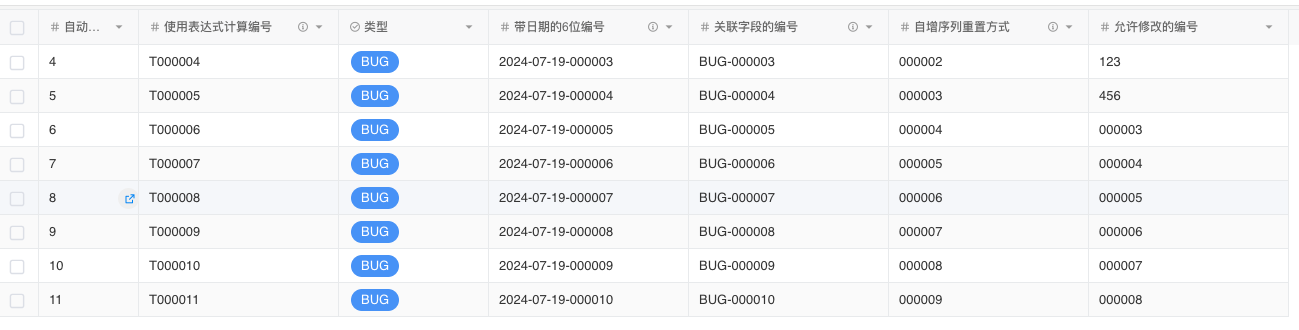
ID is an incremental 6-digit number, e.g., T000001
T${String.lpad(seq,6,'0')}ID is an incremental 6-digit number with date, e.g., 2024-07-19-000001
${Misc.formatDate(Date.sysdate(),'yyyy-MM-dd')}-${String.lpad(seq,6,'0')}Use type field as prefix, 6-digit number ID
${record.type}-${String.lpad(seq,6,'0')}Display Effect