

Data Table
Overview
The Data Table module is used to store and display data. After creating a data table, the system automatically generates a table in the database to store the data, and users can view and modify the data using the system-generated table views and forms on the frontend. The fields in the data table can be configured using the form designer. Data tables can be referenced as data sources by modules such as Table View, Dashboard, Workflow, Form Designer, Questionnaire, etc.
Data Table Functions
After creating a data table, the platform automatically creates the following functional components:
Database Table
The platform's underlying ORM engine will create a real physical table in the database based on the Data Table Module and Data Table Field configurations.
This approach brings us the following benefits:
- Data security and reliability support
- Massive data storage support (1 billion+ level)
- Support for data table column index optimization
- Support for data table partitioning
- Support for data table field type switching
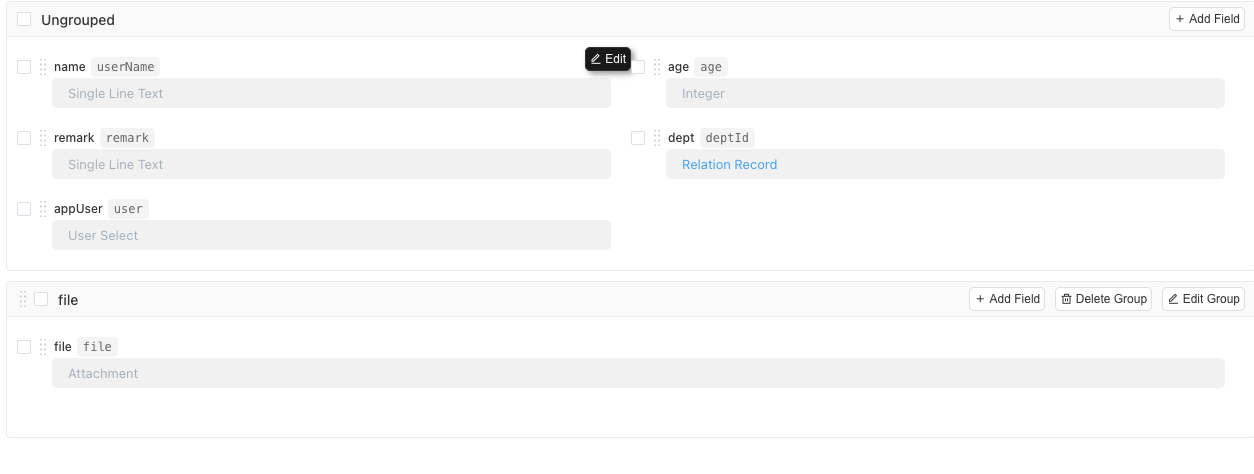
Table View
After creating a Data Table Module, the platform will provide a default Table View for that module to meet our data management needs. Using the table view, we can easily view and manage data. The table view supports inline editing, multi-level headers, sorting, filtering, and other functions.
If we have other special display and operation requirements for data, the platform also provides
- Gantt Chart and other data display modes
Form
After creating a Data Table Module, the platform automatically generates a form interface. The form supports multi-column layout, tab grouping, dynamic hiding/showing, modification history, and other functions. Users can easily view and maintain data using the form.
Data Table Fields
The platform provides a total of 33 field types across five major categories: Text, Date and Number, Controls, Relationships, and Static Fields to support modeling work. Among them, relationship-type fields support the following data models:
- One-to-one relationship: Used to reference fields from other tables in this table. For example, a contract is associated with a customer.
- One-to-many relationship: Used to display sub-tables in forms. For example, a class corresponds to multiple students.
- Tree relationship: Used to represent tree structures, such as department hierarchy.
Data Table Data Sources
By default, data table data is stored in the local database. The platform also provides some other advanced usages to handle various complex scenarios:
- Default data source: The platform's underlying ORM engine creates a real data table in the database to store data based on the
Data Table ModuleandData Table Fieldconfigurations. - Data tables from other applications: Reference data tables from other applications to achieve cross-application data access.
- Database view: Use SQL statements to define data sources, which can implement complex report summarization.
- Script data source: Return data through script calculation, for example, by calling API interfaces to return data from external systems and then displaying it in this application.
- External database: By configuring external database connection information, the platform will automatically connect to the external database, supporting multiple external databases such as MYSQL, PGSQL, SQLSERVER, and ORACLE.
Data Table Usage
Data tables in Informat are used to store, display, and maintain data, and can also be used as data storage for other modules. Here are several usage scenarios for data tables:
- Table view: Use the data table module as a data source and then create different display methods, such as Gantt charts, kanban boards, etc.
- Dashboard cards: Use data tables as the data source for dashboard cards
- Workflow: Store data generated by workflows in data tables and use data table forms as workflow filling forms
- Form designer: Reference data table fields in the form designer
- Automation and scripts: Perform CRUD operations on data table data in automation and scripts
- Questionnaire: Write data from questionnaires into data tables