

Data Source - Default Data Source
Overview
Data will be stored in the database. Informat will create a database table to store data. If the data table contains fields of type Related List, the system will additionally create an adjacency list for each field to store the association relationship.
Data Table Storage
When the Data Source type of a data table is Default, the system will create a real physical table for the data table and automatically create the following two fields:
| Field | Type | Description |
|---|---|---|
| id | varchar(32) | System-generated unique ID, primary key |
| seq | int(8) | Order of data addition |
Notes
- The physical table name is automatically generated based on the rule
z_{Application ID}_{Data Table ID}, where appId and tableId are 12-digit unique IDs generated by the system - The column IDs in the physical table are also automatically generated by the system, and the column data types are dynamically set according to the
data table fieldtypes
Data Table Structure Example
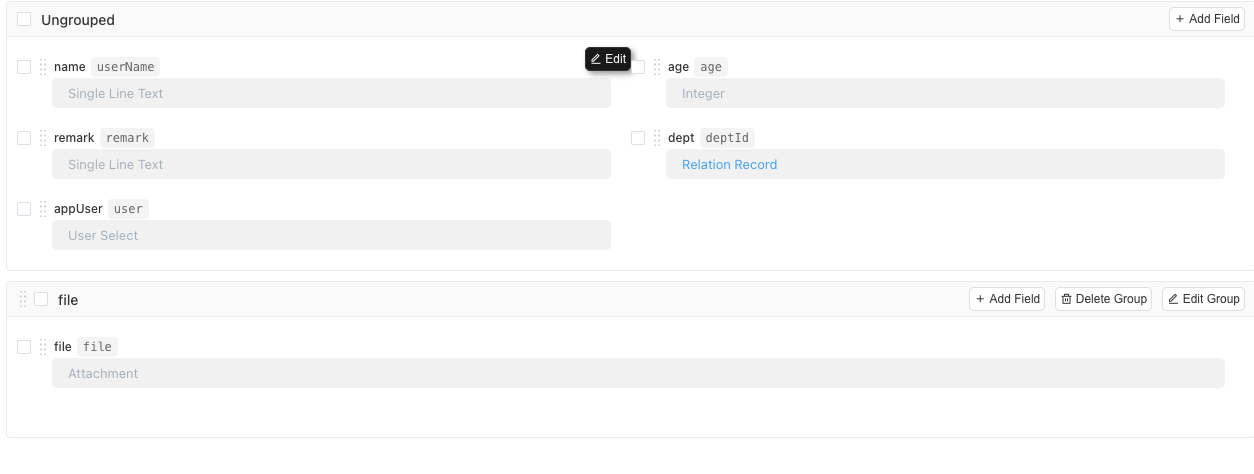
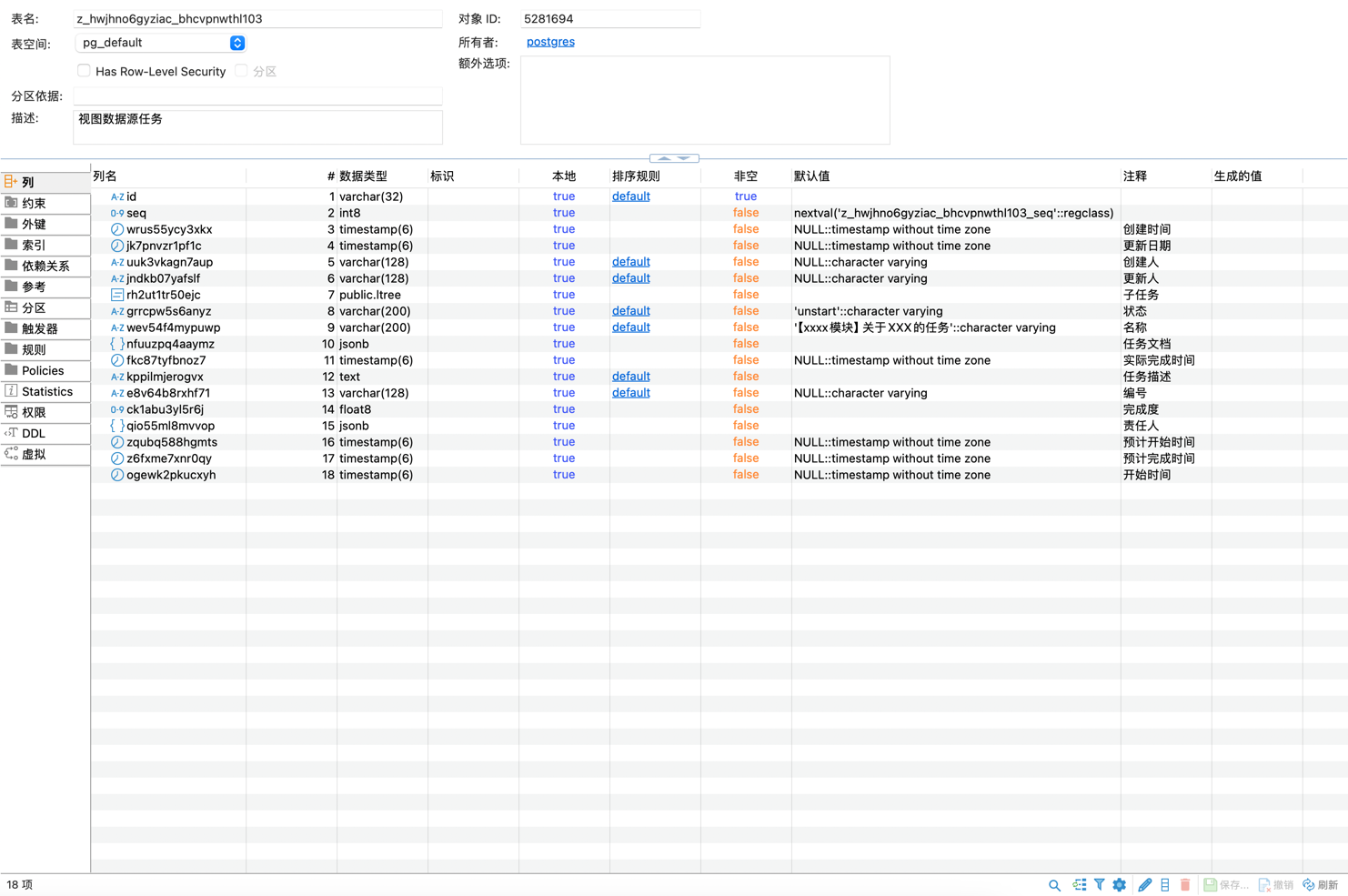
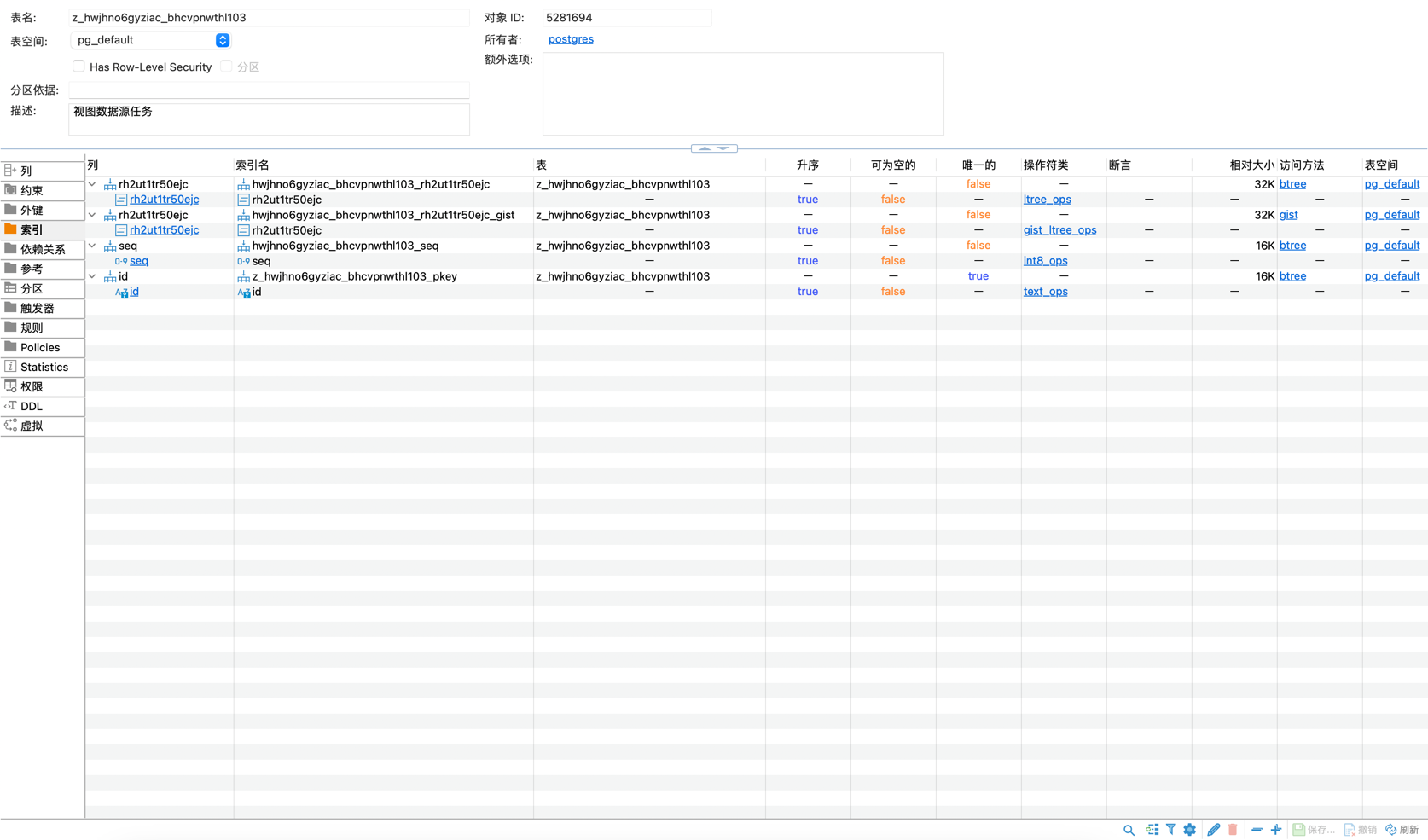
Data Table View
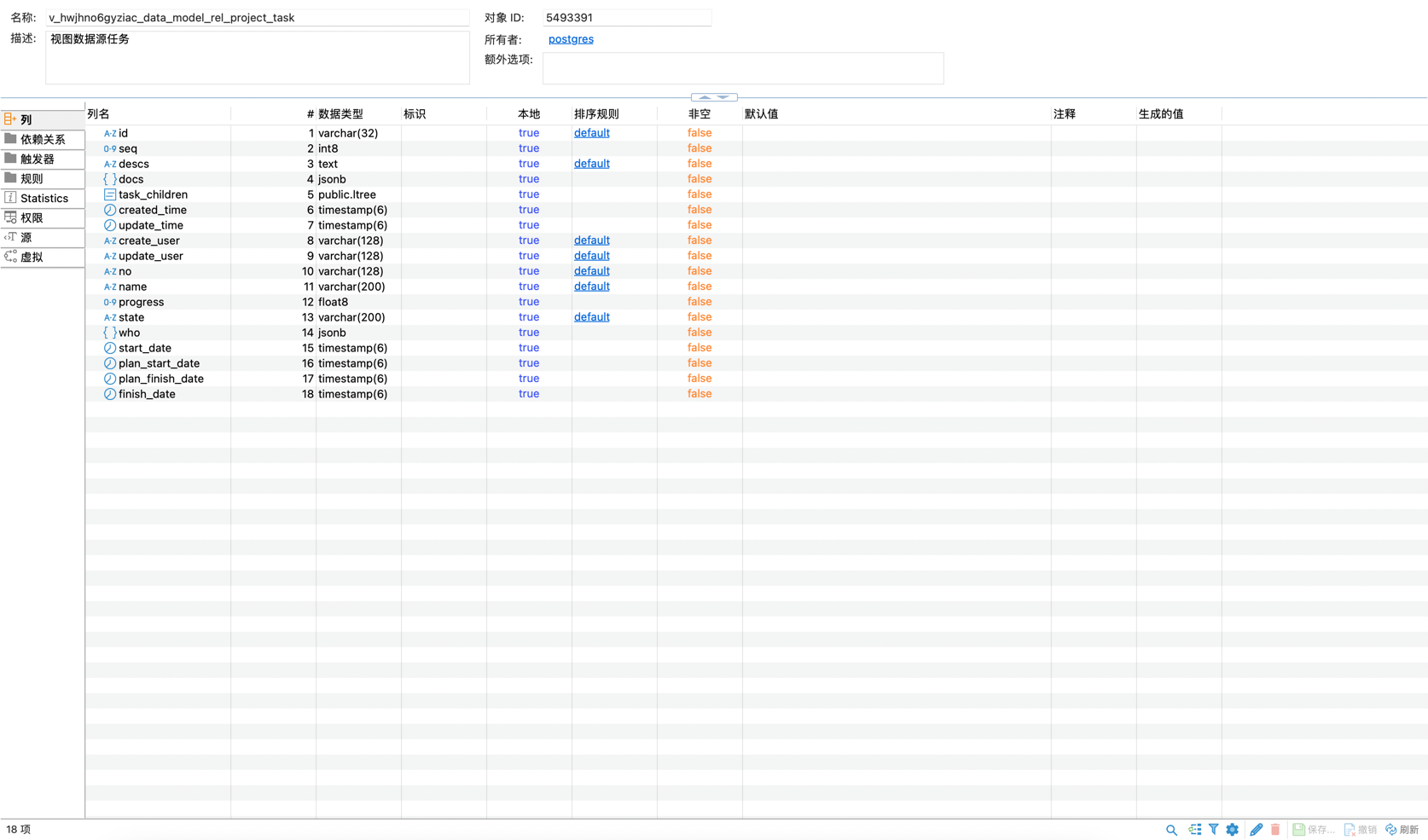
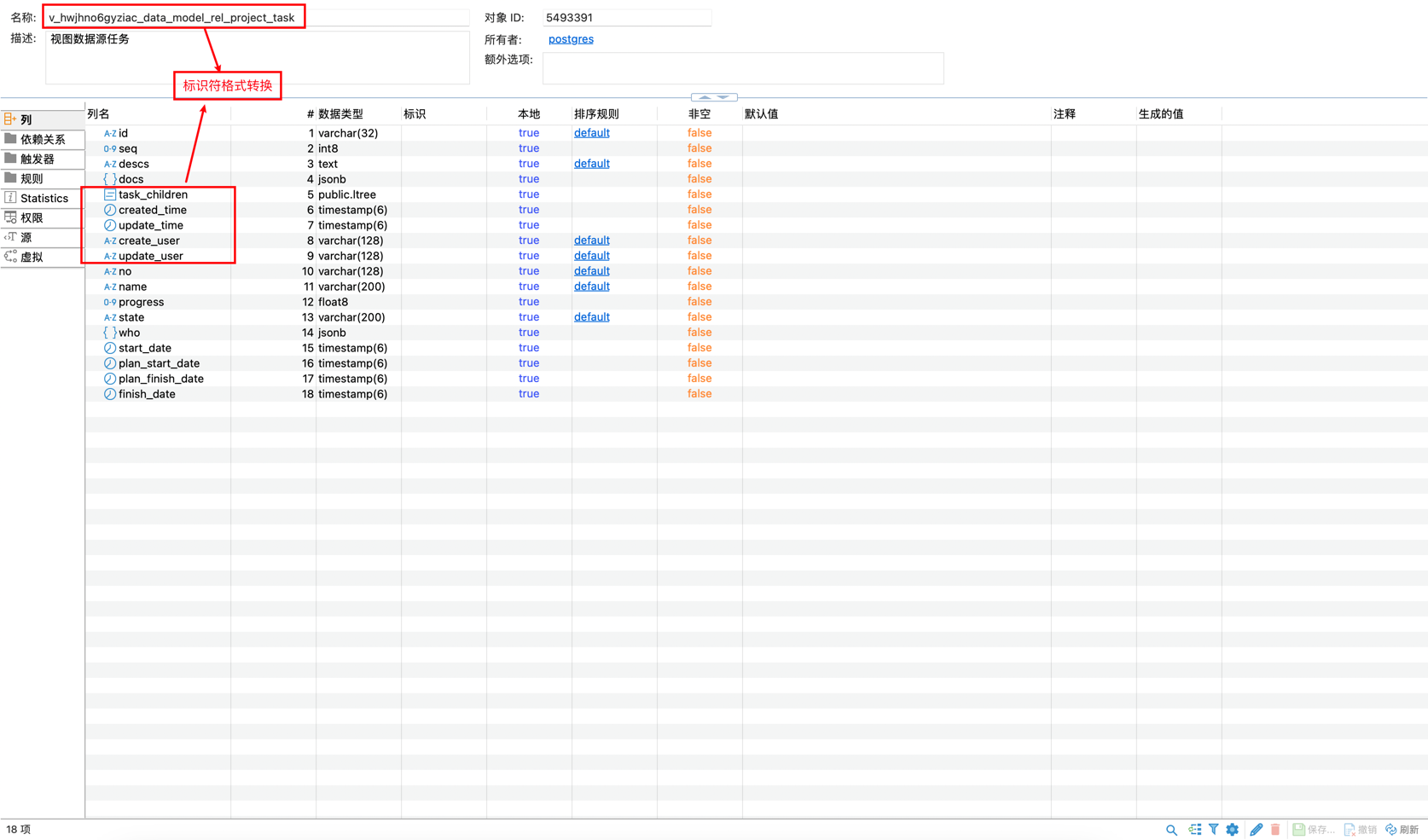
Through understanding the physical table creation process, we can find that the content generated by the physical table is unreadable. To improve readability, after the physical table is created, the platform will create a readable view based on the physical table.
Notes
- The view name is automatically generated based on the rule
v_{Application ID}_{Module Identifier}The module identifier is converted according to Snake case naming convention. For example, if the module identifier isdemoTable, the resulting view name isv_{Application ID}_demo_table - The column IDs of the view are also converted according to Snake case naming convention
View Structure Example
Field Storage
For each field type, Informat establishes columns in the data table in different formats. The column IDs are 12-digit unique IDs automatically generated by the system.
| Type | Database Type | Description |
|---|---|---|
| Single Text | varchar(200) | Default maximum of 200 characters, can be adjusted |
| Multi-line Text | varchar(1000) | Default maximum of 1000 characters, can be adjusted |
| Rich Text | text | |
| Integer | int8 | |
| Decimal | float8 | Stores decimal numbers |
| Date | timestamp(6) | Stores dates |
| Time | varchar(32) | Stores time |
| Rating | int4 | Rating component |
| List Selection | varchar(200) | List selection component allows users to select one or more values from a list |
| Tree Selection | Tree Selection | Tree structure selection allows users to select one or more values from a tree structure |
| Cascading Selection | jsonb | Cascading selection control allows users to select one or more values from a cascading structure |
| Attachment | jsonb | Attachments allow uploading files in formats such as images and documents. These files can be previewed online or downloaded |
| Checkbox/Switch | bool | Checkbox |
| User Selection | jsonb | Application member field allows adding one or more application members |
| Department Selection | jsonb | Department field allows selecting one or more departments |
| Color | varchar(32) | Color picker |
| Handwritten Signature | jsonb | Allows users to handwrite signatures, preserving handwriting |
| Geographical Coordinates | jsonb | Geographical coordinates |
| Function | Uses functions and values from other fields to calculate a result | |
| Custom Component | Uses website module pages to customize display controls | |
| Related List | Associates multiple records from another table | |
| Related Record | varchar(64) | Associates one record from another table, stores the record ID of the dependent table |
| Related Record Field | Associates specific fields from another table | |
| Lookup List | Looks up records associated with this table based on filter conditions | |
| Sub-object | ltree | Using sub-objects can make the data table have a tree structure |
| Related List Rollup | float8 | Calculates summary data of specific fields in the [Related List] |
| Lookup Rollup | float8 | Looks up records associated with the related list based on filter conditions and summarizes data according to specific fields of the related list |
| Serial Number | varchar(128) | System-generated serial number |
| Sub-object Number | text | Complete path of the tree structure |
| Creation Time | timestamp(6) | Automatically records the creation time of data |
| Last Modification Time | timestamp(6) | Automatically records the last modification time of data |
| Creator | varchar(128) | Automatically records the creator of data |
| Last Modifier | varchar(128) | Automatically records the last modifier of data |
| Static Text | Uses rich text to edit static display text, the text content can be dynamically set using expressions |
Notes
Fields with no marked Database Type indicate that the field does not have a corresponding mapping column in the current data table model
Single Selection and Multiple Selection
When field options allow multiple selections, data is stored as an array type. For example, when the User Selection field is single-select, it stores a TableUser type, and when it's multi-select, it stores an Array<TableUser> array. This should be noted when querying and updating data through automation or scripts.
Sub-object
The database storage format of sub-objects is a string, which stores the parent object ID list separated by . For example, the structure of the department data table is as follows:
| Field | Type | Description |
|---|---|---|
| id | String | Record ID |
| name | Single Text | Name |
| parent | Sub-object | Parent-child relationship between departments |
The data in the table is as follows:
| id | name | parent |
|---|---|---|
| 0000 | Head Office | |
| 0001 | Technical Department | 0000 |
| 0002 | Product Department | 0000 |
| 0003 | Operations Department | 0000 |
| 0004 | Technical Team 1 | 0000.0001 |
| 0005 | Technical Team 2 | 0000.0001 |
Related Record Field
Related Record Field is not stored in the data table and is dynamically obtained from the target table at runtime based on the association relationship. Related Record Field is always read-only and cannot be edited.
Related List
Related List represents a one-to-many relationship between models. For each related record field, the system creates an adjacency list to store it. The name of the adjacency list is z_appId_tableId_fieldId. Where appId is the application id, tableId is the internal id of the main table, and fieldId is the internal id of the field.
The structure of the adjacency list is as follows:
| Field | Type | Description |
|---|---|---|
| id | int | Main table record ID |
| relation_id | varchar | Sub-table record ID |
| index | int | Sorting |
| create_time | date | Creation Time |
After the related list field is deleted, the system will delete the adjacency list.
Lookup List
Lookup List is not stored and is dynamically queried at runtime based on the configured filter conditions.