

Single Sign-On
Overview
Single Sign-On (SSO) allows Informat to use third-party authentication services to authenticate users. There are two authentication processes:
- Initiated from the Informat login page: After the user enters their account and password, a third-party system is called for authentication.
- Initiated from a third-party system page: Informat API is called for authentication.
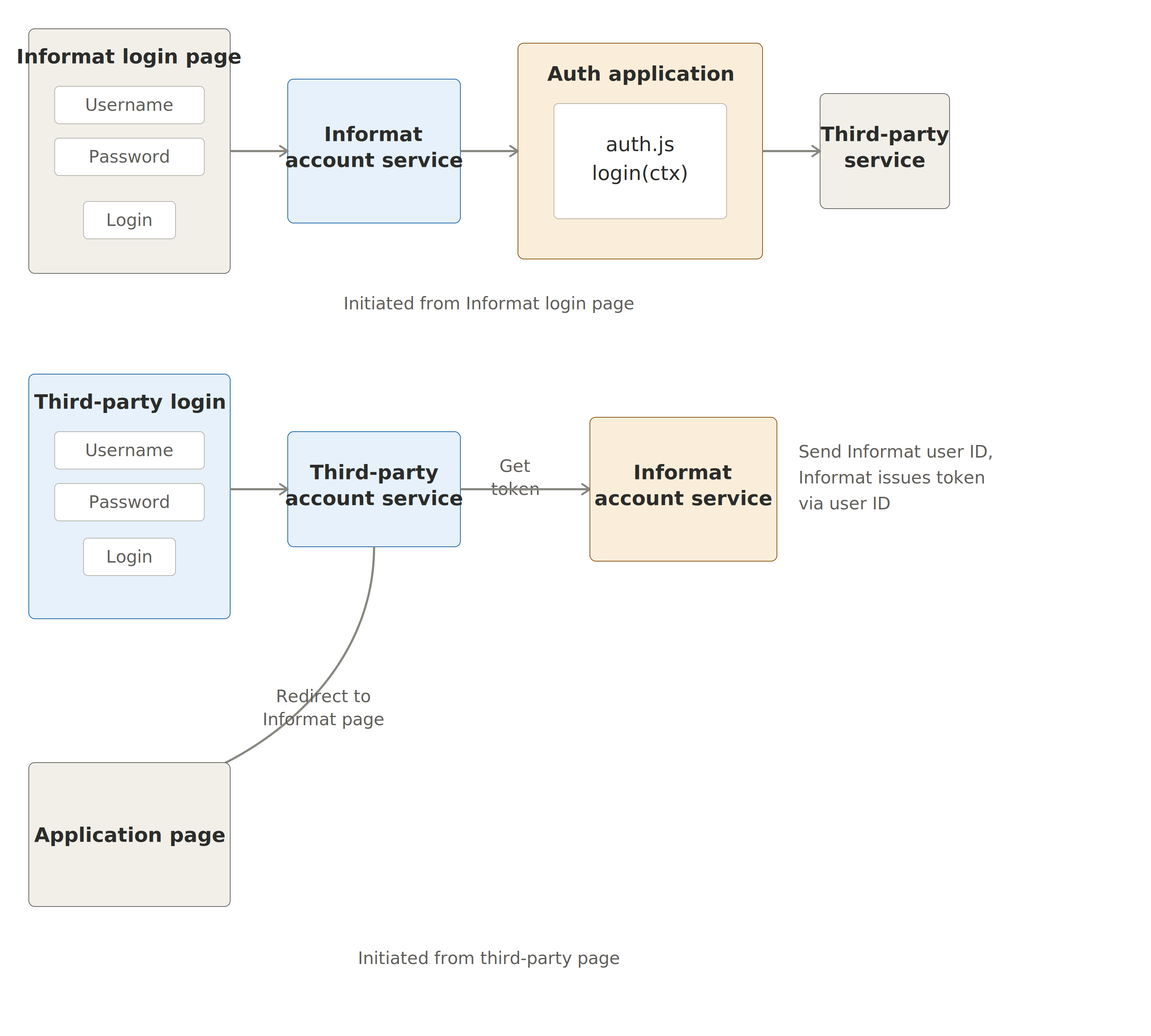
Initiated from Informat Login Page
Trigger timing: Triggered after the user enters their account and password. Configuration conditions:
- In a newly created or existing application, find Application Design -> Scripts, and create a systemhook.js file (the script name can be customized). Implement the sso method in the systemhook.js file to handle authentication business logic.
export function login(ctx) {
  console.log("ctx parameters:", ctx.userName, ctx.password, ctx.ip, ctx.type);
  //todo authentication
  return {
    success: true,
  };
}Login function input parameter ctx
id Description userName User name (may be phone number or email) password Password ip IP address type Login type index,mobile Login function return value
id Description success Whether authentication was successful message Error message, can be omitted if successful Find and set the following parameters in the Informat management backend (/guide/admin) -> System Information -> Parameter Settings:
- System Hook Application ID
- Data storage database index of the team to which the system hook application belongs
- System Hook Script Path
- SSO login function initiated from the Informat login page
- SSO login function initiated from a third-party page
TIP
system.systemHookDbIndex Set to 0 if there is only one business database
How to find the application ID from the first step? Find the Application Management button on the workbench
Click the Application Management button, find the application from the first step in the application list, then click Settings
Find the appid in the application information
- system.systemHookScriptPath Enter the script path created in the first step (systemhook.js)
Example: Single Sign-On with LDAP Authentication
export function login(ctx) {
  console.log("ctx", ctx.userName, ctx.password, ctx.ip, ctx.type);
  // const success=informat.user.passwordAuth(ctx.userName,crx.password);
  const userName = ctx.userName;
  const password = ctx.password;
  let connection = null;
  try {
    connection = informat.ldap.connect({
      providerURL: "LDAP://1.13.173.190:389",
      securityPrincipal: userName,
      securityCredentials: password,
    });
  } catch (e) {
    //Connection to LDAP server or authentication failed
    console.error("ldap login failure:", userName);
    return {
      success: false,
      message: "Login failed", //Login failure message
    };
  } finally {
    if (connection != null) {
      connection.close();
    }
  }
  return {
    success: true,
  };
}SSO Initiated from Third-Party Page
SSO login process:
- Third-party service makes an HTTP request to the Informat SSO service address:
https://ai.ainformat.com//account/main/sso - Informat SSO service calls the sso function for authorization
In a newly created or existing application, find Application Design -> Scripts, and create a systemhook.js file (the script name can be customized). Implement the sso method in the systemhook.js file to handle business logic before authorization.
export function sso(ctx) {
  console.log("ctx parameters:", ctx);
  //TODO authenticate to get accountId
  return {
    accountId: "x38s0fa436v69",
    success: true,
    redirectUrl: "/workbench/app",
  };
}- SSO function input parameter ctx
| Property | Type | Description |
|---|---|---|
| headers | Object | HTTP request headers |
| cookies | Object | HTTP cookies |
| query | Object | Query parameters |
| body | String | HTTP request body |
| url | String | HTTP request URL |
| path | String | Path |
| method | String | Request method |
| ip | String | IP address |
- SSO function return value
| Property | Type | Description |
|---|---|---|
| accountId | String | Authorized account ID |
| success | Boolean | Whether authorization was successful |
| message | String | Error message |
| redirectUrl | String | Redirect URL after authorization |
Example:
export function sso(ctx) {
  console.log("ctx------>", informat.utils.toJSON(ctx));
  const query = ctx.query;
  const userName = query.userName;
  const password = query.password;
  //Find account by user name
  var accountList = informat.system.queryAccountList({
    filter: {
      conditionList: [{ fieldId: "userName", opt: "eq", value: query.userName }],
    },
  });
  console.log("accountList", accountList);
  if (accountList.size() == 0) {
    return {
      success: false,
      message: "Account does not exist",
    };
  }
  //Here we use Informat account password authentication, in practice you can use your own business logic for authentication
  var result = informat.system.validateAccount(userName, password);
  if (!result) {
    return {
      success: false,
      message: "Incorrect account or password",
    };
  }
  return {
    accountId: accountList[0].id,
    success: true,
    redirectUrl: "/workbench/app",
  };
}TIP
- Third-party page initiates request: https://ai.ainformat.com//account/main/sso?userName=test&password=12345678
- After success, redirect to https://ai.ainformat.com//workbench/app
Logout Interception and Redirect to Third-Party Page
- When logging out from Informat, it will request the Informat logout address:
https://ai.ainformat.com//account/main/logout - The system.systemHookLogoutFunc script intercepts the logout and returns to the third-party page
- Redirect to the third-party page
In a newly created or existing application, find Application Design -> Scripts, and create a systemhook.js file (the script name can be customized). Implement the logout method in the systemhook.js file to handle business logic after logout.
export function logout(ctx) {
  console.log("ctx parameters:", ctx);
  return {
    success: true,
    redirectUrl: "/auth/login",
  };
}- Logout function input parameter ctx
| Property | Type | Description |
|---|---|---|
| accountId | String | Account ID |
| accountName | String | Account name |
| tokenType | String | Token type, index: PC web page; mobile: mobile terminal |
| request | Object | WebRequest object |
WebRequest
Web request
interface WebRequest {
  cookies: Object; //http cookies
  query: Object; //query parameters
  body: string; //http request body
  url: string; //http request url
  path: string; //path
  method: string; //request method
  ip: string; //ip address
}- Logout function return value
| Property | Type | Description |
|---|---|---|
| success | Boolean | Whether logout was successful |
| message | String | Error message |
| redirectUrl | String | Redirect URL after logout |
Example:
export function logout(ctx) {
  console.log("ctx------>", informat.utils.toJSON(ctx));
  return {
    success: true,
    redirectUrl: "/auth/login",
  };
}