

8.1 Overview
Workflow is an abstract and generalized description of business rules between workflow processes and their operation steps. There are three basic concepts in workflow: process instance, process variable, and user task.
- Process instance: A process initiated by a participant (which can be a user or a program) according to the process definition content, which is a process instance.
- Process variable: Data associated with the process during the flow of the process, which can be used as a basis for judging the flow of the process.
- User task: A task that requires user participation. When a workflow instance encounters a user task, it will pause execution, wait for the user to complete the task, and then continue execution. A user task belongs to a process instance.
In the Informat platform, if you want to build business processes or approval processes, you can implement them through the workflow module. The workflow construction specification in Informat uses BPMN2.0, which combines workflows with data tables and automation on the platform to realize process design for various scenarios.
Introduction to BPMN Concepts
BPMN2.0 (Business Process Model and Notation) is a representation and specification of business process models, used to define, visualize, measure, and improve business processes. It consists of graphical elements that represent different concepts and activities in business processes. The following briefly introduces several graphical elements in BPMN2.0:
- Events: Events are an important concept in BPMN2.0 execution semantics, which are things that happen during the process operation, and the occurrence of these things will affect the operation of the process. Events can be divided into start events, intermediate events, and end events. Start events and end events are usually used to mark the start and end points of a process, while intermediate events are used to mark other important events in the process. The graphical representation of an event consists of a circle and an internal icon. The number of circles indicates whether it is a terminal event or an intermediate event. One circle indicates a terminal event (start, end), and two circles indicate an intermediate event. The internal icon indicates the type of event, for example, lightning indicates an error, clock indicates a timer, triangle indicates a signal, email indicates a message, and cross indicates cancellation.

- Activities: Activities are another important element in BPMN2.0, which represent specific operations and tasks in business processes. Activities can be divided into multiple types, such as user tasks, service tasks, script tasks, etc. The graphical representation of an activity is a rectangle, which contains one or more operators, used to indicate the type and behavior of the activity.

- Gateways: Gateways are a control element in BPMN2.0, used to implement branching and merging operations in processes. Gateways can be divided into multiple types, such as Exclusive Gateway and Parallel Gateway. The graphical representation of a gateway is a diamond, which contains one or more arrows, used to indicate the flow direction and branching conditions of the process.

- Sequence Flow: Sequence flow is one of the basic elements in BPMN2.0, used to connect events, activities, gateways, and other elements. Processes can be divided into multiple types, such as Sequence Flow, Parallel Flow, and Conditional Flow. The graphical representation of a process is an arrow, used to indicate the flow direction and connection relationship of the process.
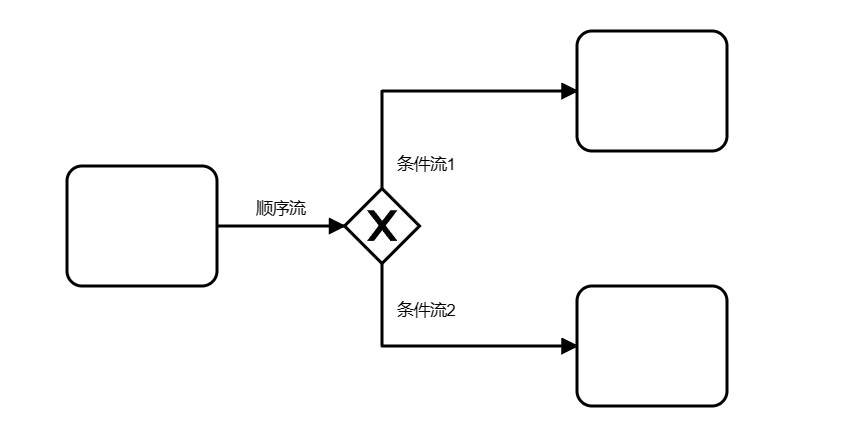
The above are several main graphical elements in BPMN2.0, which together form a visual representation of business process models. By analyzing and understanding these graphical elements, we can better understand and optimize business processes. For an introduction to BPMN models, you can click here to view the help documentation.